Identity Details
Identity Details pages show pertinent information about the identity based on the data collected from your identity provider.
To view Identity Details, click a Display Name from the Identities view of Directory. For more information, see Directory.
Summary tab
The Summary tab shows identity information organized in sections.
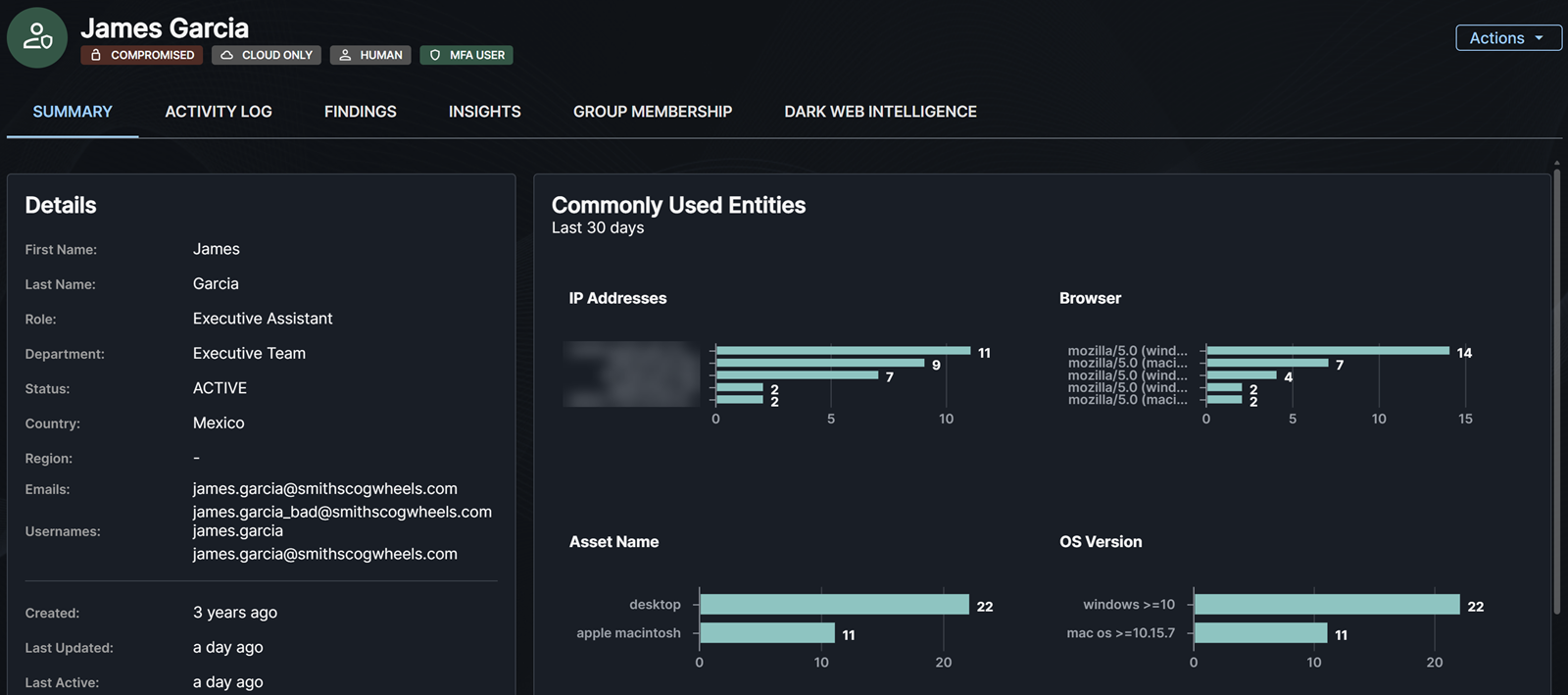
Details
The Details section contains details about the identity as available from your Microsoft Entra ID environment. This includes information about their role, department, status, country, and region. It also shows when their account was created and updated, the last password change time, and other related email addresses associated with the user.
For identities that are an agent's user account, which is a specialized identity type designed to bridge the gap between agents and human user capabilities, the Details section also shows:
- Agent:
Yes, indicating that the identity is paired with an agent identity. - Blueprint lineage: A link to the agent identity blueprint this account's paired agent identity was provisioned from. See Non-Human Identity Details.
For more information on agent users, see The agent's user account in Microsoft Entra Agent ID.
Assets
The Assets section shows Intune devices that are associated with the user in Microsoft Entra ID.
Multi-Factor Authentication
The Multi-Factor Authentication (MFA) section shows details about the user's MFA configuration, such as the MFA provider, primary MFA method, and other MFA types configured.
Sponsors
For identities that represent an agent's user account, the Sponsors section lists the users and groups that are accountable for the paired agent's lifecycle and access. For more information, see Owners and sponsors.
Recent Detections
The Recent Detections section contains tabs with the following information:
- Open Detections: Open detections for the identity within the past seven days.
- Closed Detections: Closed detections for the identity within the past 30 days.
Click View All in Recent Detections to go to the Insights tab.
Risk Score
The Risk Score section shows the identity's current Risk Score and the top factors contributing to the score. For details of how scores are calculated and how to improve them, see Identity Risk Score.
Top Sign-in Locations
The Top Sign-in Locations section maps the user's top sign-in locations, including counts and breakdowns by public and private IP activity. Click View Details to see a breakdown of the top IP addresses used for authentication in the last 30 days, including geographic location, ASN, frequency, and filters for IP type and login outcome.
Commonly Used Entities
The Commonly Used Entities section provides insights into some of the attributes related to successful authentications over the last 30 days. This helps you understand the profile of the user and what is common or uncommon. The following graphs show when we have relevant data for the user:
- IP Addresses: The IP addresses that we've observed the user successfully authenticating from.
- Browser: The user agents that we've observed the user successfully authenticating from.
- Asset Name: The types of assets that we've observed the user successfully authenticating from.
- OS Version: The operating system version that we've observed the user successfully authenticating from.
Organization
The Organization section provides a snapshot of the identity's reporting structure. This allows you to see who the individual reports to and whether they have direct reports. This is useful when investigating threats or formulating a risk assessment of the user and their related activity. The selected identity is highlighted in the chart so you can quickly identify its position in the reporting structure.
Each card in the chart shows the following information:
- The person's name, role, and department or team
- Relevant identity icons and tags, such as Admin
- The person's current Risk Score in the top-right corner
- Number of their open findings by risk level, or an indication that they have none
Click a person in the organization chart to view that identity.
Activity Log tab
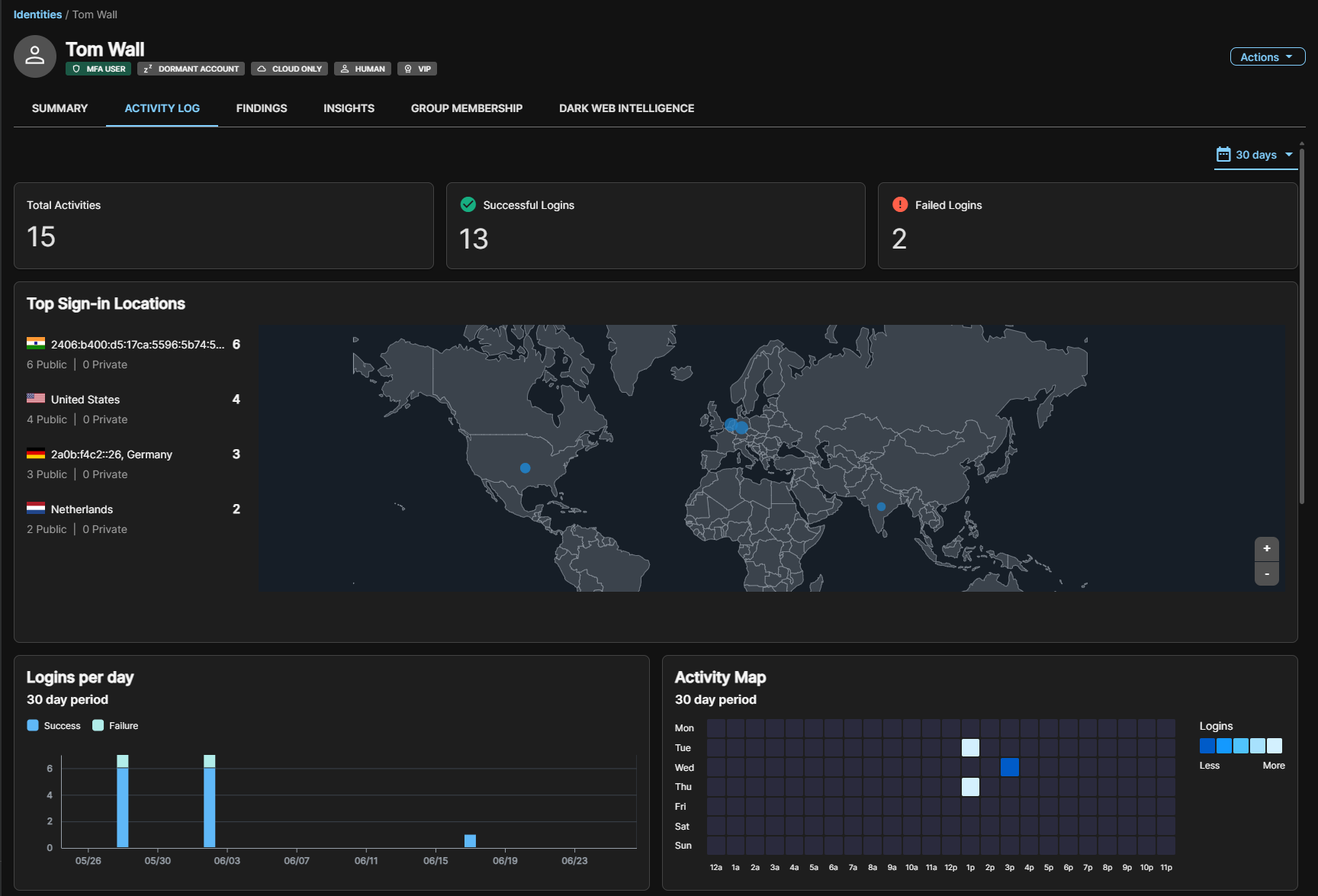
The Activity Log tab shows authentication activity for the identity during the period you set on the top right of the section.
Summary metrics
At the top of the tab, the following metrics give an at-a-glance status of the identity's authentication activity in the selected time period.
- Total Activities: Total number of authentication events.
- Successful Logins: Number of authentication events that completed successfully.
- Failed Logins: Number of authentication attempts that did not succeed.
Top sign-in locations
This section lists the countries and IP addresses from which the identity has authenticated, along with a login count per location and a breakdown of public and private IP usage. Locations are plotted on an interactive world map, making geographic anomalies immediately visible.
Logins per day
This section shows a bar chart of daily authentication volume in the selected time period. Successful and failed logins are rendered in different colors, making it easy to identify spikes or clusters of failed attempts.
Activity map
This section shows a heatmap of login frequency by day of week and time of day. Color intensity indicates volume, helping you quickly determine whether authentication activity aligns with expected working hours or suggests off-hours access that may warrant further investigation.
Authentication locations
This section shows the most frequent authentications observed for this entity in the last 30 days, broken down by IP address and ASN. Use the search bar to search for locations, IP addresses, or ASNs.
Findings tab
The Findings tab shows a table of findings related to the specific identity, sorted by risk. For more information, see Findings.
Hover over the Recommendation field to view the full recommendation.
Click the finding name to open the finding details.
Insights tab
The Insights tab shows the following information:
- Open Detections: Open detections for the identity within a default period of the past seven days; use the date picker at the top of this section to change the period.
- Closed Detections: Closed detections within the past 30 days for the identity.
Group Membership tab
The Group Membership tab shows the list of groups the user is part of. Use the search field to search for groups and click the Group Name field to open the group in a new page to view other members.
Dark Web Intelligence tab
The Dark Web Intelligence tab shows a list of leaks to which the identity is linked. Click the link from the Breach Source field to view additional details about the leak record. For more information, see Dark Web Intelligence.