Get help from Product Support
You can get help from Sophos Product Support in any of these ways:
- Open a case from Sophos Fusion.
- Chat or open a case via the Sophos Support portal.
- Phone Support.
Note
A product support case is for troubleshooting software issues. It isn't the same as an MDR case, which is for the investigation of active threats. To raise an MDR case, see Get help from the MDR Operations team.
Before you contact Support
When you open a case or contact Support, make sure you have the information the Support team will need.
- A clear description of the issue and impact.
- Product version, environment details, and recent changes.
- Steps to reproduce, if applicable.
- Logs, screenshots, or error messages.
- A copy of the Sophos Diagnostic Utility (SDU) log from an affected device. See Sophos Diagnostic Utility: Run the installed version and send logs to Sophos Support.
Open a case via Sophos Fusion
-
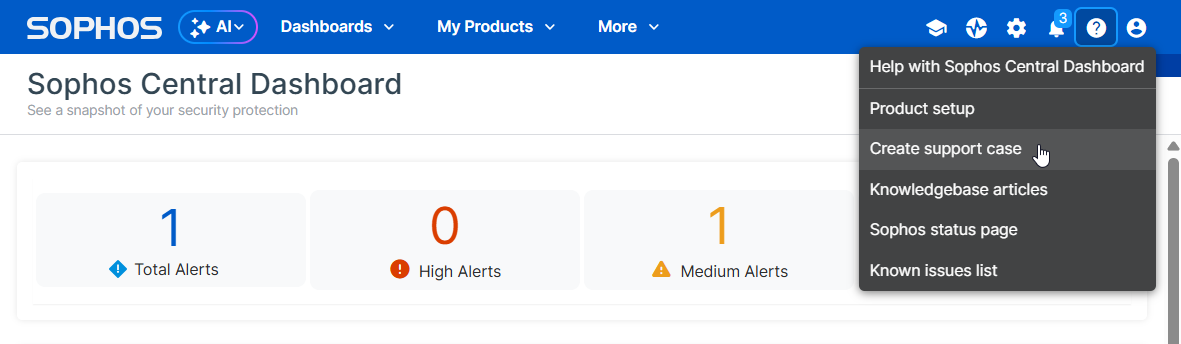
Click the Help icon and select Create support case.
-
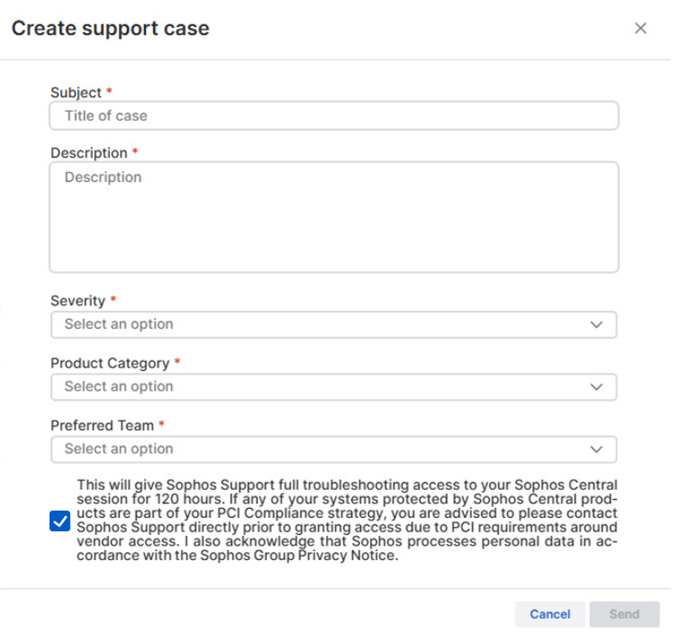
Complete the Create support case form.
We recommend that you select the checkbox that gives Support temporary access to your Sophos Fusion session. This might help us resolve your issue more quickly.
Chat or open a case via the Support page
To get help via the Support page, use one of these methods:
Chat with Support
To chat with Support, do as follows:
-
Go to
https://support.sophos.com. -
If you're not already signed in, click Login in the upper right of the page and enter your Sophos ID.
-
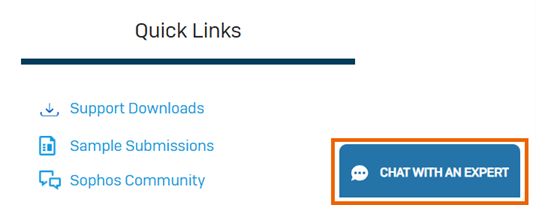
Click Chat with an expert in the lower right of the page.
-
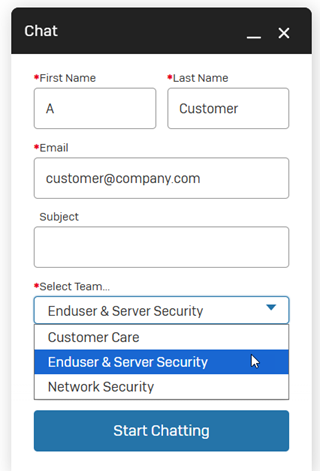
In the Chat screen, enter your details and select the team you need help from. Then click Start Chatting.
Tip
In most cases, MDR customers need help from the Enduser & Server Security team.
To find out when the Chat service is available, see Digital Chat support.
Open a support case
To open a support case, do as follows:
- Go to
https://support.sophos.com. - If you're not already signed in, click Login in the upper right of the page and enter your Sophos ID.
-
Click one of the suggested prompts, or type your question on the AI prompt bar and click Ask Assistant.

-
Answer the Support Assistant's questions.
-
Ask the Support Assistant to create a case, if needed.
The Support Assistant collects the necessary information and may ask further diagnostic questions.
-
Review and submit the case. The case number then appears.
For more information, see Best Practices when opening a case with Sophos Support.
Phone Support
You can contact Support by phone. For a full list of numbers for each region, see Phone support.