Manage authentication methods
You can manage your authentication methods by adding, renaming, and removing MFA options, updating settings, and accessing your account securely from the Sophos Fusion Partner dashboard.
Add an authentication method
- For instructions on how to add a passkey, see Set up a passkey.
- For instructions on how to add an authenticator app, see Set up an authenticator app.
- For instructions on how to add a browser-based authenticator app, see Set up a browser-based authenticator.
Note
You must register at least two multi-factor authentication (MFA) methods. For more information, see Sophos Fusion Partner MFA Requirements.
Rename an MFA method
To rename an MFA method, do as follows:
- Sign in to your Sophos Fusion Partner account.
- Click your Profile icon
 , then click My info.
 - Click Manage MFA.
- Authenticate to continue.
-
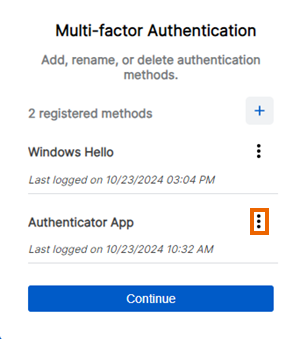
In the Multi-factor Authentication dialog, click the three dots icon next to the MFA method you want to rename.
-
Click Rename, then enter a new name for the MFA method.
Note
If you haven't already specified a name, registered MFA methods use a default name based on the method that was registered. If more than one of that type of method is registered, they're also numbered.
Delete an MFA method
To remove an MFA method, do as follows:
- Sign in to your Sophos Fusion Partner account.
- Click your Profile icon , then click My info.
- Click Manage MFA.
- Authenticate to continue.
-
In the Multi-factor Authentication dialog, click the three dots icon next to the MFA method you want to delete.
-
Click Delete.
Note
You can’t delete authentication methods once you've reached the minimum required number.
-
Click Continue to go to the Sophos Fusion Partner dashboard.