Firewall templates
You can create firewall templates that consist of settings and firewall rules. You can apply these templates to groups of your customers.
A firewall template lets you:
- Apply the same settings to all your customers' firewalls in a group
- Stop customers from changing the settings for the groups you manage. Customers can create nested groups and override specific settings in the groups you manage.
- Update templates and push changes to your customers.
To create a firewall template, do as follows:
- Go to My Business > Firewalls.
- Click Add Template.
-
In the Add a template dialog, do as follows:
- Enter a name and description for the template.
- Click Save.
-
On the Firewall Templates page, click the three dots icon
 next to the template you've created and select Edit Customers.
 -
In the Edit Customers dialog, do as follows:
-
Select the customers you want to apply the firewall template to.
Note
The customer list includes customers that don't have registered firewalls.
-
Click the arrow
 to move the customer to the Assigned Customers.
 - Click Save.
-
-
On the Firewall Templates page, click the three dots icon
next to the template you've created and select Manage Policy.This opens the Rules and Policies page in Sophos Firewall, where you can configure firewall rules.
Changes you make to settings and rules are automatically applied to your customers' firewalls. Customer firewalls are placed in a group that indicates they're managed by a partner in Sophos Fusion Admin.
In the screenshot below, the Sophos Fusion Partner template name is "Medium-security rules".

Firewalls in each partner managed group automatically inherit all the settings and rules you create using Manage Policy for the appropriate template in Sophos Fusion Partner.
Delete a template
To delete a firewall template, do as follows:
- On the Firewall Templates page, click the three dots icon next to the template you want to delete.
- Select Delete.
-
In the Delete Confirmation dialog, confirm that you want to delete the firewall template and click Delete.
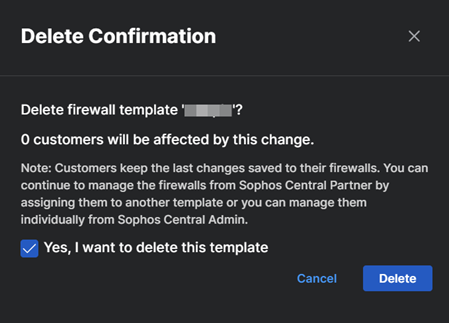
The template is removed from the Firewall Templates page.