Health check alerts
Account Health Check helps make sure that you have the best protection. It sends an alert if your score on any health check falls to less than 100.
For information on how we calculate your health check scores, see Health check scores.
How alerts work
Account Health Check detects any change you make on your account, such as editing a policy, and updates your score automatically. If one of your scores falls to less than 100, it sends an alert. It takes 10 minutes or more for an alert to be sent.
A separate alert is sent for each check with a score less than 100. All alerts are medium severity.
If the health check score returns to 100, we automatically close the alert.
View your alerts
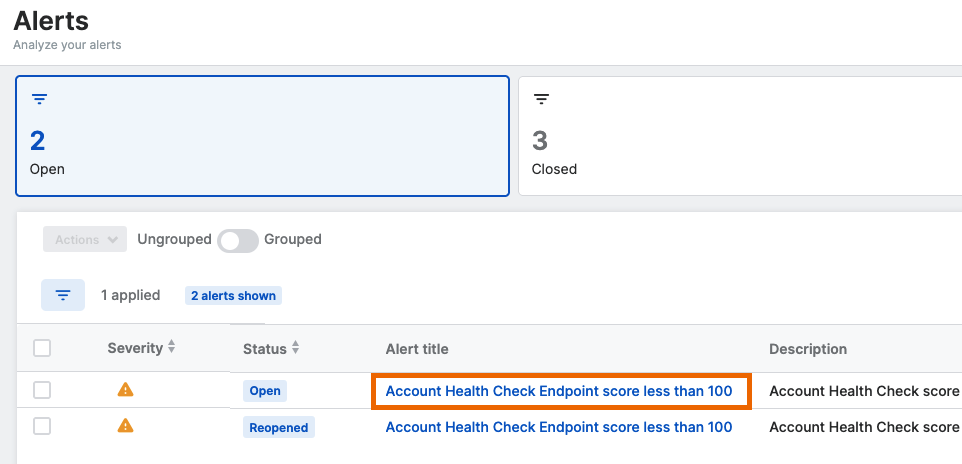
The alerts are shown on the Sophos Fusion Alerts page. They're classified as Device and Platform Health alerts.
Click an alert name to see full details of the alert.
View the check that caused an alert
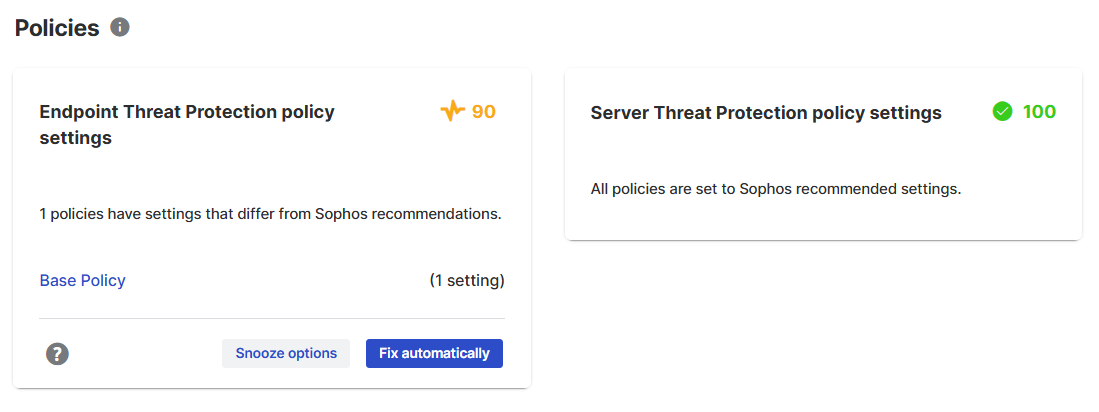
You can view the check that triggered an alert on the Account Health Check page.
Go to My Environment > Account Health Check. The card for a health check with an issue shows a score in yellow and details of the issue.
Resolve alerts
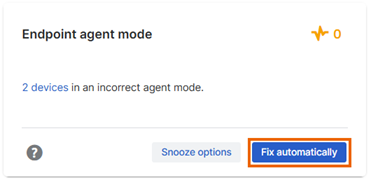
To resolve alerts, go to My Environment > Account Health Check and look for the issue that triggered the alert. Then take one of the following actions:
-
Click Fix automatically. We'll apply our recommended settings and close the alert.
-
Click the Help icon in the lower left to see how to fix the issue manually.
Snooze alerts
You can snooze health checks if you want to postpone dealing with them.
If you snooze a health check that's sent an alert, we close the alert for 6 months. If you later end the snooze for that health check, and the score is still less than 100, we reopen the alert.
For more information on snoozing alerts, see Snooze issues.
Get email notifications
You can configure email notifications to be sent to administrators when Account Health Check raises an alert.
To configure notifications for all alert types, including Account Health Check alerts, see Configure email alerts.