Identity Risk Score
The Identity Risk Score is an indicator of the overall risk an identity represents, combining the likelihood it may be involved in a security incident with the potential impact if it were compromised. The score is calculated by a patent-pending machine learning model that evaluates behavioral signals, account configuration, and active findings to produce a single, continuously updated risk indicator for every identity in your environment. Identities with elevated privileges, weak security posture, or open findings score higher, even when no suspicious activity has been observed.
In short:
- Every identity gets a score from 0-10.
- The higher the number, the more attention that identity needs.
- The score rises when things like missing MFA or open security findings are present, and falls when good security practices are in place.
- You can change some factors that contribute to the score, like turning on MFA, but not others, like a user's department or job title. For details, see What raises the score.
Powered by a patent-pending ML model.
The Identity Risk Score is generated by ITDR's patent-pending machine learning model. Rather than relying on static rules, the model learns from behavioral and configuration signals across your environment to produce a score that reflects each identity's actual risk profile.
This gives security teams two powerful capabilities in a single number:
- Threat investigation: The Risk Score on an affected identity tells you immediately whether you are dealing with a high-value target. For example, an 8.5 score on a privileged admin account warrants a different response than a 1.2 on a standard user account.
- Security posture assessment: Identities with high scores and no active findings represent risk that hasn't turned into an incident yet. They haven't been compromised, but they're configured in ways that make them attractive targets. Addressing these proactively reduces your attack surface before an incident occurs.
Note
Risk Scores are currently available for Active identities sourced from Entra ID and on-premises Active Directory. Identities marked Deleted or Disabled in your identity provider don't receive a Risk Score.
Score bands
| Band | Score Range | Meaning |
|---|---|---|
| Critical | 8.0–10 | High-confidence risk signal. Likely has open findings and multiple amplifying attributes. Investigate immediately. |
| High | 6.0–7.9 | Meaningful risk elevation. One or more significant findings or a combination of risky attributes. Review within your normal triage cycle. |
| Medium | 4.0–5.9 | Moderate risk. May have a lower-severity open finding, or a combination of risky factors without a finding. |
| Low | 2.0–3.9 | Some risk signals present but no significant open findings. Monitor for changes. |
| Informational | 0–1.9 | Baseline risk. No open findings, and the identity's factors don't currently raise concern. |
How the score is calculated
ITDR calculates a Risk Score for each identity and keeps it current as your environment changes. Scores update on a daily cycle and are also recalculated automatically when findings are opened or closed, or when account modifications are detected. The score reflects a combination of identity attributes and active findings: the more risk signals present, the higher the score.
There are two categories of contributing factors, shown separately wherever factors appear in Sophos ITDR:
- Security factors: Attributes tied to account configuration and security posture that you can directly influence, such as MFA status, admin roles, and open findings.
- Profile factors: Attributes about the identity that are not easily controlled, such as department, job title, or the city an identity signs in from. A user based in a higher-risk city, for example, shows a profile factor raising their score regardless of their security configuration.
Because profile factors are largely outside a customer's control, we recommend you prioritize remediation on security factors first. For details, see Improving an identity's score.
What raises the score
The following security and profile factors raise an identity's score:
-
Security factors:
- No MFA configured on the identity.
- MFA configured without a passwordless method (when MFA is otherwise enabled).
- Open findings, particularly at critical or high severity, which are labeled Identity Exposures in the Contributing Factors panel.
- Admin or privileged directory roles.
- Guest account status.
- Active credential leaks (compromised credentials).
- Hybrid account (synced from an on-premises directory).
- Broad email footprint (more linked email addresses).
- Historical alert and investigation activity associated with the identity.
-
Profile factors:
- Department is a higher-risk group.
- Job title is a higher-risk group.
- City is a higher-risk location.
- Employee type is a higher-risk group.
- No manager on file.
- Identity is configured for VIP monitoring, which is shown as High-value identity, prioritize monitoring in the Contributing Factors panel.
What lowers the score
The following security and profile factors lower an identity's score:
-
Security factors:
- MFA configured and enforced.
- Passwordless MFA configured.
- Clean alert and investigation history.
- Findings resolved or dismissed.
- Removal of unnecessary admin roles.
- Fewer linked email addresses.
-
Profile Factors:
- Department is a lower-risk group.
- Job title is a lower-risk group.
- City is a lower-risk location.
- Employee type is a lower-risk group.
- Manager on file.
Note
Active credential leaks, hybrid account status, and VIP monitoring only ever raise a score, but don't factor into lowering a score.
Resolved findings continue to contribute at a reduced weight until the next daily scoring cycle. The full benefit appears in the score calculated the following day.
Where the Risk Score appears
You can see the Risk Score in the following places.
Identities table
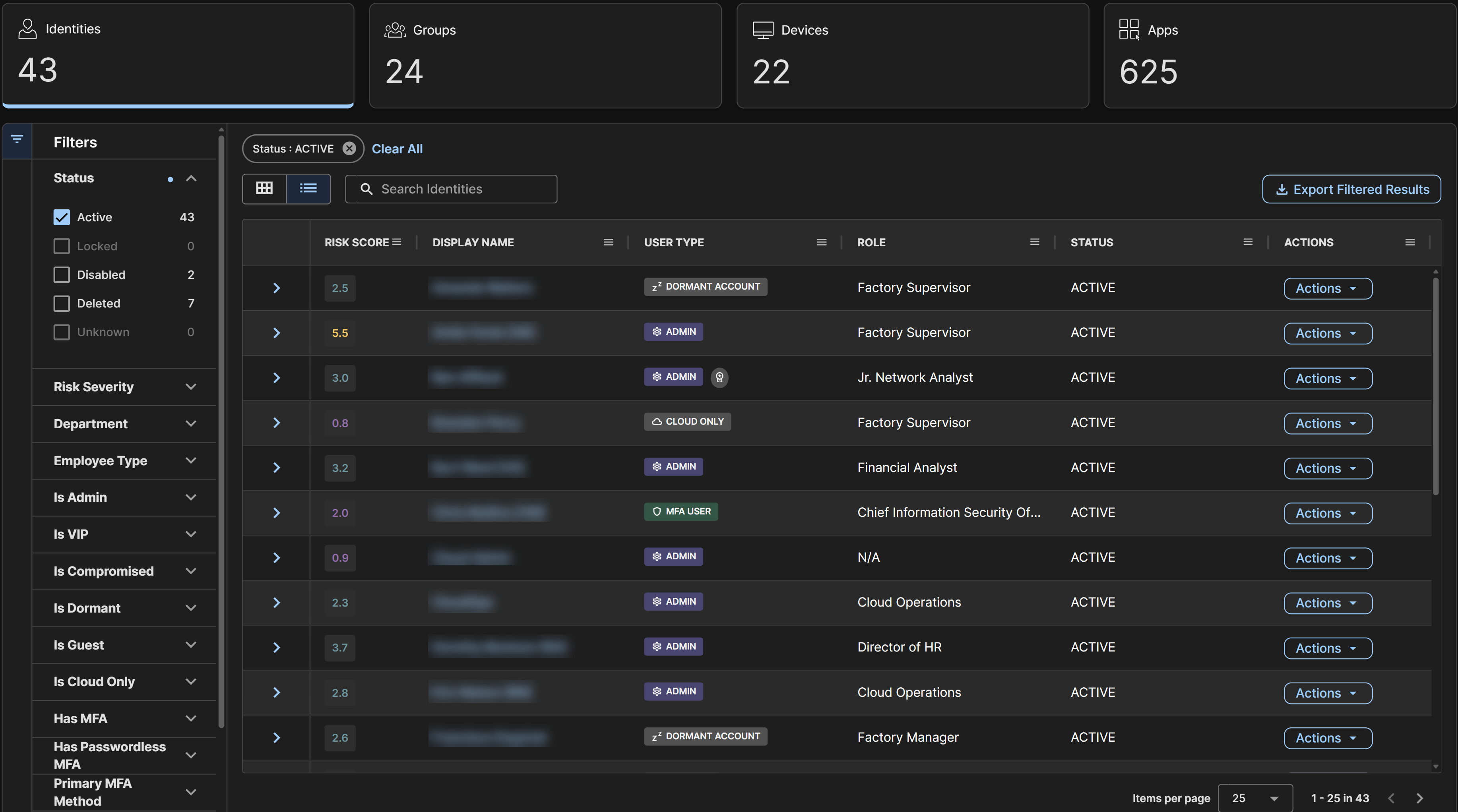
The Risk Score column in the Identities table of the Directory page shows the current score for each identity. The card view also shows the score at the top right of each card.
Tip
Sort the Identities table by the Risk Score column in descending order to show your highest-risk identities at the top.
Identity details
Select an identity from the Identities table to open its details. The Summary tab includes a Risk Score panel with the following information:
- Current score: The most recent daily score and its band.
- Contributing factors: The attributes and findings affecting the score. For details, see What raises the score.
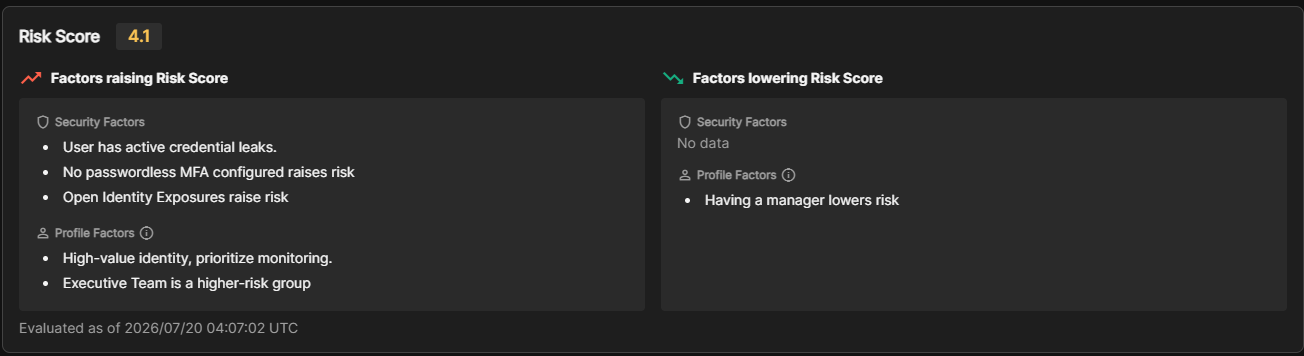
The contributing factors are divided into two columns, Factors raising Risk Score and Factors lowering Risk Score, each grouped into Security Factors and Profile Factors.
Note
If an identity has no factors in a category, that section shows No data instead of an empty list. The timestamp at the bottom of the panel shows when these factors were last calculated.
Tip
Use the contributing factors to understand exactly what is driving an elevated score before taking remediation action.
Top 5 Risky Users widget
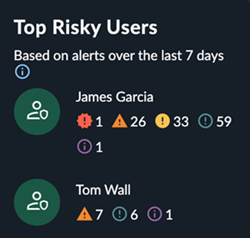
The Top 5 Risky Users widget shows the identities that combine a high score with open findings: the highest-priority group for daily triage. Each entry shows the identity name, open finding counts by severity, and the current score.
Improving an identity's score
The following actions have the highest impact on the next scoring cycle:
| Action | Expected Effect |
|---|---|
| Resolve open critical or high findings | Significantly reduces score because this removes the largest contribution |
| Enforce MFA on the identity | Reduces the credential exposure contribution |
| Enable a passwordless MFA method | Further reduces the MFA-related contribution beyond standard MFA |
| Resolve active credential leaks | Removes the compromised-credential contribution |
| Remove unnecessary admin roles | Reduces role-based contribution in the base score |
| Convert guest accounts to managed accounts | Removes the guest-status contribution |
| Consolidate or remove unused linked email addresses | Reduces the email-footprint contribution |
| Dismiss false-positive findings | Excluded entirely from the calculation |
Note
These actions all target security factors. Profile factors, such as department, job title, city, employee type, manager status, and VIP monitoring, are attributes of the identity rather than configuration, so there's no direct action to change them. We recommend you focus remediation on the security factors above.
Hybrid account status is also not directly actionable. It reflects your directory sync architecture rather than a per-identity setting. Historical alert and investigation activity likewise has no single action to take. It's a record of past detections rather than a setting, and naturally improves over time as new alerts are avoided.