Block Generative AI apps in all browsers
You can use DNS Protection for endpoints to block access to unauthorized Generative AI (Gen AI) applications from endpoint devices. To do this, turn on DNS Protection on endpoints, create a custom domain list for the Gen AI applications you want to block, and add the list to a DNS Protection policy. The policy blocks access to the Gen AI domains.
Turn on DNS Protection for endpoints
To turn on DNS Protection for endpoints, do as follows:
- Go to My Products > DNS Protection > Policies.
- Click Endpoint policies and open the Base Policy - Endpoint DNS Protection policy.
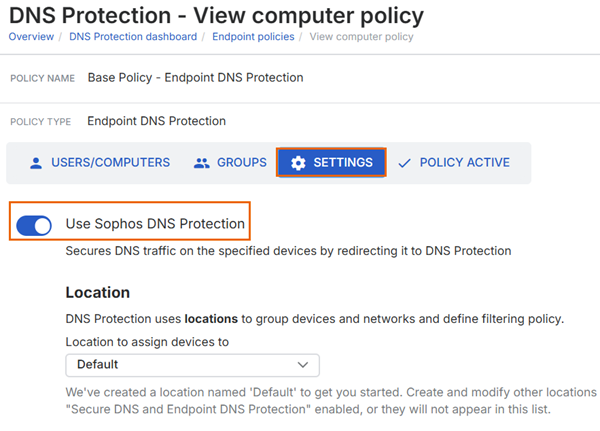
- Click Settings.
-
Turn on Use Sophos DNS Protection.
-
Click Save.
Add a domain list for Gen AI apps
To add a domain list, do as follows:
- Go to My Products > DNS Protection > Domain lists.
- Click Add domain list.
- Enter a name for the domain list.
- In Domains, enter the domains or URLs for the Gen AI applications you want to block.
- Click Save.
Add the domain list to a DNS Protection policy
To add a domain list to a policy, do as follows:
- Go to My Products > DNS Protection > Policies, and click Filtering policies.
- Open a DNS Protection policy that allows traffic and applies to the users or devices you want to manage.
- Click Settings.
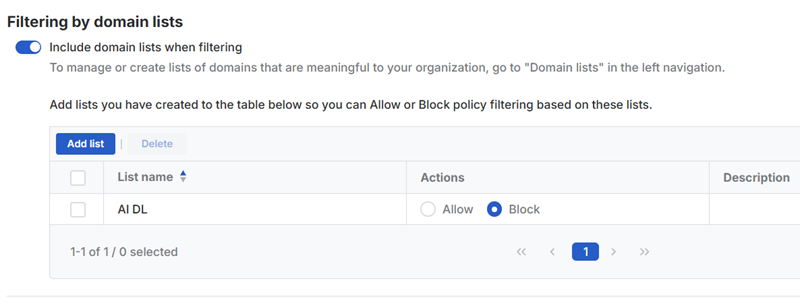
- Under Filtering by domain lists, turn on Include domain lists when filtering.
- Click Add list.
- Select the domain list you created for the Gen AI applications.
- Click Save.
-
For the list you added, under Actions, select Block.
-
Click Save.