Identity Overview
Identity Overview provides a snapshot of your organization's identity risk. It includes the identities and devices ITDR is monitoring, your Risk Posture Score and its trend, and the findings, accounts, and users that need attention.
Use it to understand your current identity risk before exploring the Directory, Findings, or Dark Web Intelligence pages for more details.
Note
Posture checks are performed in Sophos cloud infrastructure against data collected from your identity provider by the ITDR sensor or Entra ID integration. No posture assessment processing occurs on your on-premises network.
Identity Breakdown
The Identity Breakdown widget shows three cards representing the identities and devices ITDR is monitoring in your environment based on data collected from your identity provider:
- Humans: Active human identities.
- Non-Human Identities (NHIs): Active service principals, applications, agent identities, agent identity blueprints, and other machine identities.
- Devices: Registered devices.
Note
Applications and agent identities are consolidated within the Non-Human Identities (NHI) number rather than shown separately. Groups are not shown in this widget, but you can see groups on the Directory page.

Click a card to go to the matching section of the Directory page.
Identity Risk Posture Score
The Identity Risk Posture Score widget shows your organization-level score based on the number and risk level of open findings. Higher scores indicate greater risk. The score updates daily and increases or decreases based on whether findings are discovered, remediated, or dismissed. You can see the change from the previous day as a percentage and directional arrow.
The following are possible risk ratings and associated scores:
- Critical: 75-100
- High: 50-74
- Medium: 25-49
- Low: 0-24
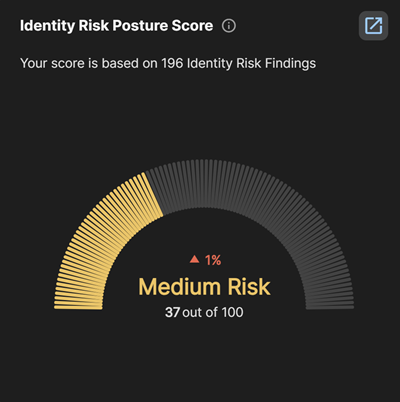
Click the New Tab icon to go to the Risk Posture Score page. See Risk Posture Score.
Risk Over Time
The Risk Over Time widget shows the trend of your average monthly Risk Posture Score for the last six months. Each month's point in the graph is the average of that month's daily scores. The widget also includes the following statistics:
- Current: The most recent daily Risk Posture Score.
- Change: Percent change of score from the prior period.
- Peak: The highest score observed over the charted period.
Tip
Hover over a point in the chart to see the average of all scores that month.
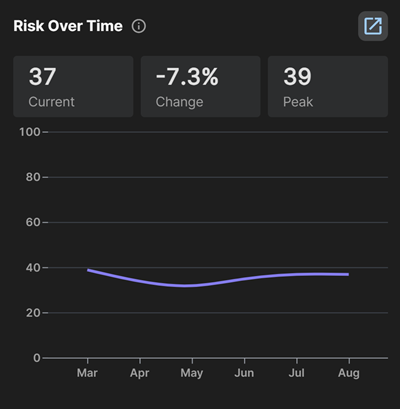
Click the New Tab icon to go to the Risk Posture Score page. See Risk Posture Score.
Recommendations & Actions
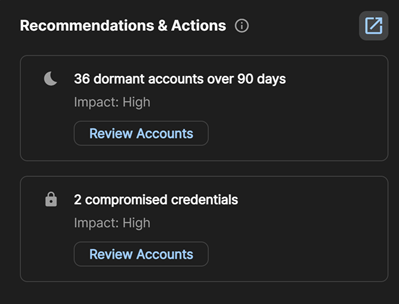
The Recommendations & Actions widget shows a list of remediation steps based on your current open findings, such as the following:
- Enable MFA for privileged accounts.
- Review dormant accounts inactive for an extended period.
- Review accounts with compromised credentials.
Each recommendation shows an Impact rating and a button that takes you to the relevant page, such as Directory or Findings, filtered for the accounts or findings the recommendation pertains to.
Aggregate of Open Findings
The Aggregate of Open Findings widget shows the number of open findings from the last seven days grouped in three ways. To see each view, select one of the following options from the Group by menu above the chart:
- Severity: Risk severity level.
- Category: Data source or check category that generated the finding.
- Type: Finding type.
Below the chart, the following four cards summarize recent finding activity from the last seven days:
- Total: Total open findings.
- New this week: Findings opened.
- Resolved this week: Findings resolved.
- Dismissed this week: Findings dismissed.
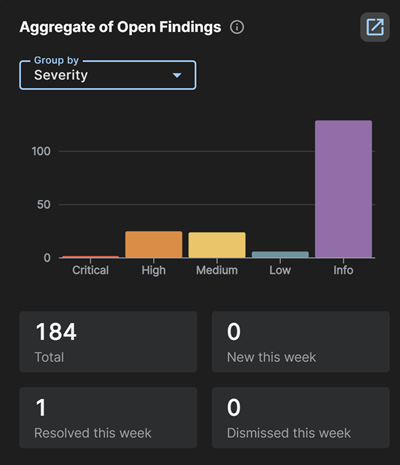
Click a bar in the chart to go to the Findings page filtered by the selected severity, category, or type.
Top Findings
The Top Findings widget shows your top five findings based on risk level.
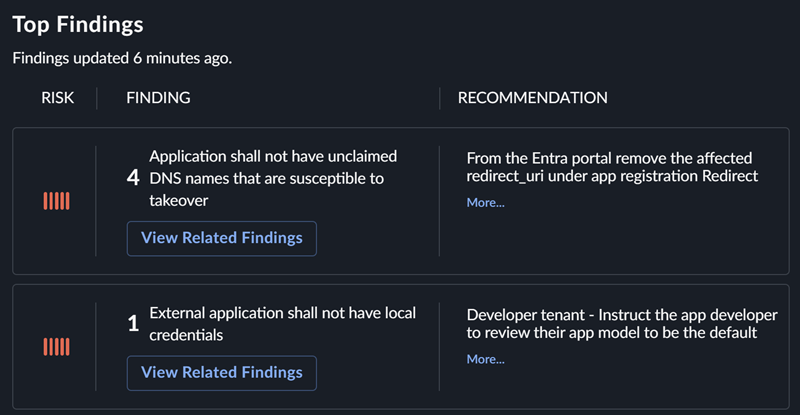
Click a finding to go to the Findings page filtered by that finding.
MFA Coverage
The MFA Coverage widget shows the percentage of identities with multi-factor authentication configured, both overall and by the following identity types:
- Admin Users: Identities with an admin role.
- Internal Users: Standard internal human identities.
- Guest Users: Guest accounts.
- VIP Users: Identities configured for VIP monitoring. See Select users for VIP monitoring.
Use this widget to spot where MFA gaps are concentrated. For example, guest users typically show the lowest coverage and are a common place to start remediation.
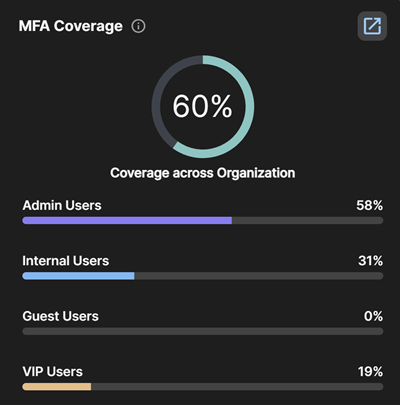
Click an identity type to go to the Directory page filtered by the matching identities.
Top 5 Risky Users
The Top 5 Risky Users widget shows identities with a high Risk Score and open findings, which is the highest-priority group for daily triage. Each entry shows the identity name, the number of open findings by severity, and the current score.
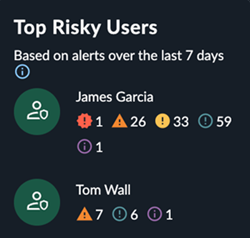
Take the following actions from this widget:
- Click the user name or icon to go to the Identity Details page for that user.
- Click the New Tab icon to go to the Identities section of the Directory page.
Dormant Accounts
The Dormant Accounts widget shows the number of accounts that haven't signed in during the last 90 days, overall and by account type:
- Members: Non-guest accounts.
- Guests: Guest accounts.
- Admins: Identities with an admin role.
- No MFA: Identities with no MFA enabled.
- Compromised: Identities with an active credential leak.
- VIP: Identities configured for VIP monitoring. See Select users for VIP monitoring.
Each category is an independent metric, not a mutually exclusive breakdown. An account can be present in more than one category.
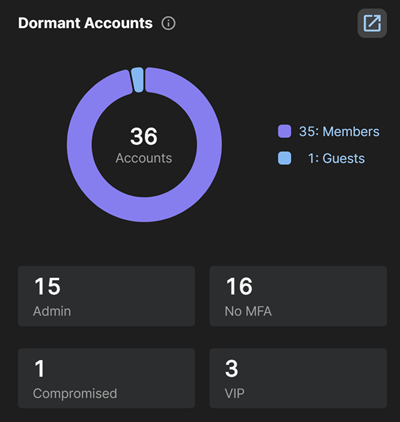
Click a segment in the chart to go to the Directory page filtered for those identities.
Credential Leaks
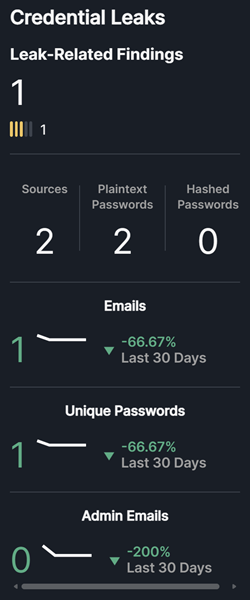
The Credential Leaks widget shows the number of open credential compromise findings by risk level, and metrics related to leaked credentials found for your configured domains. Where applicable, it also shows the trend of these metrics over the last 30 days.
The statistics in the widget include all known active credential leaks. This could include data for identities who are no longer with the organization or old leaked data matching the selected domains. We only generate findings for what we consider active leaks that include an active matching identity, so the following statistics may differ from what you see on the Findings page.
- Leak-Related Findings: The total number of open credential compromise findings, also broken down by risk level.
- Sources: The number of active unique leak sources where data for your domains has been observed.
- Plaintext: The number of active leaks where plaintext passwords were found in the leak data.
- Hashed: The number of active leaks where hashed passwords were found in the leak data.
- Breached Email Accounts: The number of active unique email accounts that have been observed in the leak data.
- Unique Passwords Breached: The number of active unique passwords that have been observed in the leak data.
- VIP Account Leaks: The number of leaks tied to identities configured for VIP monitoring. See Select users for VIP monitoring.
Take the following actions from this widget:
- Click the total Leak-Related Findings number at the top to go to the Findings page filtered by credential compromise findings.
- Click a metric to see matching leak data on the Dark Web Intelligence page.
VIP Users
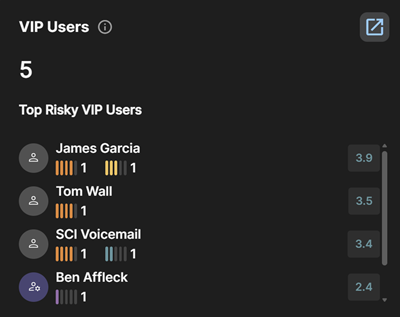
The VIP Users widget shows the total number of users you have configured for VIP monitoring, along with a Top Risky VIP Users list. Each entry shows the user's name, number of open findings by severity, and current Risk Score.
Take the following actions from this widget:
- Click the user name or icon to go to the Identity Details page for that user.
- Click the number of findings to go to the Findings tab for that user.