Pin AI responses
You can pin responses in the AI assistant to keep them easily available as you continue to chat. Pinning helps you stay focused on key details during long or complex chats.
You can pin the following items:
- Individual rows within a table
- Entire tables
- Specific queries
- Full messages
Pin an item
To pin an item, do as follows:
-
Click the Pin icon next to the item.
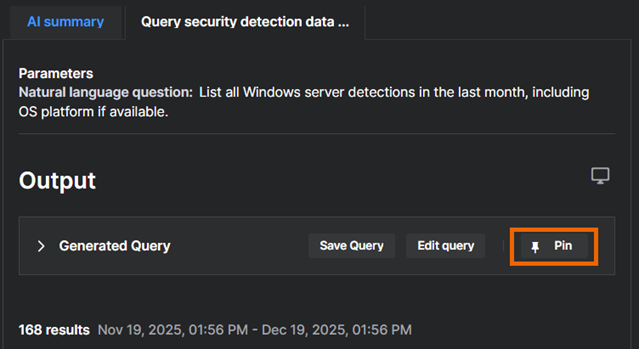
-
(Optional) In Pin item, add a note to say why the item is important.
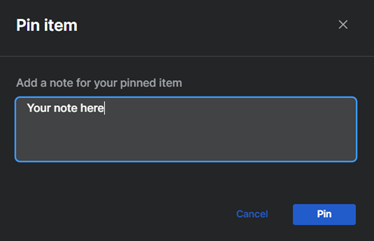
-
Confirm that you want to pin the item.
The pinned data now persists in your workbench for the duration of the chat.
View pinned items
To view your pinned items, do as follows:
-
Click the Pin icon at the top of your chat.
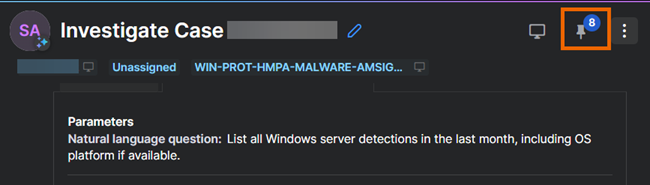
-
In the Pinned tab that opens on the right of the screen, you can see and manage your items.
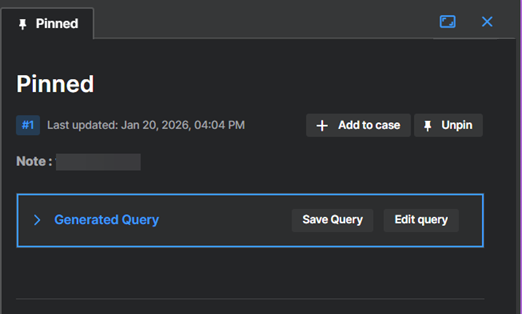
Alternatively, click a workbench icon in your chat to show the Pinned tab.
Unpin an item
To unpin an item, do as follows:
-
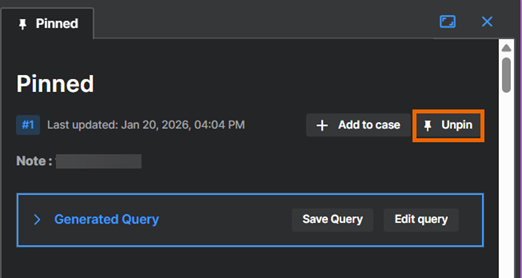
Click the Pin icon at the top of your chat to open the Pinned tab.
-
Find the pinned item and click Unpin.
 .
.
Alternatively, find the item in the chat and click Unpin next to it.