Sophos Support Assistant
Sophos Support Assistant is now available via the Sparkle icon in the Sophos Fusion top menu or via the help menu.
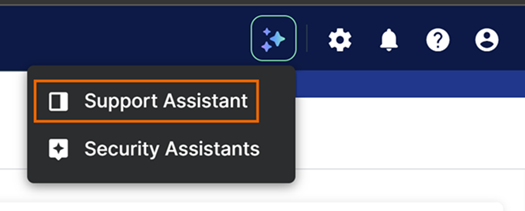
Restriction
The support assistant is only available to customers with an active license or a firewall contract.
If you don't have a valid license, visit Sophos Support Portal.
How the assistant works
Sophos Support Assistant lets you ask an AI chatbot questions.
Open the Support Assistant chat and you'll see a list of queries frequently handled by the Sophos support team. Select one of these queries if it meets your needs, or type your question in the prompt window.
The assistant will search Sophos product documentation and knowledge base articles to try to answer your question with as much detail as possible.
Need to speak to a human?
If you need a clearer answer or more information, type "Can I speak to a human support agent?" You'll be connected to an agent who will chat with you to answer your question.
After a chat is escalated to a human agent, a ticket is created to track the interaction and resolution.
Want to pick up an earlier chat?
Sophos Support Assistant lists previous chats. You can leave the chat and return to continue it at any time, even after you sign out of Sophos Fusion or if the chat has timed out after a few minutes of inactivity.
Sophos Support Assistant isn't integrated with the assistant in the Support Portal, so the previous chats it lists don't currently include any Support Portal chat interactions.
Need help to manage support cases?
You can manage your support cases through Sophos Support Assistant. Ask "Show me my support cases" or "Create a new support case".
Note
If you're an MDR customer, send an email to mailto:mdr-ops@sophos.com.
Tell us what you think
During the chat experience, you're asked whether the chat has been helpful. Please select a thumbs-up (Yes) or thumbs-down (No) response and add comments if you want to. We'll review your feedback and use it to guide continued development of this feature.
Video
