Health information
Use Health information (HI) to detect health-related data in messages and attachments, such as medical records or patient details.
We recommend that you use the Sophos list. This list includes predefined content control lists (CCLs) that are selected to help detect health information accurately.
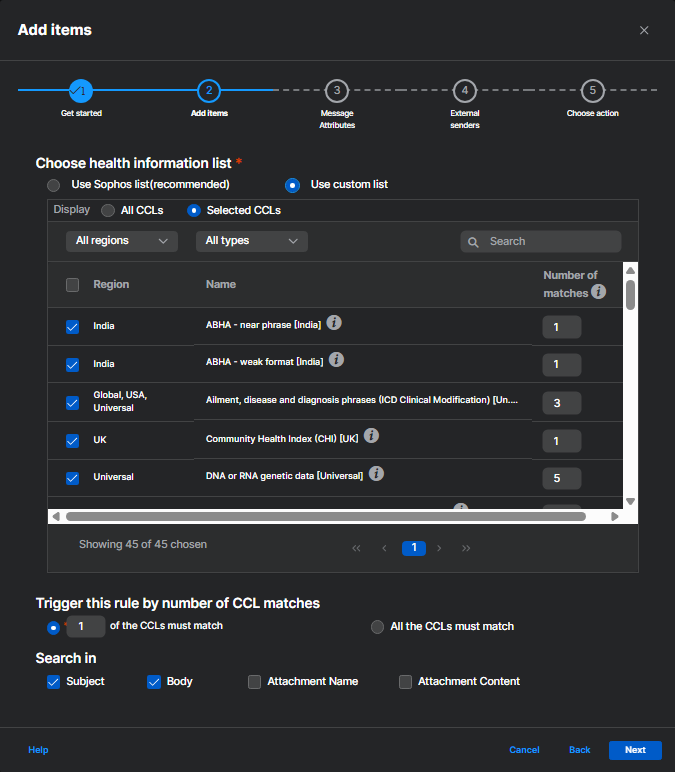
In Search in, select where Sophos Email searches for health information. You can search in the message subject, message body, attachment names, attachment content, or any combination of these locations.
You can use a custom list if you need to change the predefined CCL selections. When you select Use custom list, Sophos Email automatically selects the CCLs recommended for health information. You can then add or remove CCLs, change the number of matches required to trigger the rule, and choose where Sophos Email searches for the selected CCLs.
Warning
Only change the custom list if you understand how the selected CCLs affect detection. Removing recommended CCLs may reduce detection coverage, and adding unrelated CCLs may cause the rule to match more messages than expected.
To learn more about CCLs and how to configure them, see Content control lists.