About Endpoint DNS Protection policy
You can use the Endpoint DNS Protection policy to use Sophos DNS Protection with Sophos Endpoint. DNS Protection prevents the devices on your network from accessing domains associated with security threats and other unwanted websites controlled through policies. See DNS Protection.
To use DNS Protection with Sophos Endpoint, you must create an Endpoint DNS Protection policy in Sophos Endpoint and turn on Use Sophos DNS Protection in the policy. Sophos Endpoint automatically configures the devices in the policy to use DNS Protection, so no manual setup is required. Once configured, it intercepts DNS traffic and securely redirects it over HTTPS to DNS Protection.
DNS Protection uses locations to group devices and networks. You can assign your devices to locations by selecting a location in the Endpoint DNS Protection policy. The devices associated with this policy are now controlled by the policies in DNS Protection. In DNS Protection, each location can have a different DNS resolution policy that controls which domains are allowed or blocked. You can also enforce features such as Google Safe Search in the policy.
How DNS Protection works with Sophos Endpoint
If you use DNS Protection with Sophos Endpoint, DNS Protection resolves DNS requests as follows:
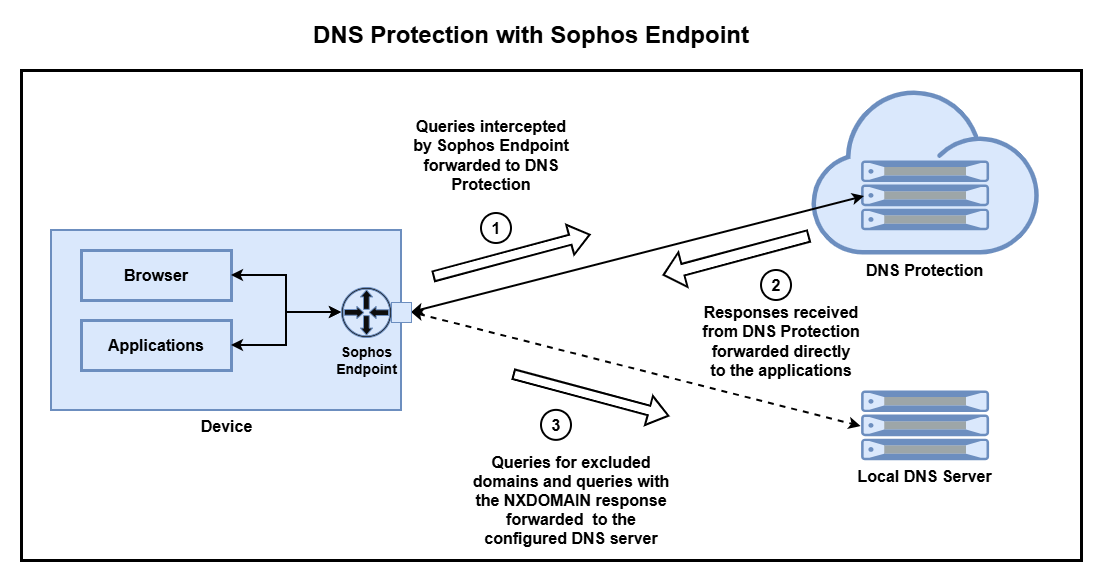
- Sophos Endpoint intercepts and forwards all DNS traffic, except for the excluded domains, to DNS Protection.
- It forwards all responses from DNS Protection directly to the applications.
- It forwards queries for excluded domains to your local DNS server. If DNS Protection returns an
NXDOMAINresponse, you can choose to retry such queries using your local DNS server.
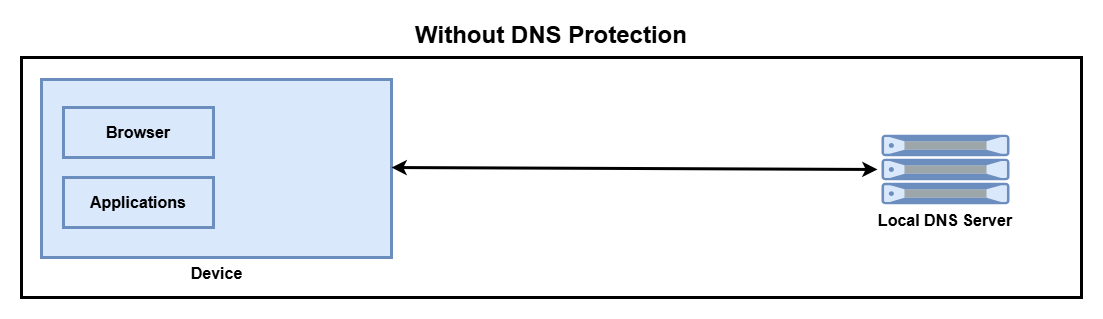
Your local DNS server handles all DNS queries if you don't use DNS Protection.