Wireless
Configure and manage access points, wireless networks, and connected devices.
Go to My Products > Wireless to configure and manage Sophos Wireless.
Warning
Don't disconnect your access point from the power outlet when the lights blink rapidly. This means that a firmware update is in progress.
This video explains how to plan and set up your wireless network.
Domain requirements
You must allow traffic to specific domains so that access points can communicate with Sophos Fusion, update the time, and log wireless events. The domains you need to allow depend on whether your firewall or proxy supports wildcards.
Click the appropriate tab for details.
If your firewall or proxy supports wildcards, allow the following domains:
central.sophos.com
fusion.sophos.com
*.sophos.pool.ntp.org
sophos.jfrog.io
jfrog-prod-use1-shared-virginia-main.s3.amazonaws.com
wifix-\*.sophos.com
If you can't use wildcards, you must determine the geographic location of your Sophos Fusion account and allow the specific domains for that location. Do as follows:
- Sign in to Sophos Fusion.
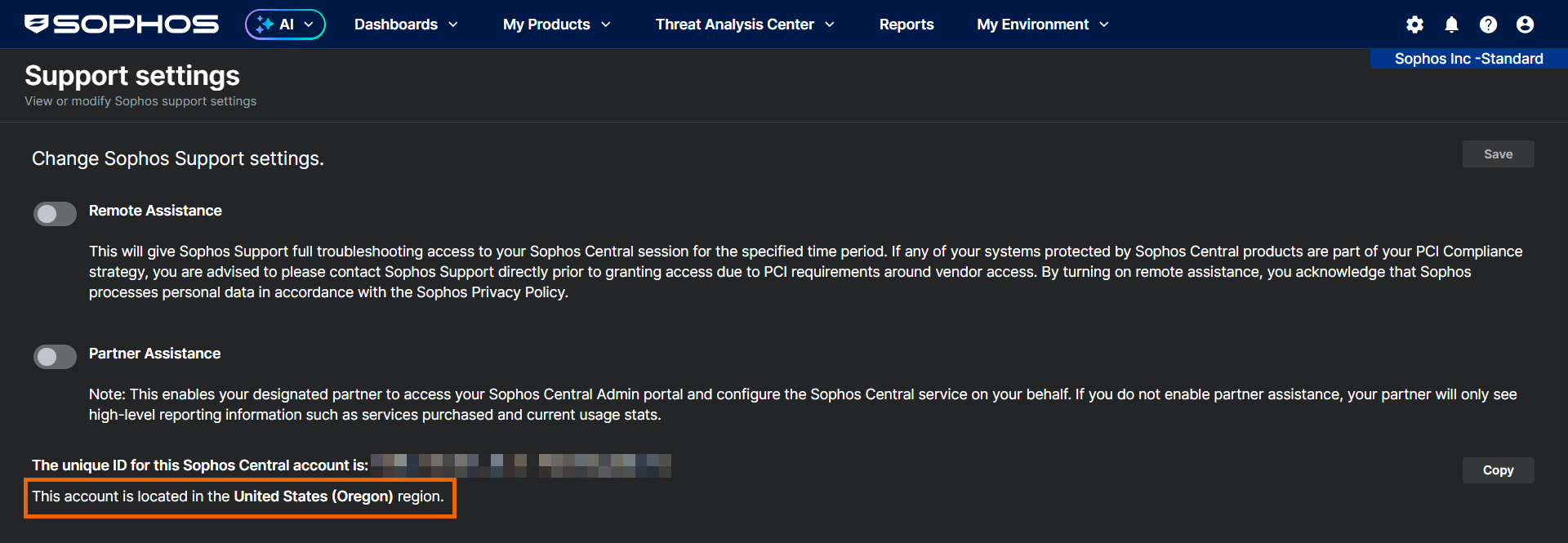
- Click your account name, and then click Support settings.
-
Look for the line that starts with "This account is located in" to see which geographical region your Sophos Fusion account is in.
-
Use the following table to find the MCS URL of your Sophos Fusion account.
Region MCS URL United States (Oregon) us-west-2.prod.hydra.sophos.com United States (Ohio) us-east-2.prod.hydra.sophos.com Ireland eu-west-1.prod.hydra.sophos.com Germany eu-central-1.prod.hydra.sophos.com Canada stn100yul.ctr.sophos.com Australia stn100syd.ctr.sophos.com Asia Pacific (Tokyo) stn100hnd.ctr.sophos.com South America (Sao Paulo) stn100gru.ctr.sophos.com India stn100bom.ctr.sophos.com -
Allow the following domains:
central.sophos.com fusion.sophos.com 0.sophos.pool.ntp.org jfrog-prod-use1-shared-virginia-main.s3.amazonaws.com sophos.jfrog.io wifix-authenticator.cloudhub.eu-west-1.prod.hydra.sophos.com -
Use the following table to determine the region-specific domains to allow based on the MCS URL of your Sophos Fusion account.
MCS URL Domains to allow us-west-2.prod.hydra.sophos.com wifix-proxy.cloudstation.us-west-2.prod.hydra.sophos.com
wifix-push-ws.cloudstation.us-west-2.prod.hydra.sophos.com
us-east-2.prod.hydra.sophos.com wifix-proxy.cloudstation.us-east-2.prod.hydra.sophos.com
wifix-push-ws.cloudstation.us-east-2.prod.hydra.sophos.com
eu-west-1.prod.hydra.sophos.com wifix-proxy.cloudstation.eu-west-1.prod.hydra.sophos.com
wifix-push-ws.cloudstation.eu-west-1.prod.hydra.sophos.com
eu-central-1.prod.hydra.sophos.com wifix-proxy.cloudstation.eu-central-1.prod.hydra.sophos.com
wifix-push-ws.cloudstation.eu-central-1.prod.hydra.sophos.com
stn100yul.ctr.sophos.com wifix-proxy.stn100yul.ctr.sophos.com
wifix-push-ws.stn100yul.ctr.sophos.com
stn100syd.ctr.sophos.com wifix-proxy.stn100syd.ctr.sophos.com
wifix-push-ws.stn100syd.ctr.sophos.com
stn100hnd.ctr.sophos.com wifix-proxy.stn100hnd.ctr.sophos.com
wifix-push-ws.stn100hnd.ctr.sophos.com
stn100gru.ctr.sophos.com wifix-proxy.stn100gru.ctr.sophos.com
wifix-push-ws.stn100gru.ctr.sophos.com
stn100bom.ctr.sophos.com wifix-proxy.stn100bom.ctr.sophos.com
wifix-push-ws.stn100bom.ctr.sophos.com
Network requirements
Access points must be able to communicate with Sophos Fusion. You must ensure your network meets the following requirements:
- You must have DHCP and DNS servers to provide an IP address to the access point and answer its DNS requests (IPv4 only).
- Access points can reach Sophos Fusion without requiring a VLAN to be configured on the access point for this connection.
- There's no HTTPS proxy on the communication path.
Note
For remote support, allow outbound SSH connections on port 22.
VLAN requirements
You must add the proper VLANs in the trunk port of the wired switch. The access point always communicates over untagged VLAN. Make sure the native or management VLAN is untagged in the wired switch.