Tools
This page is for modern Windows only. On macOS and legacy Windows platforms, users see the same tools in the Endpoint Self Help.
The Tools page provides tools you can use to find and investigate issues with your Sophos software.
Here's a brief description of the tools. For detailed help, there's a link to a knowledge base article on each tab.
Note
You need elevated privileges to use the tools. If you have UAC on your device, you'll be prompted to elevate. You might also be asked enter a tamper protection password.
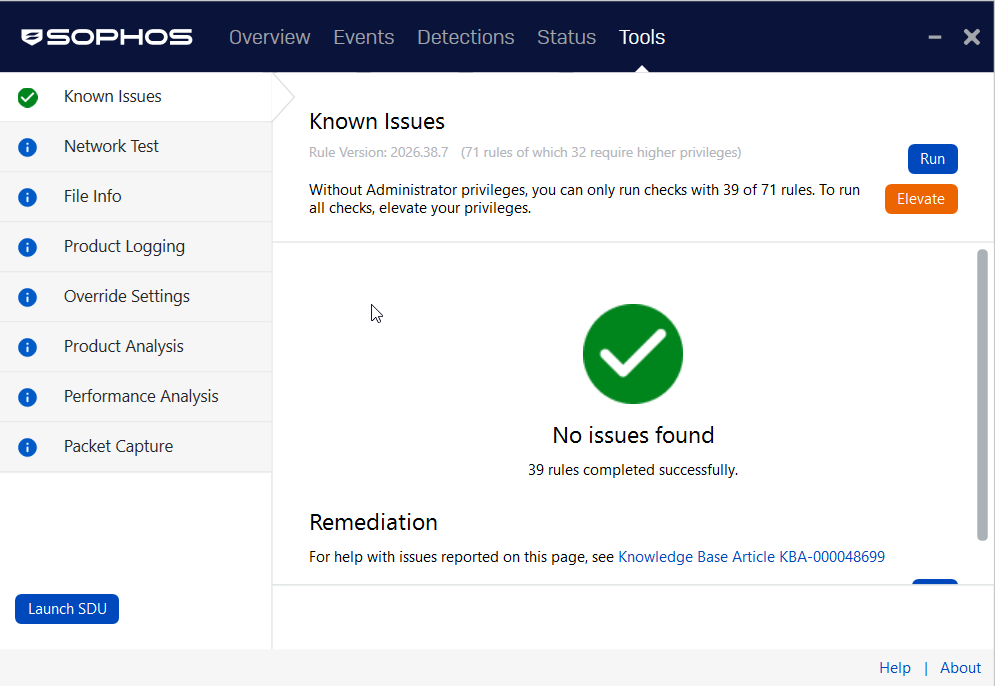
Known issues
Known Issues lets you analyze the device for known issues without needing to contact Sophos Support.
It detects issues using rules that we distribute to every device automatically.
We automatically run a set of checks when you access the Status or Tools pages. Any issues are shown with a link to a knowledge base article that tells you how to fix the issue. To perform the checks again, click Run.
Note
You need elevated privileges to run the full set of checks. However, you can run some checks without elevation. The page shows how many you can run.
Network Test
Network Test lets you check communication channels directly to Sophos or through an Update Cache and Message Relay, if you have one configured.
The channels tested are for updating, communications, and Sophos Extensible List (SXL) lookups.
Note
"Management communication" is our former term for communications and is still used on legacy operating systems.
Note
To allow lookups to the SXL threat database, User Account Control (UAC) elevation is required.
Click Run to start the network tests.
File Info
File Info analyzes portable executable (PE) files to decide whether a file is malware, a controlled application, or a potentially unwanted application (PUA), or has a poor reputation.
Drag and drop a file to the File Info page, or browse to the file.
Product Logging
Product Logging lets you configure different log levels for Sophos components and features. You may need to do this when you investigate issues.
Only use product logging when Sophos Support ask you to, or following documented guidance.
Override Settings
Override Settings lets you turn Sophos Fusion policy settings on or off for four hours to troubleshoot.
Product Analysis
Use the Product Analysis tool to find out which Sophos feature is causing an issue on your device.
Before you run the tool, do as follows:
- Make sure the device isn't self-isolated or admin-isolated.
- Make sure the device doesn't have a threat detection.
Run a Known issues check first.
Click Start Analysis. You're guided to turn Sophos features on or off to discover which feature is causing the issue.
Performance Analysis
Performance Analysis lets you access performance analysis files previously generated by Product Analysis or Product Logging, and review and analyse them further.
Drag and drop a file or browse to the default location for performance analysis files. For the location, see the linked knowledge base article.
Packet Capture
Packet Capture is a method for gathering data when specific Sophos features aren't working. It uses Windows Packet Monitor (Pktmon).