Sophos Fusion
Sophos Linux Sensor (SLS) uses information from Sophos Fusion for certain deployment methods and for sending alert data to the Threat Analysis Center. Make sure you note both your tenant ID and MCS URL. These are required for several SLS deployments and features.
Tenant ID
Your Sophos Fusion tenant ID is a unique string that identifies your Sophos Fusion account. To find your tenant ID, do as follows:
- Sign in to Sophos Fusion.
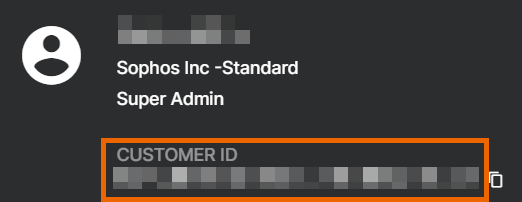
- Click your account name.
-
You can see your tenant ID under Customer ID.
-
Click copy
 to copy your Customer ID to your clipboard.
MCS URL
Your MCS URL identifies the data center where your Sophos Fusion account is stored. To find your MCS URL, do as follows:
- Sign in to Sophos Fusion.
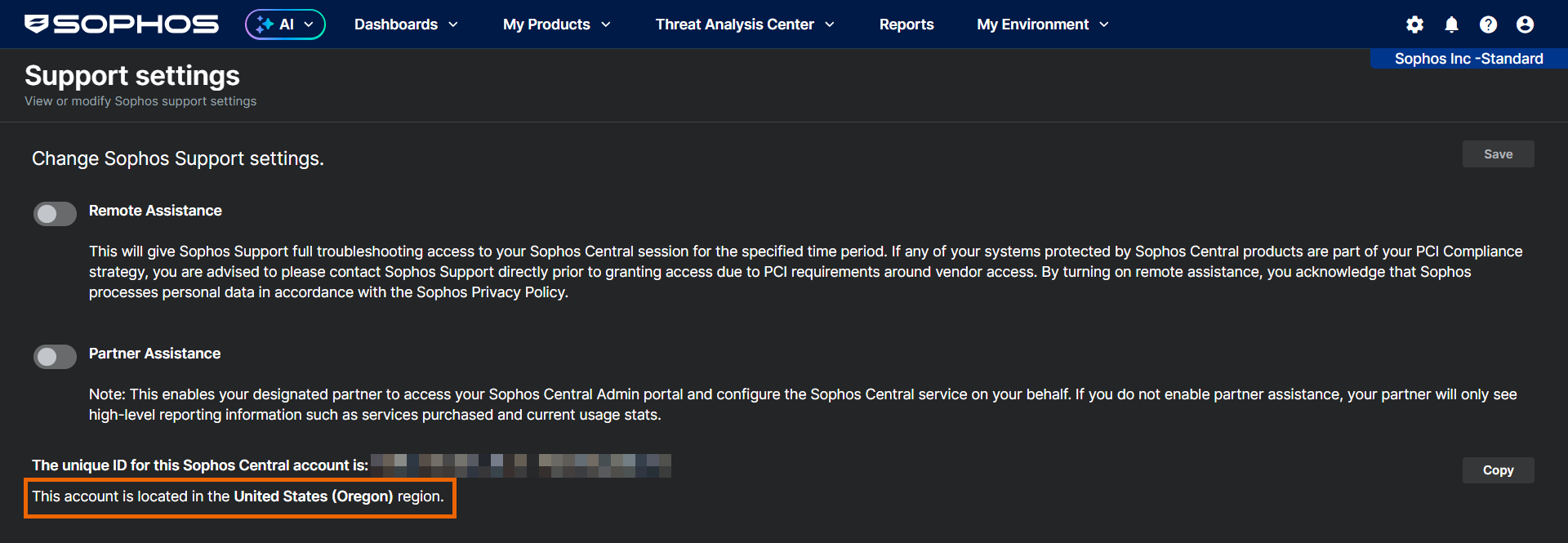
- Click your account name, and then click Support settings.
-
Look for the line that starts with "This account is located in" to see which geographical region your Sophos Fusion account is in.
-
Use the following table to find your MCS URL based on your region:
Region MCS URL United States (Oregon) mcs2-cloudstation-us-west-2.prod.hydra.sophos.com United States (Ohio) mcs2-cloudstation-us-east-2.prod.hydra.sophos.com Ireland mcs2-cloudstation-eu-west-1.prod.hydra.sophos.com Germany mcs2-cloudstation-eu-central-1.prod.hydra.sophos.com Canada mcs2.stn100yul.ctr.sophos.com Australia mcs2.stn100syd.ctr.sophos.com Asia Pacific (Tokyo) mcs2.stn100hnd.ctr.sophos.com South America (Sao Paulo) mcs2.stn100gru.ctr.sophos.com