Reports
The Reports page shows the same dashboard information as the Overview page, filtered by the criteria for the report type you select.
To see the Reports page in Sophos Fusion, go to My Products > NDR. Under Investigate, select Reports.
Create a report
To create a report, do as follows:
- Select an investigation console.
-
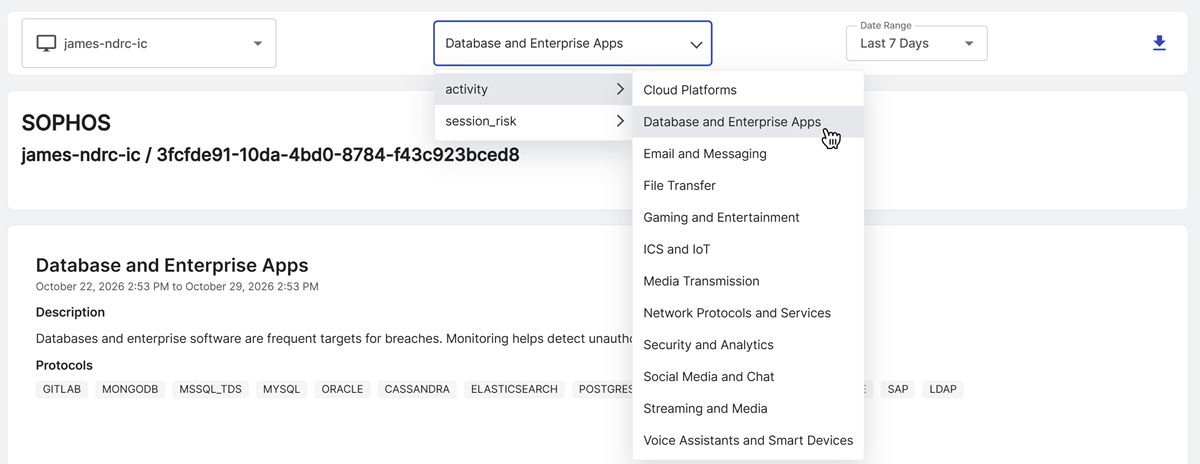
Select a report type. Report types are grouped into the following categories:
- Activity: Shows network traffic grouped by application protocol.
- Session risk: Shows potential issues with network traffic grouped by flow risk.
-
Select a date range, or click Custom and define a custom date range.
The report updates to reflect your selections.
Click the Download icon to export the report as a PDF. The PDF contains the entire report, but the Recent Detections Table only contains the rows currently shown.
To export all matching rows, click Export CSV above the table.
Report details
The investigation console name and ID show at the top of the report. Below them, you see the report title, description, and matching criteria. Activity reports show Protocols, and session risk reports show Flow risks.

The report contains the same dashboard sections as the Overview page, with data filtered by the report criteria.
Activity reports
An activity report can show network traffic and recent detections even when Total Indicators shows zero. This is expected because Total Indicators only counts the following indicator types shown in its legend:
- DGA: Domain Generation Algorithm
- EPA: Encrypted Payload Analytics
- IDS: Intrusion Detection System
- SRA: Session Risk Analytics
Activity reports describe network traffic and don't necessarily indicate a threat. If traffic for a protocol has one of these indicators, Total Indicators includes it.
In the Recent Detections Table, the Score column shows the severity. A score of 0 appears as Info. Rows with no indicators have a score of 0.
Session risk reports
Session risk reports match network flows with specific flow risks. For example, a Binary and Executable Transfers report matches the BINARY_APPLICATION_TRANSFER flow risk.
A report match doesn't always indicate malicious activity. For example, Binary and Executable Transfers can identify traffic associated with malware distribution, but the traffic might instead come from a software update or application deployment. Suspicious or Malicious Traffic can also match benign high-volume automated tasks and crawlers.
Note
Use these reports as a starting point for an investigation, not as confirmation of malicious activity.