NDR 5500 standard deployments
You can deploy an NDR 5500 appliance at the network perimeter or inside your network. Perimeter deployments inspect north-south traffic, which moves between your internal network and external networks. Internal deployments can inspect east-west traffic, which moves between systems and network segments within your network.
The deployment depends on the NDR appliance mode:
- Inline: Use with NDR+IPS Active, NDR+IPS Passive, IPS Active, and IPS Passive modes. Network traffic passes through the NDR 5500 using bridge pairs.
- Out-of-band: Use with NDR, NDR+IDS, and IDS modes. The NDR 5500 operates out of band and inspects a copy of network traffic from a SPAN or mirror port or network TAP. This is also referred to as a sniffer deployment.
For more information on appliance modes, see NDR appliance modes.
For perimeter deployments with a standalone or high-availability (HA) Sophos Firewall, you can deploy the NDR 5500 in either of these ways:
- LAN side: The appliance inspects traffic on the LAN side of the firewall.
- LAN and WAN sides: The appliance uses separate connections to inspect traffic on the LAN and WAN sides of the firewall.
For an HA firewall pair, configure the NDR 5500 to inspect traffic from both firewalls so that traffic remains visible regardless of which firewall processes it:
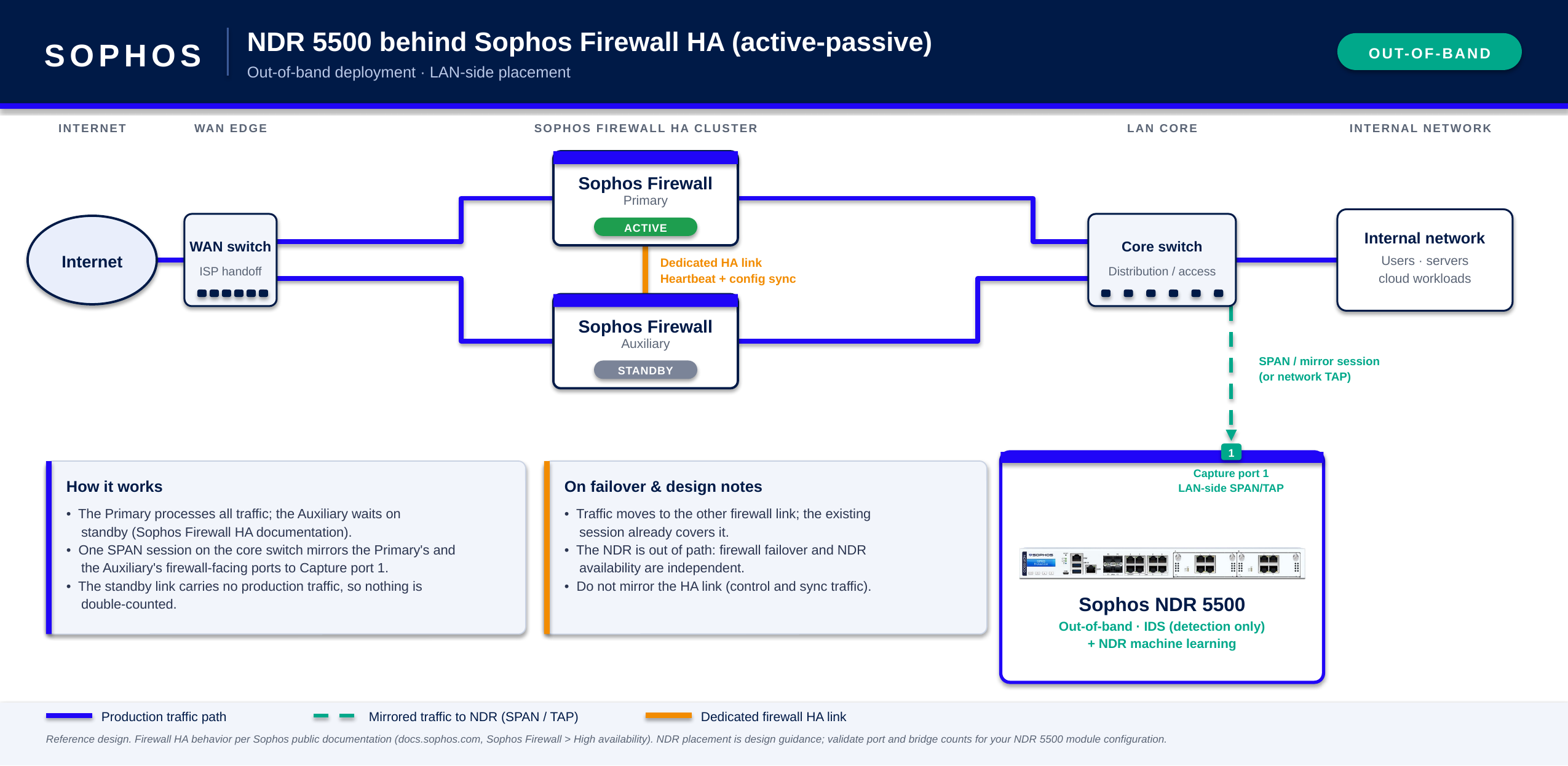
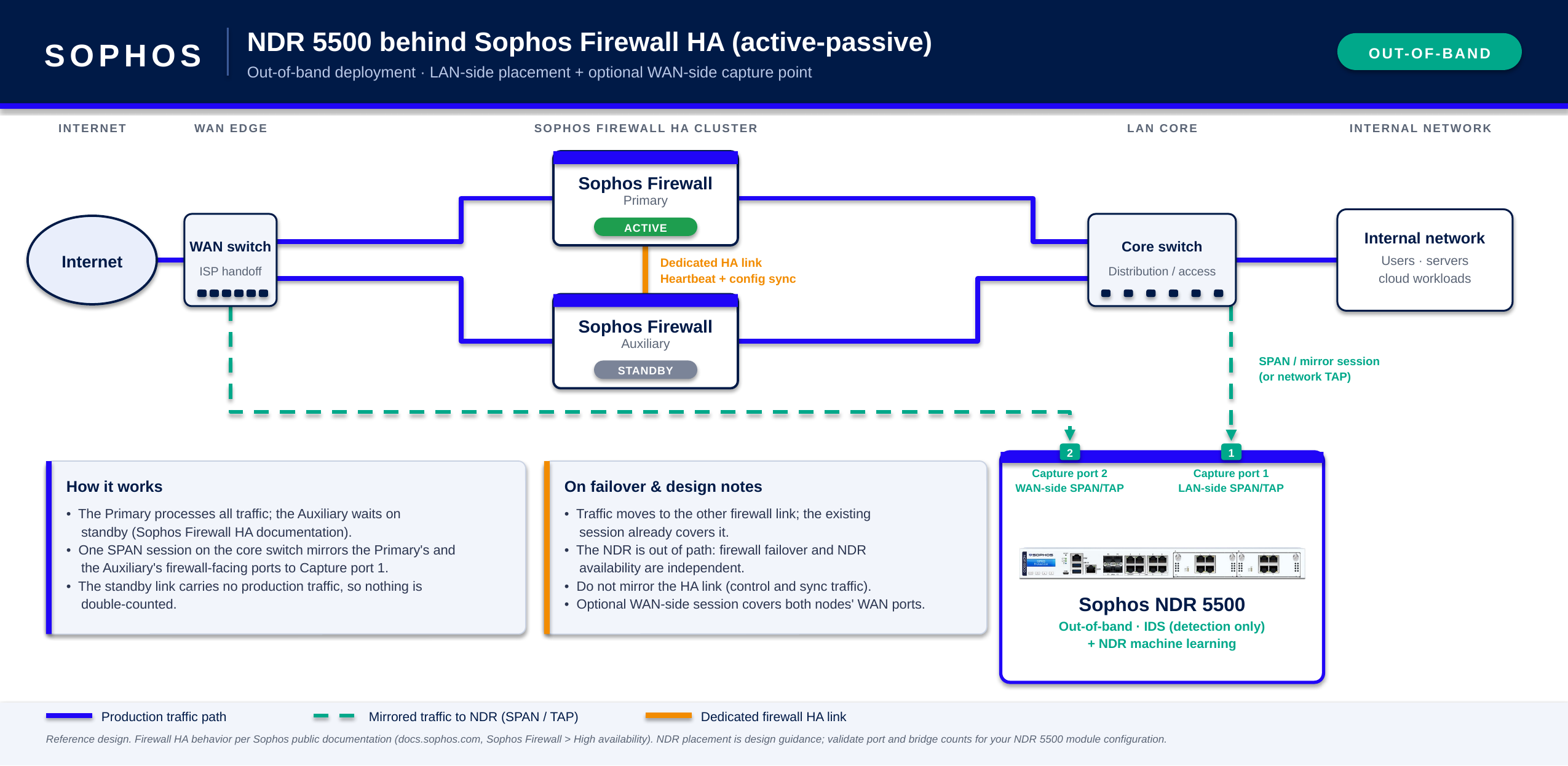
- For an out-of-band deployment, configure the SPAN or mirror session to include traffic from both firewalls.
- For an inline deployment, use a separate bridge pair for each firewall link.
Note
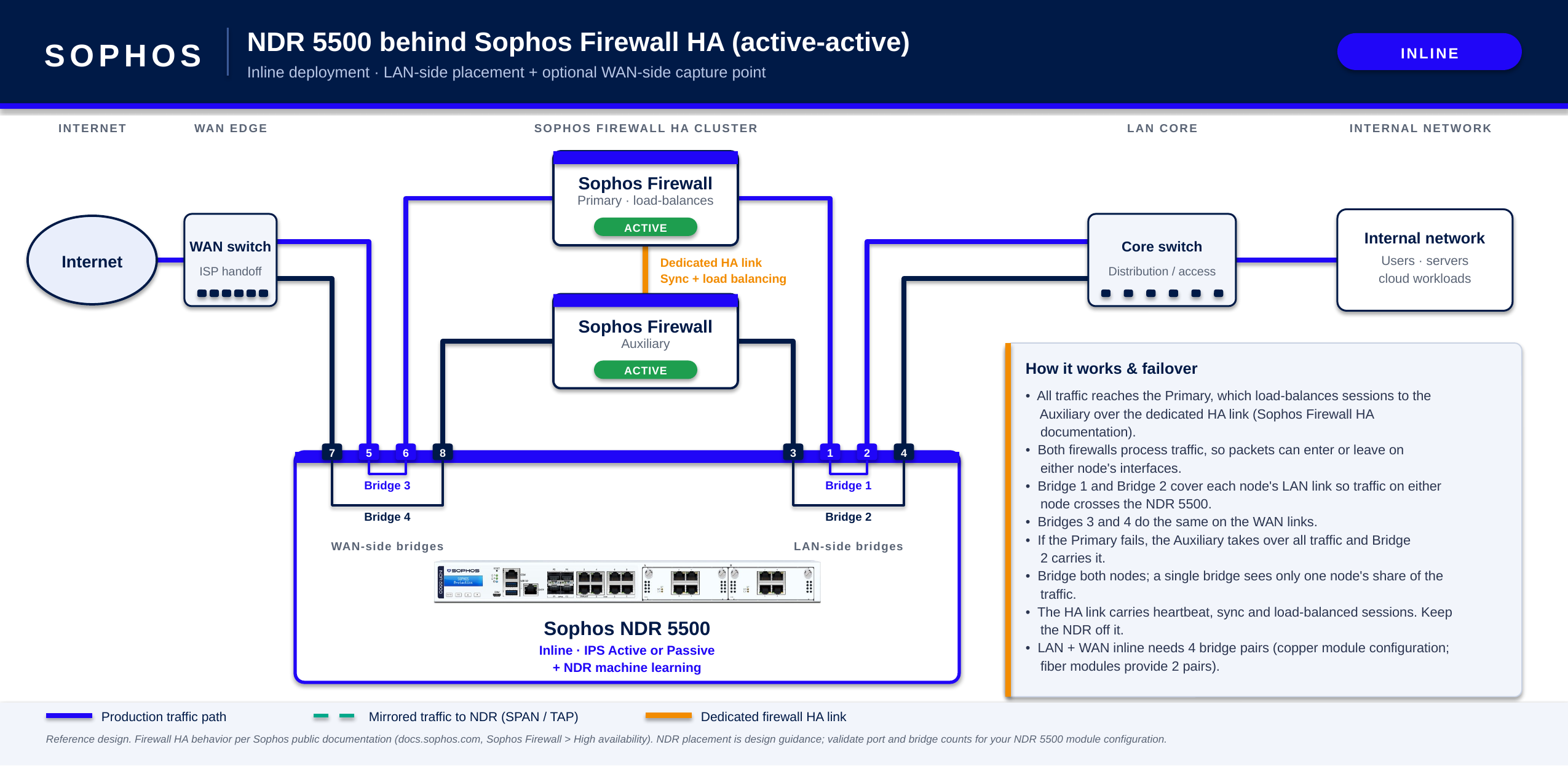
An inline deployment on both the LAN and WAN sides of an HA firewall pair requires four bridge pairs on a single NDR 5500. Copper modules support up to four bridge pairs, while fiber modules support only two.
If you require additional fiber interfaces for an HA deployment, you might need an additional NDR 5500. This depends on your network configuration and whether other network devices can provide the required traffic to the appliance.
Standalone firewall
In a standalone configuration, a single Sophos Firewall sits between the WAN and LAN. You can deploy the NDR 5500 inline or out of band and monitor the LAN side only or both the LAN and WAN sides.
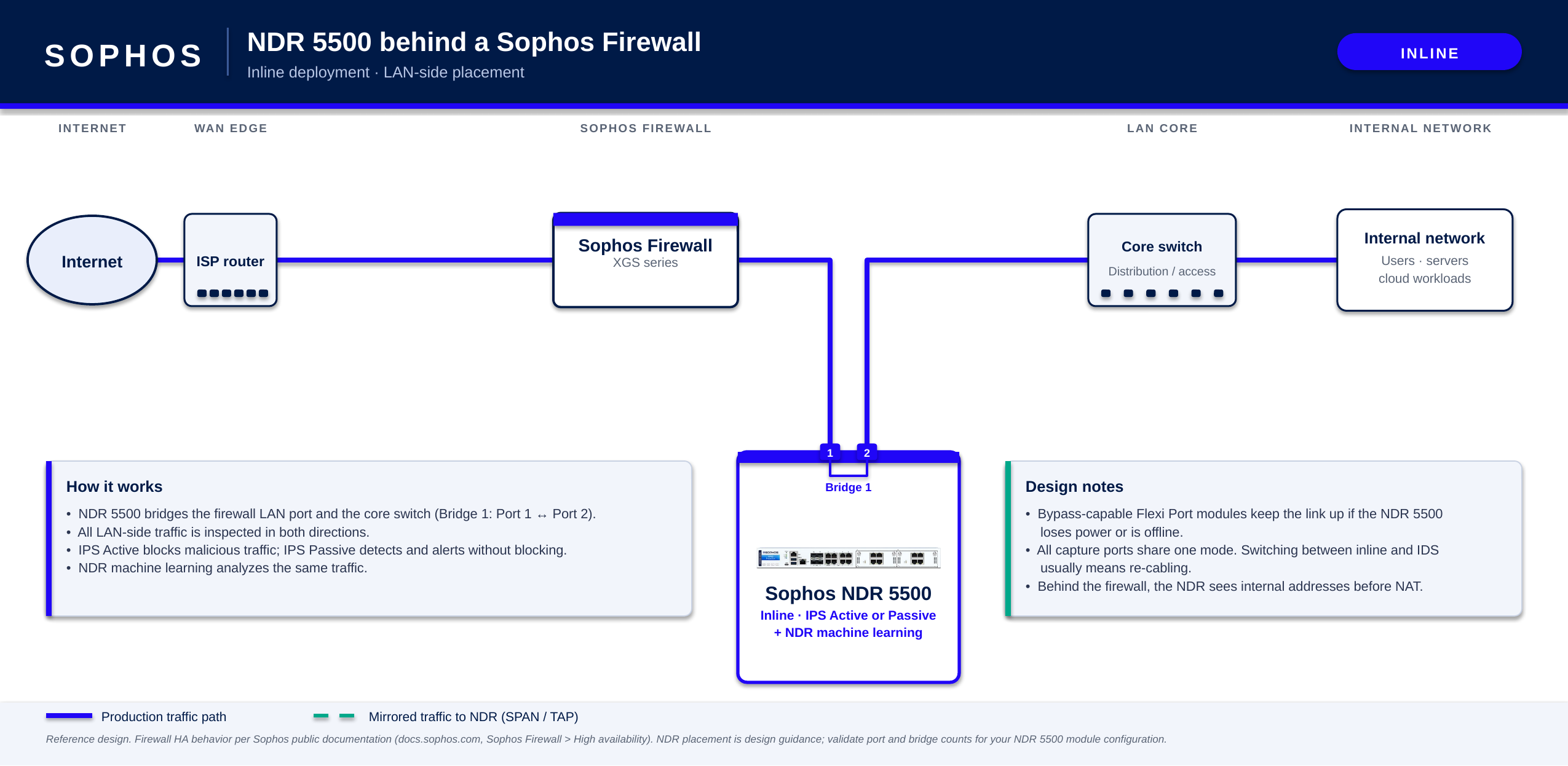
Inline, LAN side
The example below shows an NDR 5500 inline on the LAN side of a standalone Sophos Firewall. Network traffic between the firewall and LAN passes through a bridge pair on the NDR 5500.
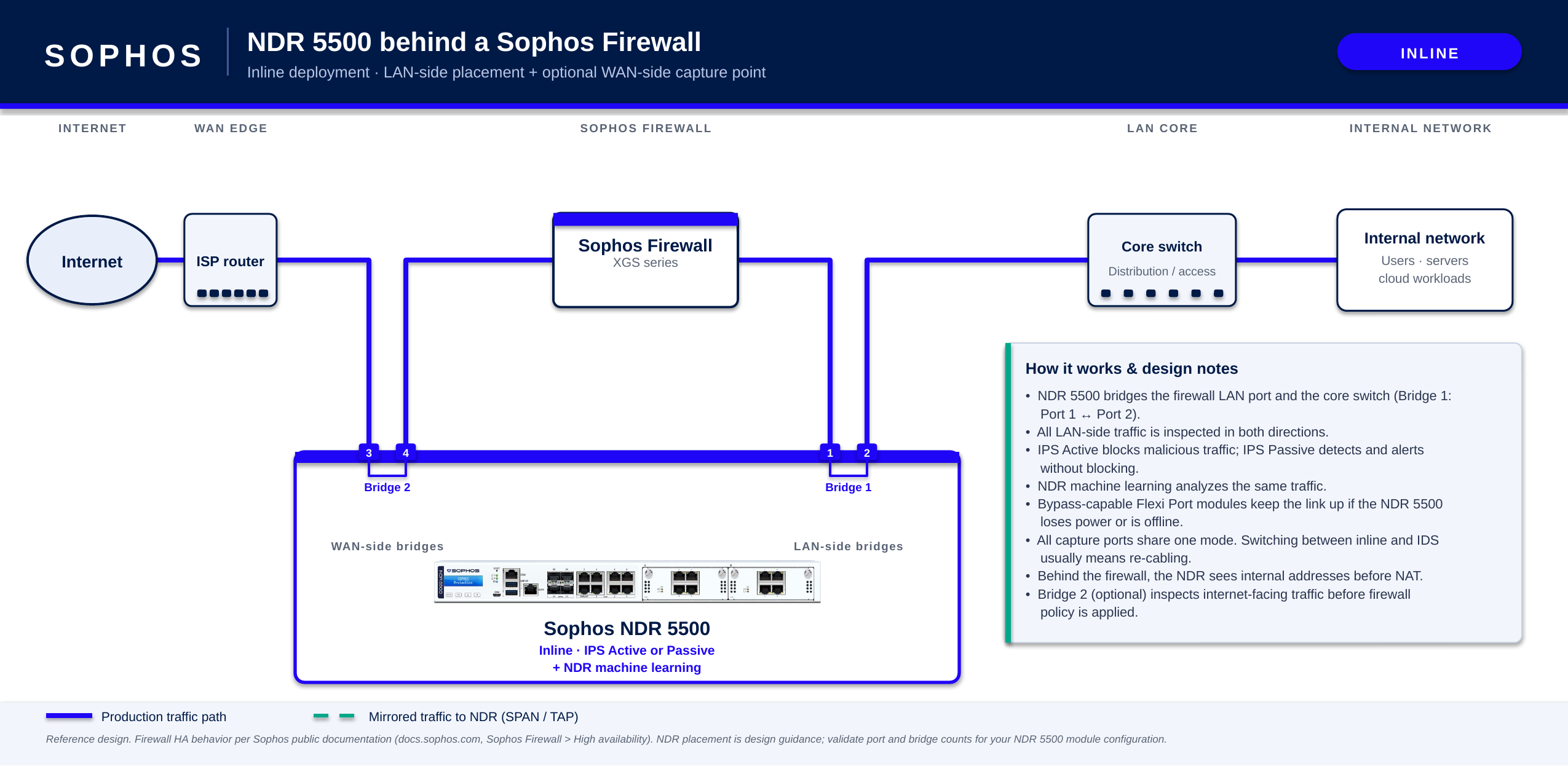
Inline, LAN and WAN sides
The example below shows an NDR 5500 inline on both the LAN and WAN sides of a standalone Sophos Firewall. A separate bridge pair places the appliance in the traffic path on each side of the firewall.
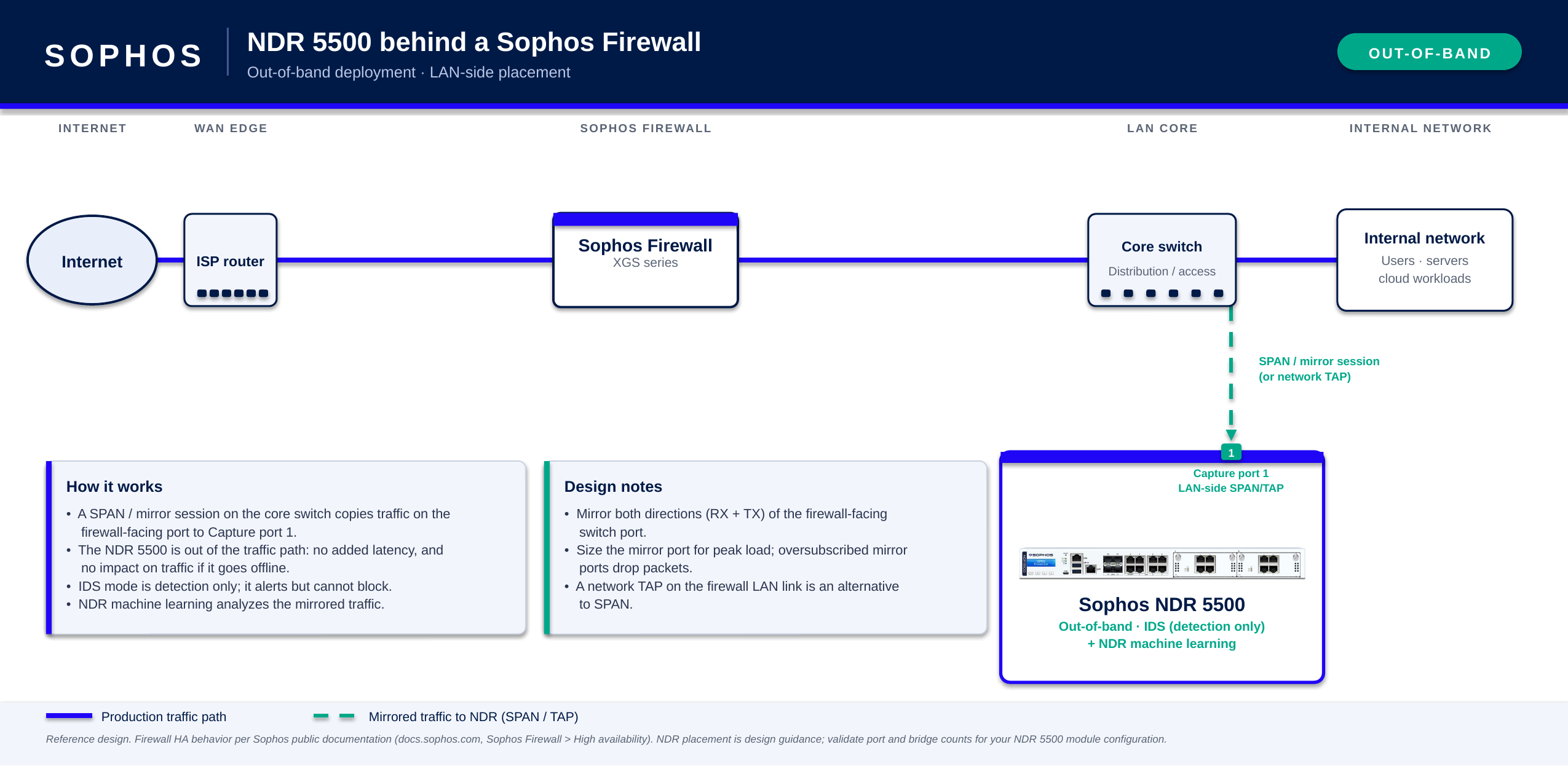
Out-of-band, LAN side
The example below shows an NDR 5500 operating out of band and receiving mirrored traffic from the LAN side of a standalone Sophos Firewall. Production traffic doesn't pass through the appliance.
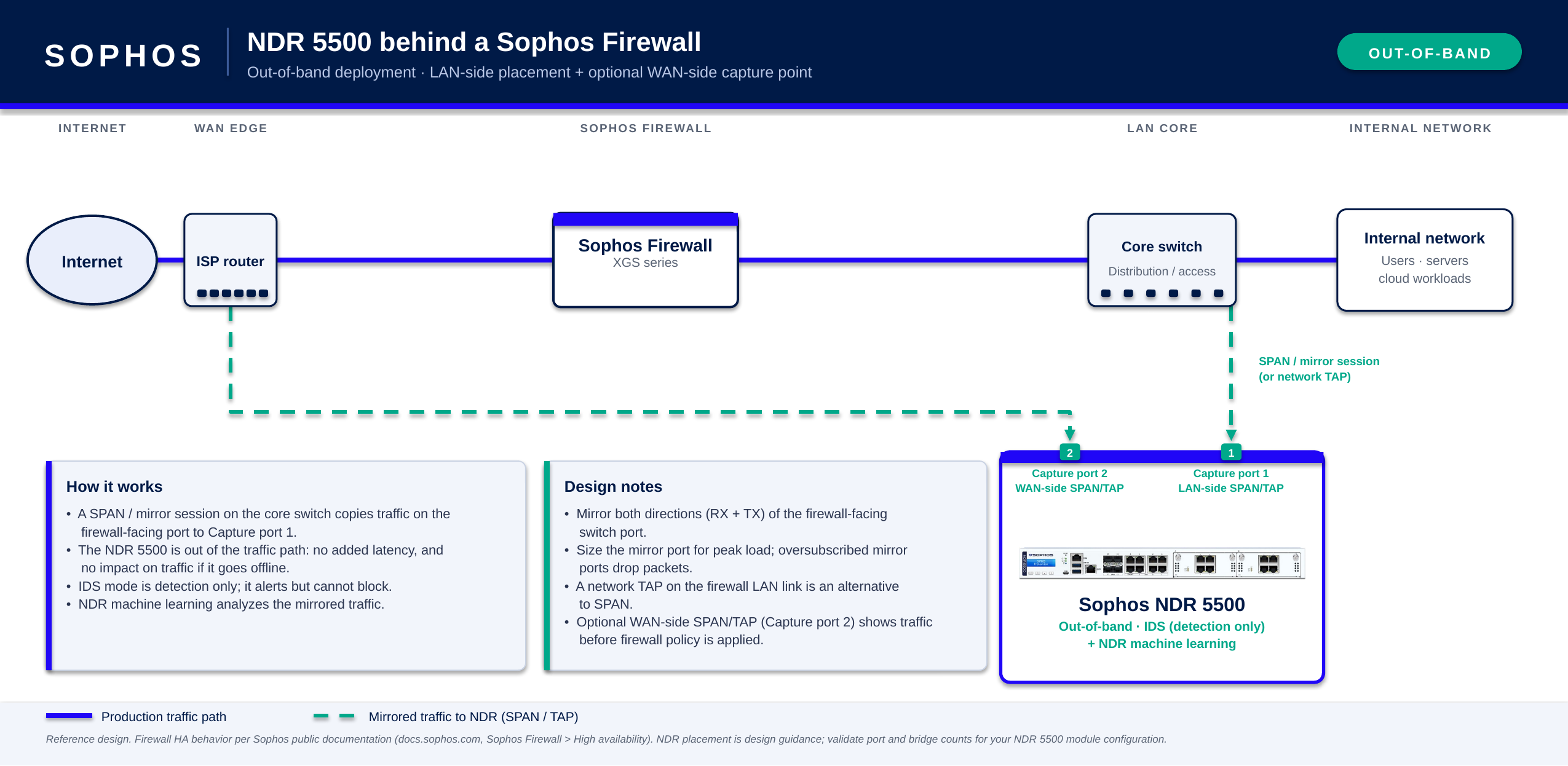
Out-of-band, LAN and WAN sides
The example below shows an NDR 5500 operating out of band and receiving mirrored traffic from the LAN and WAN sides of a standalone Sophos Firewall. Separate capture interfaces receive the mirrored LAN-side and WAN-side traffic.
Active-passive HA
In an active-passive HA pair, the primary firewall processes network traffic while the auxiliary firewall remains on standby until a failover occurs.
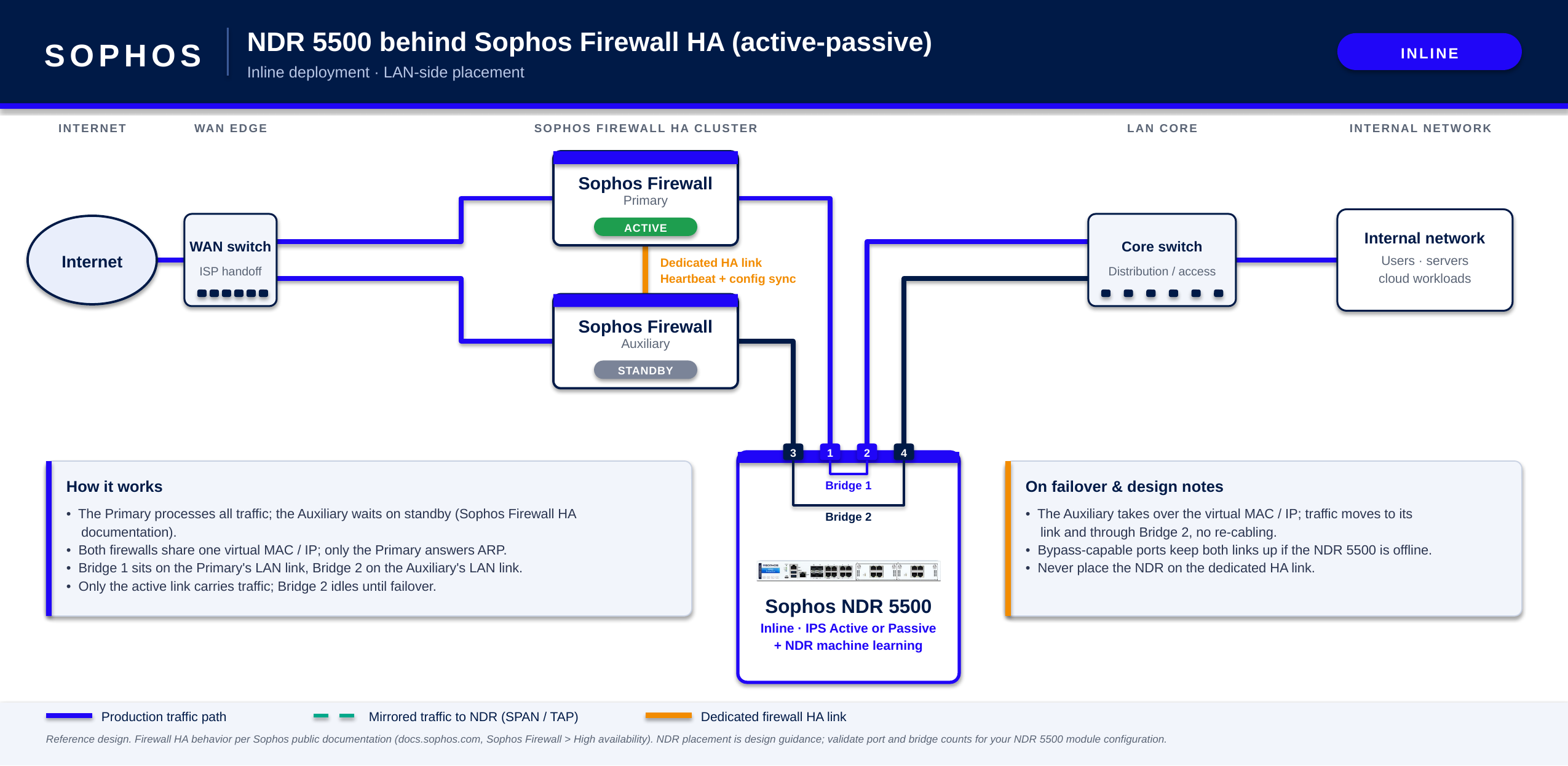
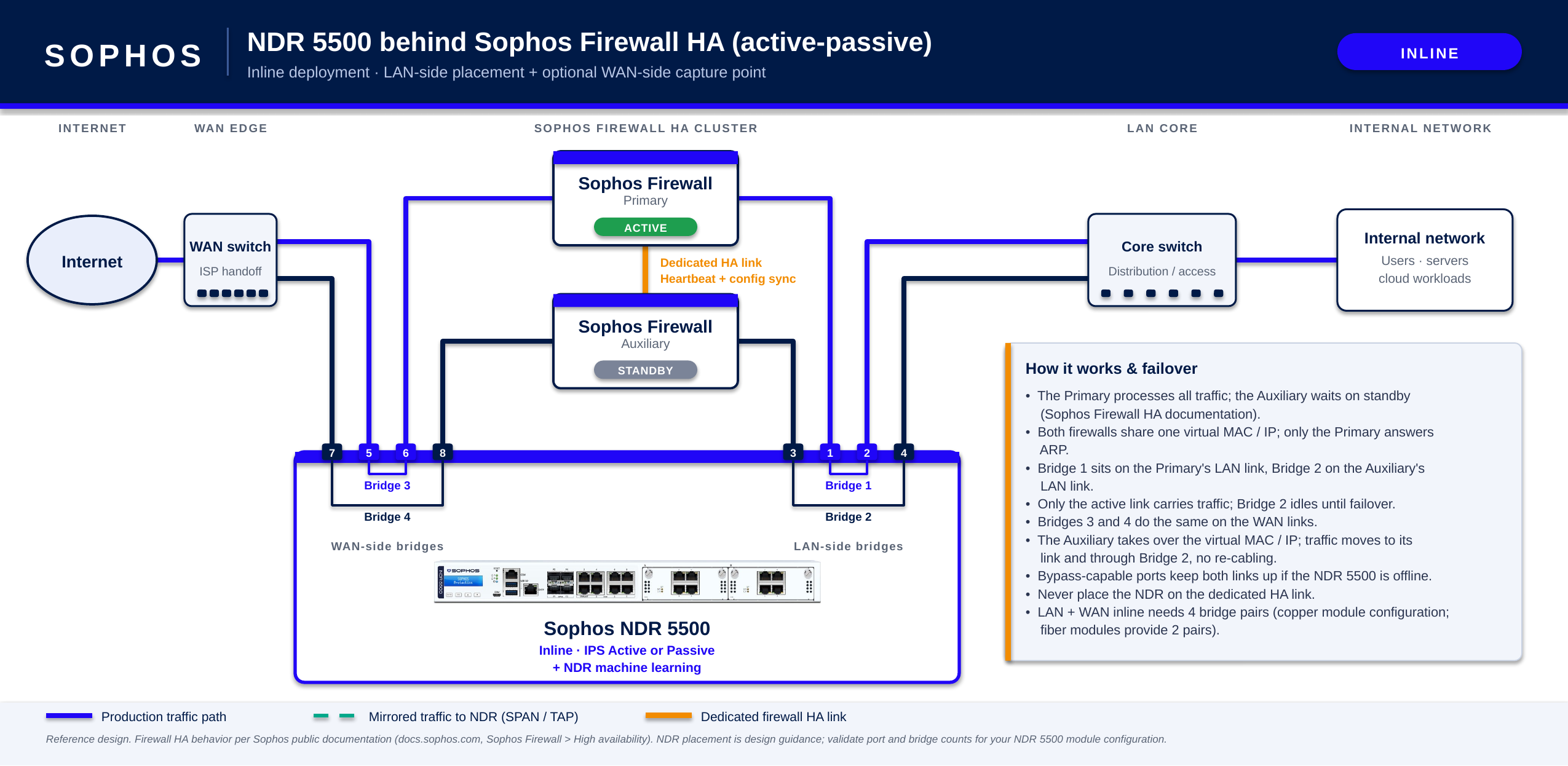
Configure the NDR 5500 to inspect the relevant traffic from both firewalls. For an inline deployment, use a separate bridge pair for each corresponding firewall link. Only the bridge pair connected to the active firewall carries traffic. After a failover, traffic passes through the bridge pair connected to the other firewall, so you don't need to re-cable the NDR 5500.
Don't connect the NDR 5500 to the dedicated HA link between the firewalls.
Inline, LAN side
The example below shows an NDR 5500 inline on the LAN side of an active-passive HA pair. Separate bridge pairs connect the appliance to the LAN links of the primary firewall and auxiliary firewall. Only the bridge pair connected to the active firewall carries traffic.
Inline, LAN and WAN sides
The example below shows an NDR 5500 inline on both the LAN and WAN sides of an active-passive HA pair. The deployment uses four bridge pairs: two for the LAN links and two for the WAN links.
Note
This deployment requires four bridge pairs on a single NDR 5500. Copper modules support up to four bridge pairs, while fiber modules support up to two.
Out-of-band, LAN side
The example below shows an NDR 5500 operating out of band and receiving mirrored LAN traffic from an active-passive HA pair. The SPAN or mirror session includes the relevant LAN-side traffic from both firewalls.
Out-of-band, LAN and WAN sides
The example below shows an NDR 5500 operating out of band and receiving mirrored LAN and WAN traffic from an active-passive HA pair. The SPAN or mirror sessions include the relevant traffic from both firewalls.
Active-active HA
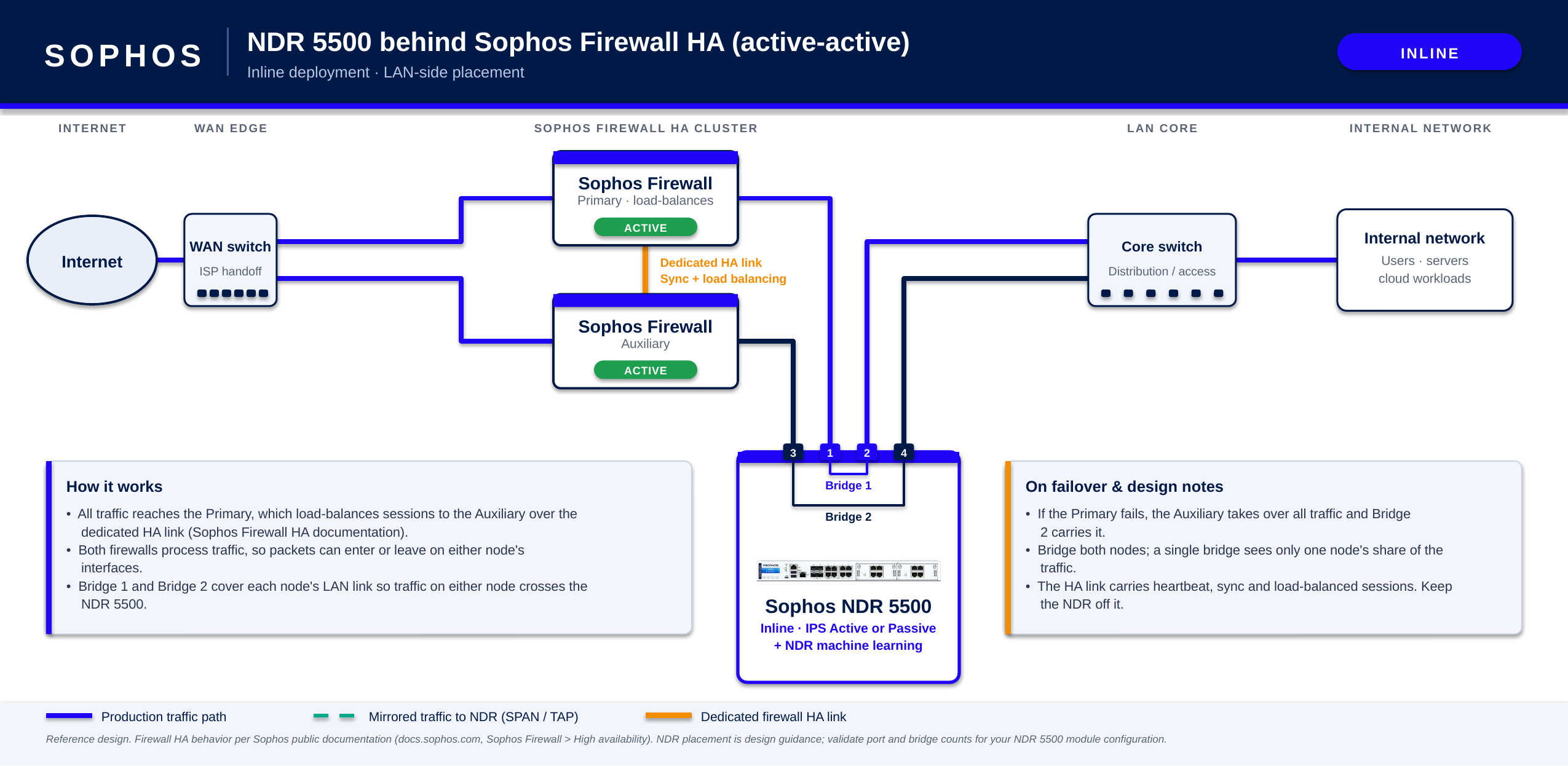
In an active-active HA pair, the primary firewall receives network traffic and load-balances sessions to the auxiliary firewall over the HA link. Both firewalls can process traffic, so configure the NDR 5500 to inspect the relevant traffic from both firewalls.
Don't connect the NDR 5500 to the dedicated HA link between the firewalls.
Inline, LAN side
The example below shows an NDR 5500 inline on the LAN side of an active-active HA pair. Separate bridge pairs connect the appliance to the LAN links of both firewalls so that it can inspect traffic carried by either firewall.
Inline, LAN and WAN sides
The example below shows an NDR 5500 inline on both the LAN and WAN sides of an active-active HA pair. The deployment uses four bridge pairs to place the appliance in the traffic paths on both sides of both firewalls.
Note
This deployment requires four bridge pairs on a single NDR 5500. Copper modules support up to four bridge pairs, while fiber modules support up to two.
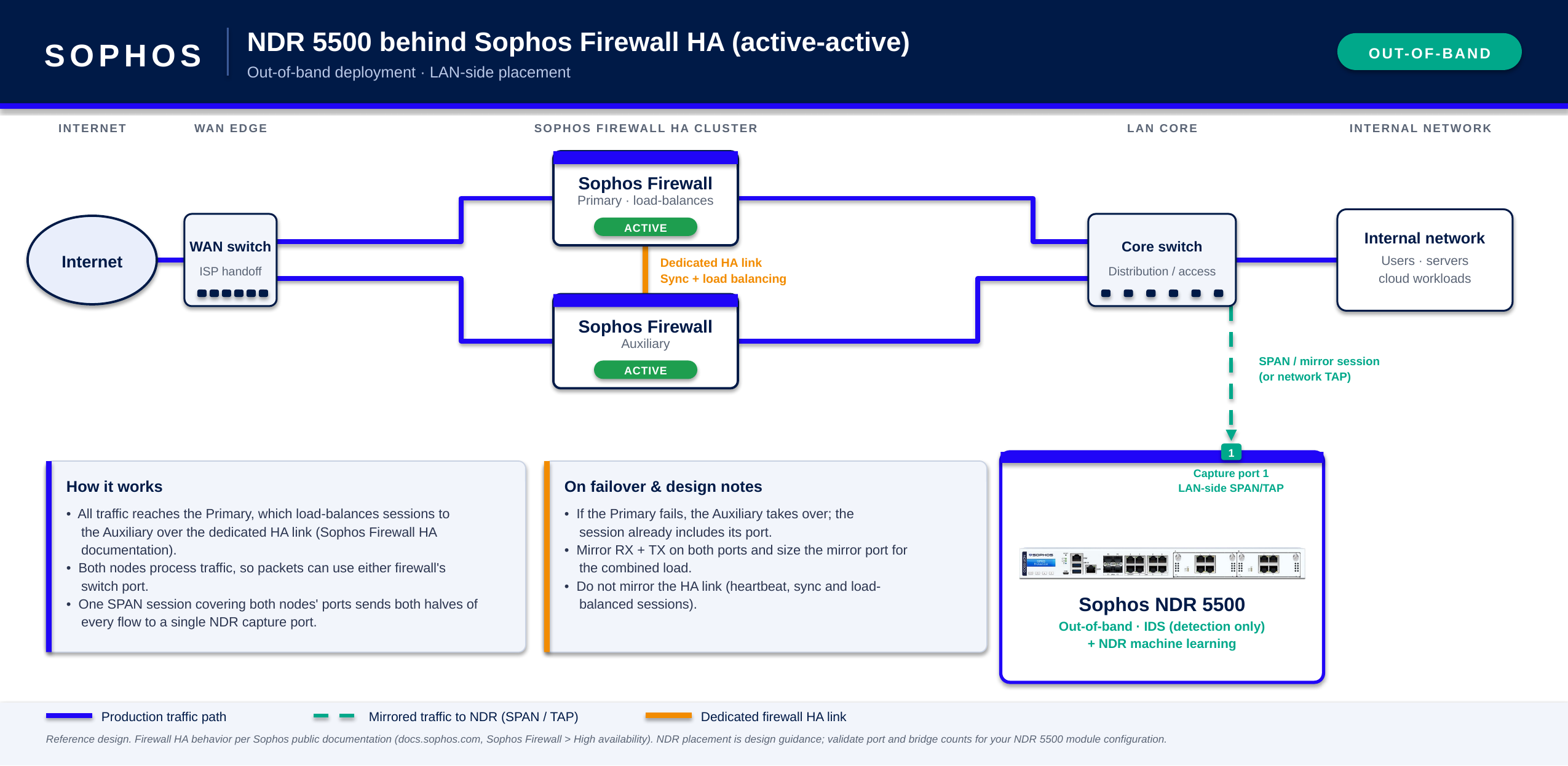
Out-of-band, LAN side
The example below shows an NDR 5500 operating out of band and receiving mirrored LAN traffic from an active-active HA pair. The SPAN or mirror session includes the relevant LAN-side traffic from both firewalls so that the appliance can inspect traffic carried by either firewall.
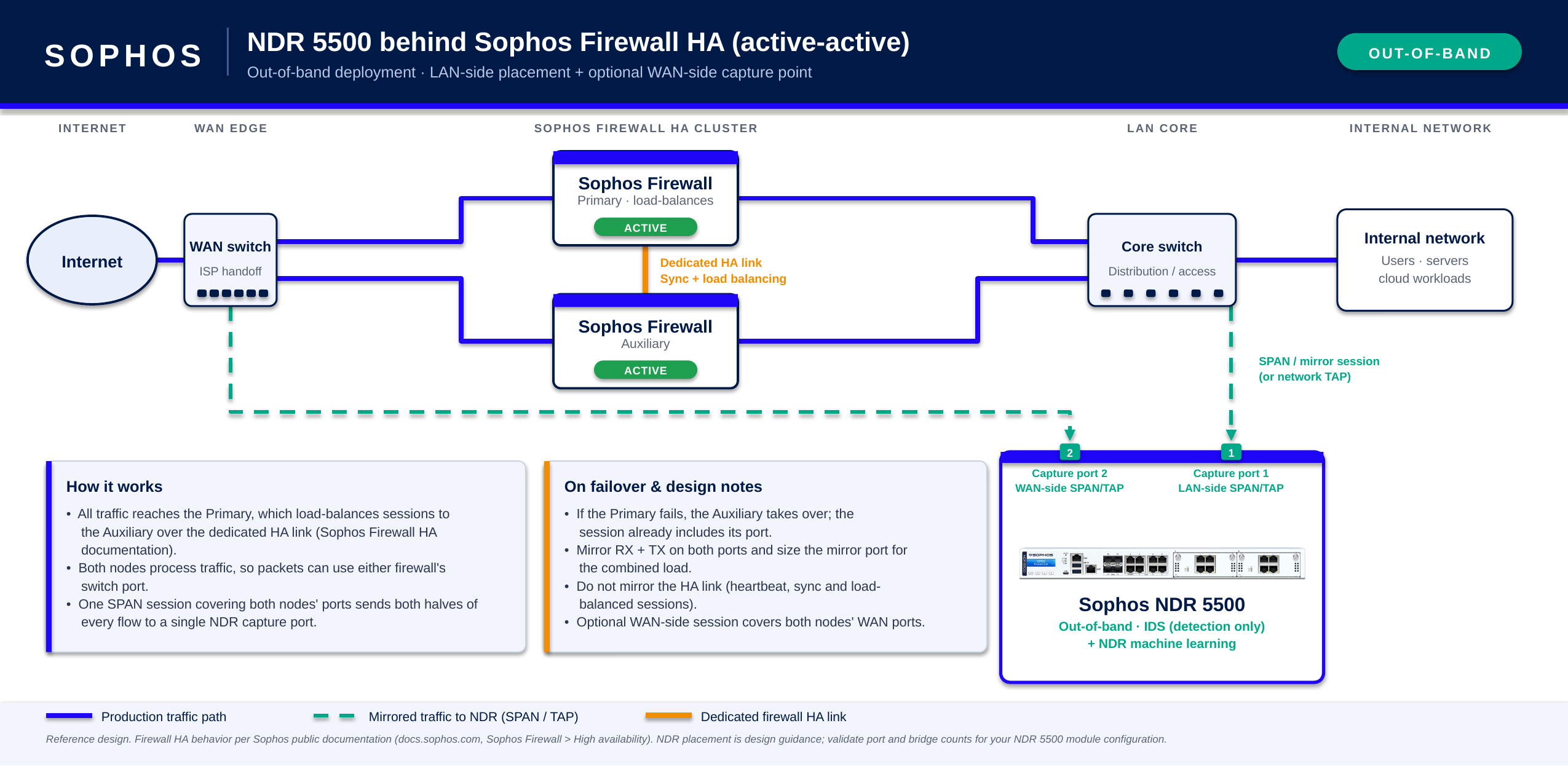
Out-of-band, LAN and WAN sides
The example below shows an NDR 5500 operating out of band and receiving mirrored LAN and WAN traffic from an active-active HA pair. The SPAN or mirror sessions include the relevant traffic from both firewalls so that the appliance can inspect traffic on either side of either firewall.
East-west traffic
You can deploy the NDR 5500 inside your network to inspect traffic between internal network segments, such as user networks and data-center workloads.
The NDR 5500 can inspect east-west traffic inline or out of band. The appliance inspects only traffic that passes through an inline bridge pair or is copied to a capture interface from a SPAN or mirror port or network TAP.
Inline
For inline inspection, place the NDR 5500 in the traffic path between the network segments you want to monitor. Each monitored link uses one bridge pair. Copper modules support up to four bridge pairs, while fiber modules support up to two.
The example below shows the NDR 5500 between a core switch and a data-center switch. Traffic between the core and data center passes through the appliance for inspection.
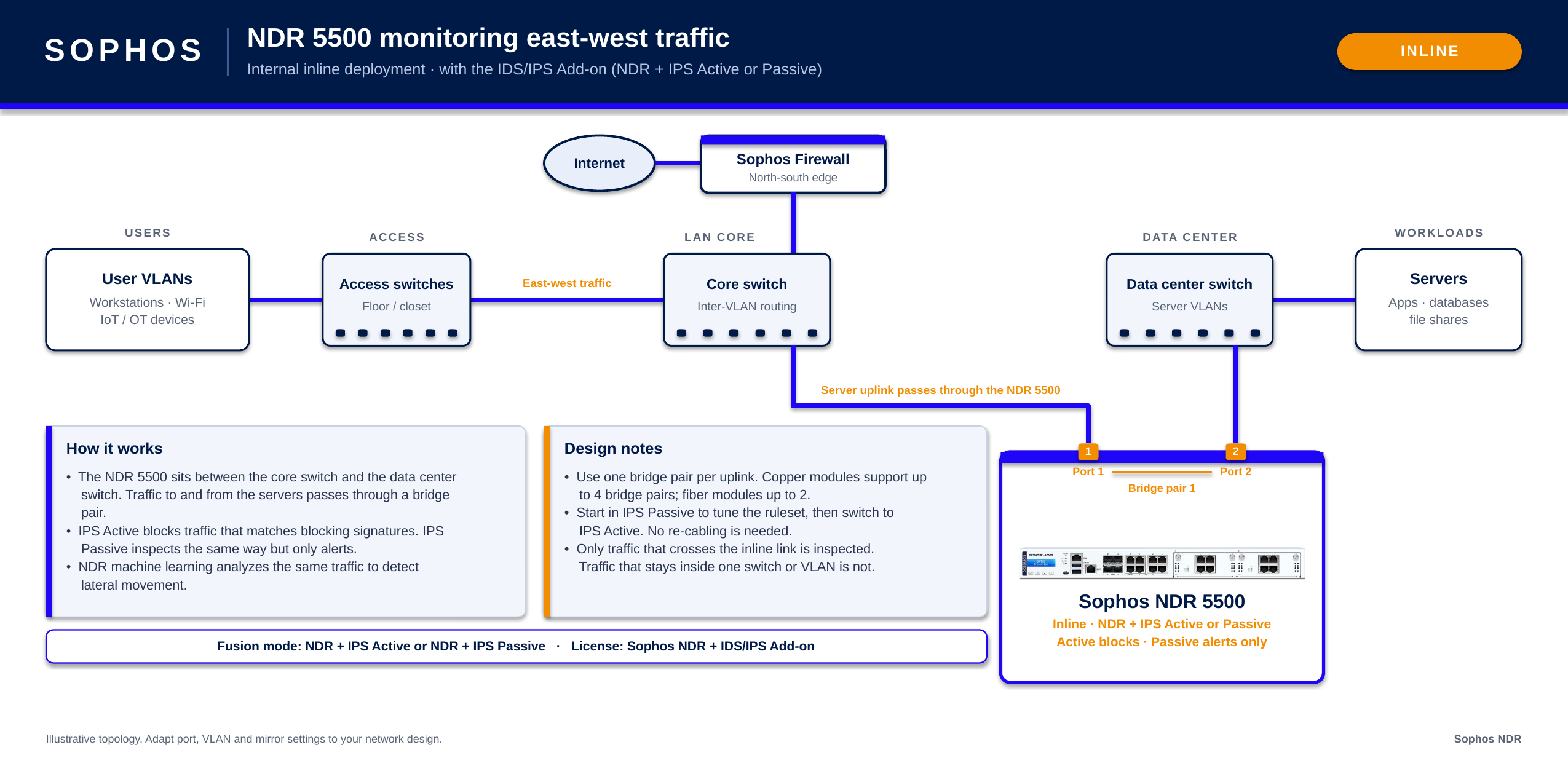
Only traffic that crosses the inline link is inspected. Traffic that remains within the same switch or VLAN doesn't pass through the NDR 5500 and isn't inspected through this connection.
Out-of-band
For out-of-band inspection, configure SPAN or mirror sessions or network TAPs to send copies of the east-west traffic you want to monitor to the NDR 5500 capture interfaces. The NDR 5500 isn't in the production traffic path and can't block traffic.
The example below shows the NDR 5500 receiving mirrored east-west traffic from core and data-center switches.
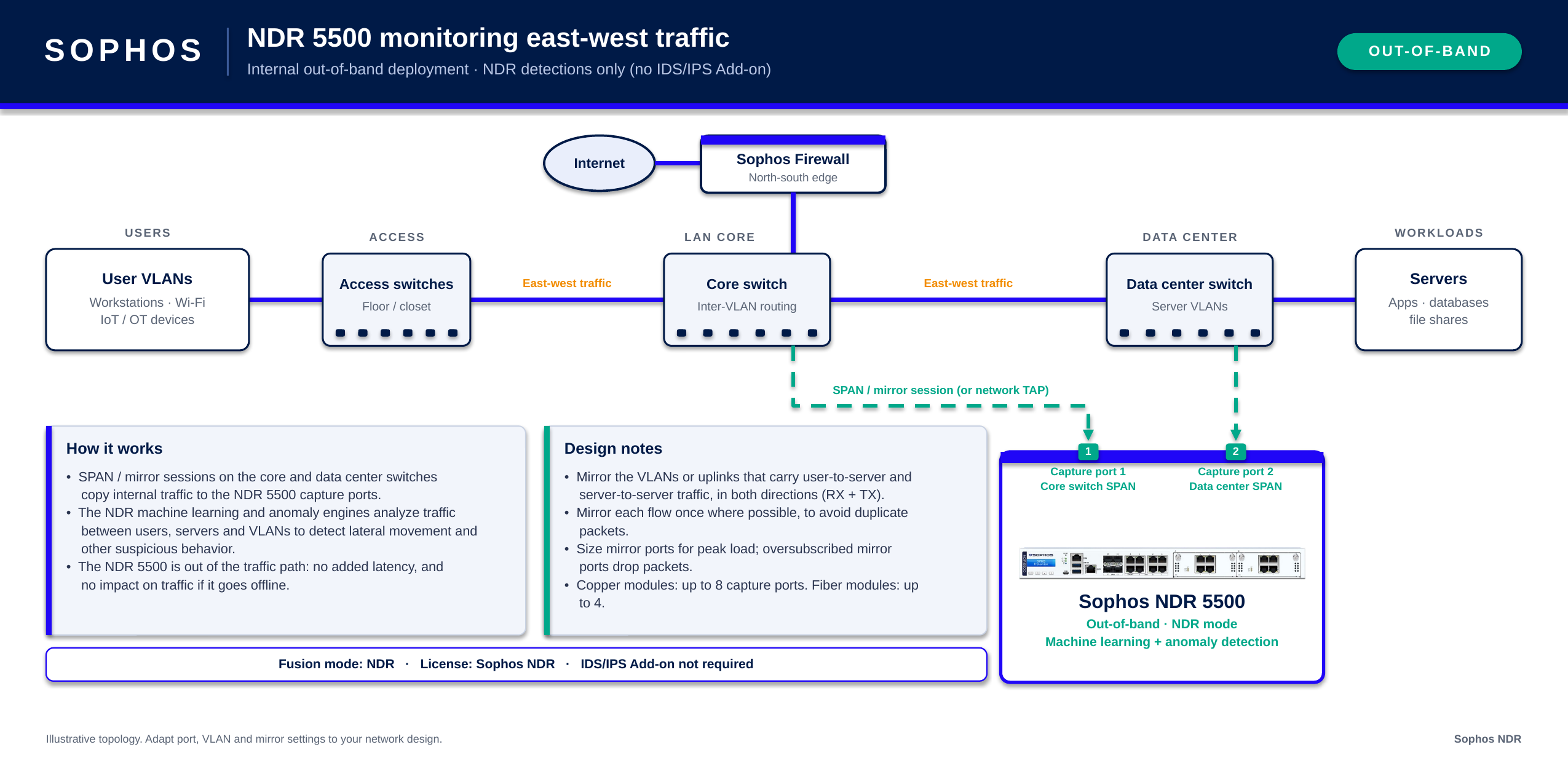
You can use NDR, NDR+IDS, or IDS mode with this topology. The selected mode determines which detection engines inspect the copied traffic. For details, see NDR appliance modes.
Configure the SPAN or mirror sources to provide both directions of the traffic you want to inspect. Where possible, mirror each traffic flow only once to avoid sending duplicate traffic to the appliance.
Traffic visibility depends on which VLANs, links, or other traffic sources you mirror to the capture interfaces.