AI Expression Assistant
AI Expression Assistant lets you create CEL expressions from natural language descriptions in supported Sophos XDR workflows. Instead of writing a CEL filter from scratch, you can describe the condition or filtering you want, generate an expression, then review or edit the CEL before saving it.
Tip
For help with CEL, supported macros, and examples, see the Related resources list on the right of this page.
Access the assistant
AI Expression Assistant is available in the following areas of Sophos XDR:
- Automatic case rules: Generate the CEL expression used for detection grouping. For details, see Automatic cases.
- Automation action conditions: Generate the CEL expression that defines the conditions in which the action appears. For details, see Configuring actions.
Generate a CEL expression
When you configure the detection grouping of an automatic case rule or edit the condition of an automation action, use the AI Expression Assistant as follows:
-
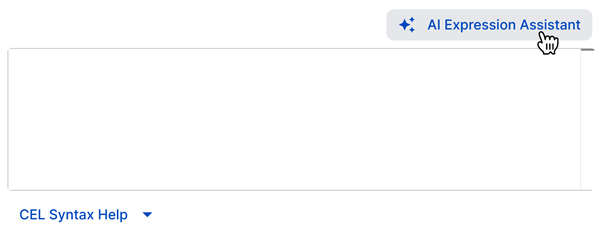
Click AI Expression Assistant.
-
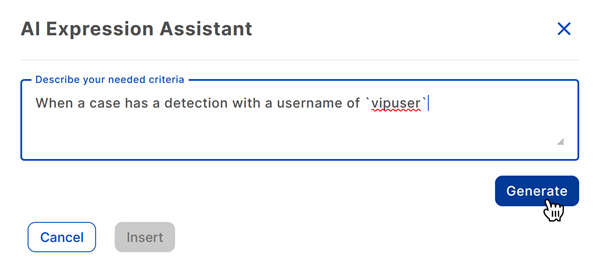
Enter your desired criteria, then click Generate.
-
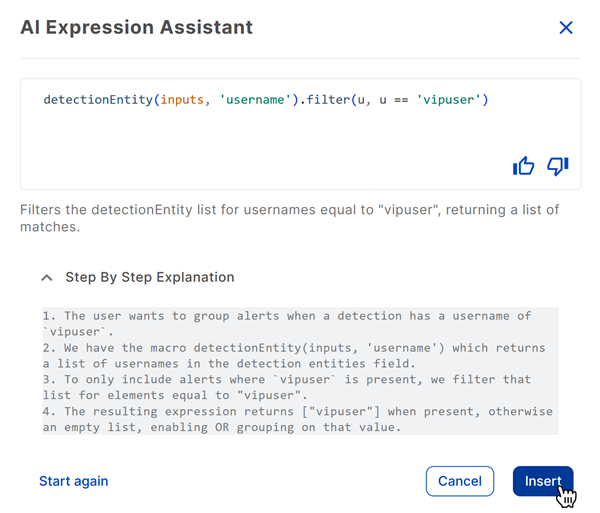
The assistant generates the expression in CEL syntax with a description of its function. For a detailed explanation, click Step By Step Explanation.
Tip
Click the Feedback icons to provide feedback on the AI-generated expression.
-
If you're satisfied with the expression, click Insert. Otherwise, click Start again to reset the assistant and try again.