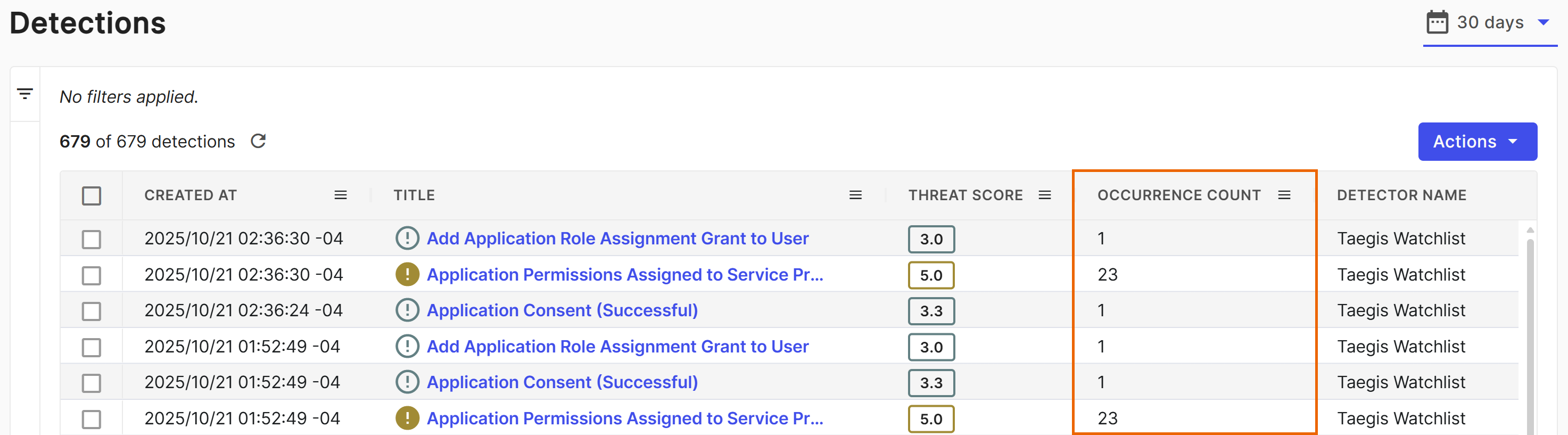
Detection group key
To reduce the number of detections, Sophos XDR detectors use the detection group key to create one detection per key within a specified time window. These group keys deduplicate detections that are identical except for timestamps and other non-essential fields. All detection types use group keys to aggregate repeated occurrences.
A group key is configured per watchlist and includes fields from the events in the detection. For example, a NIDS group key consists of the following fields:
- Tenant ID
- Sensor Type
- Detection Title
- Source IP
- Destination IP
- Date (24-hour window)
Seven-day group key
Detections for rules configured with a seven-day group key are grouped to a single day from Monday to Friday. All detections generated by the associated rule are deduplicated to the same day of the work week.
The following is an example of how seven-day group keys work:
- Rule one is set to deduplicate on Mondays.
- This rule creates a new detection on Friday.
- Repeated occurrences on Saturday and Sunday are appended to the detection created on Friday.
- On Monday, repeated occurrences generate a new detection, and occurrences are appended to that detection until the following Monday.
- The next Monday, a new detection might be created if there are repeated occurrences of the activity.
Identify grouped detections
The detection details Summary tab contains the Occurrence Count and Grouped by (Group Key) fields.
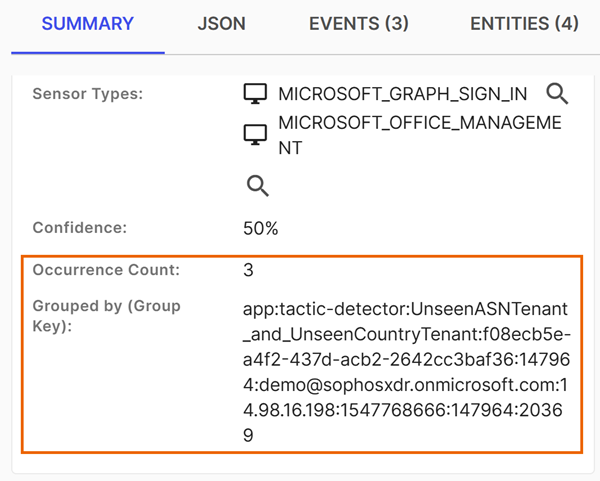
The detection JSON tab includes the events_metadata object, which contains the first and last event occurrences associated with the detection. All event occurrences are searchable and appear on the detection Events tab. The JSON tab also shows the group_key object.
You can add the Occurrence Count column to the detections tables on the following pages:
- Detections
- Advanced Search
- Case details > Evidence tab > Detections subtab