Entity Graph
An Entity Graph is a visual representation that correlates relevant data with the entities involved in a case or detection to help analysts understand the scope and identify the root cause of security incidents.
Use Entity Graph to understand entity relationships and details, see connections across different data sources, and see how entities contribute to an attack. Entity Graph helps you gain valuable insights and expedite case review.
Open an Entity Graph
You can open an Entity Graph from the following locations:
-
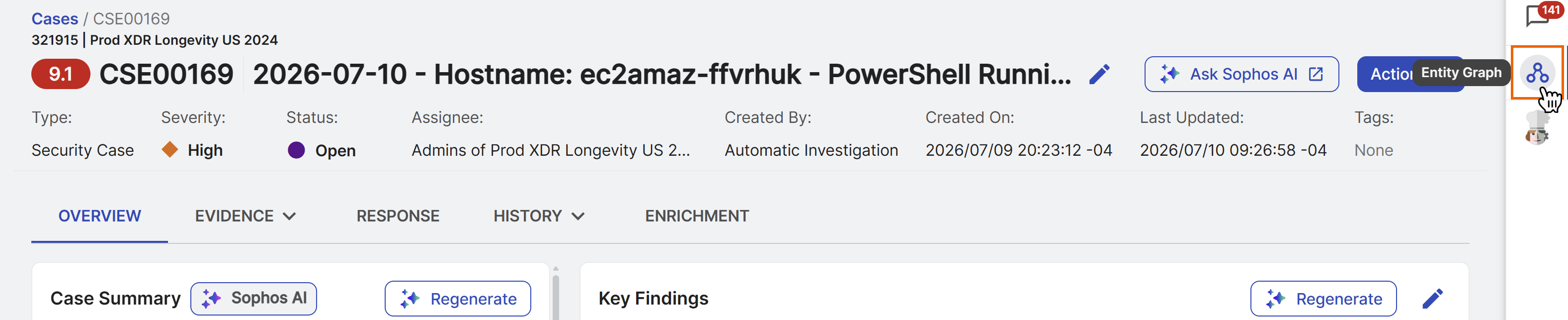
Case details: Click the Entity Graph icon in the right sidebar of case details. For more information, see Cases.
-
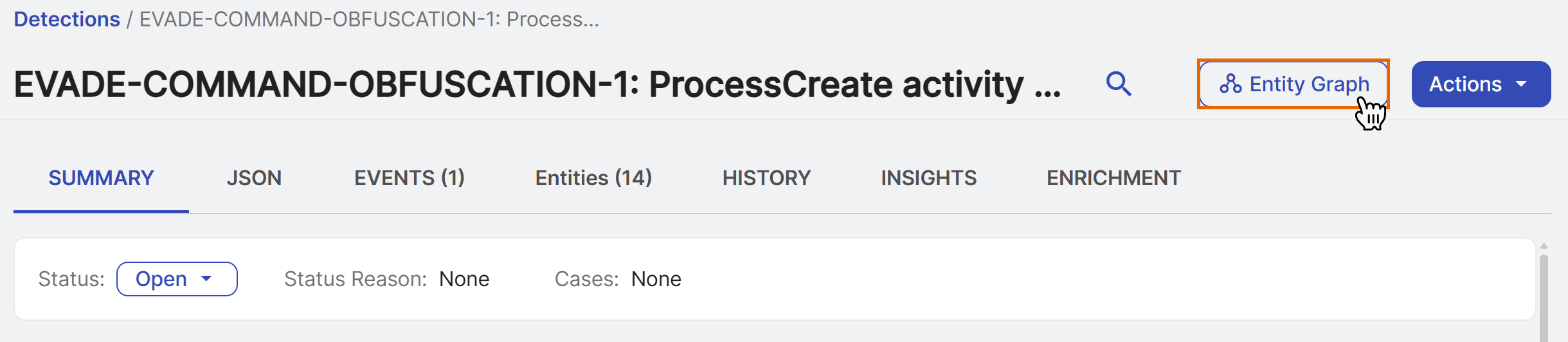
Detection details: Click Entity Graph at the top of detection details. For more information, see Detection details.
Explore an Entity Graph
Entity Graph has two main sections: the interactive graph on the left and the tabs on the right.
Graph
The interactive graph shows nodes that represent specific entities, connected by edges that represent the relationships or activities between the them.
Tip
For descriptions of supported entities and possible relationships, see Entity types and Relationship types.
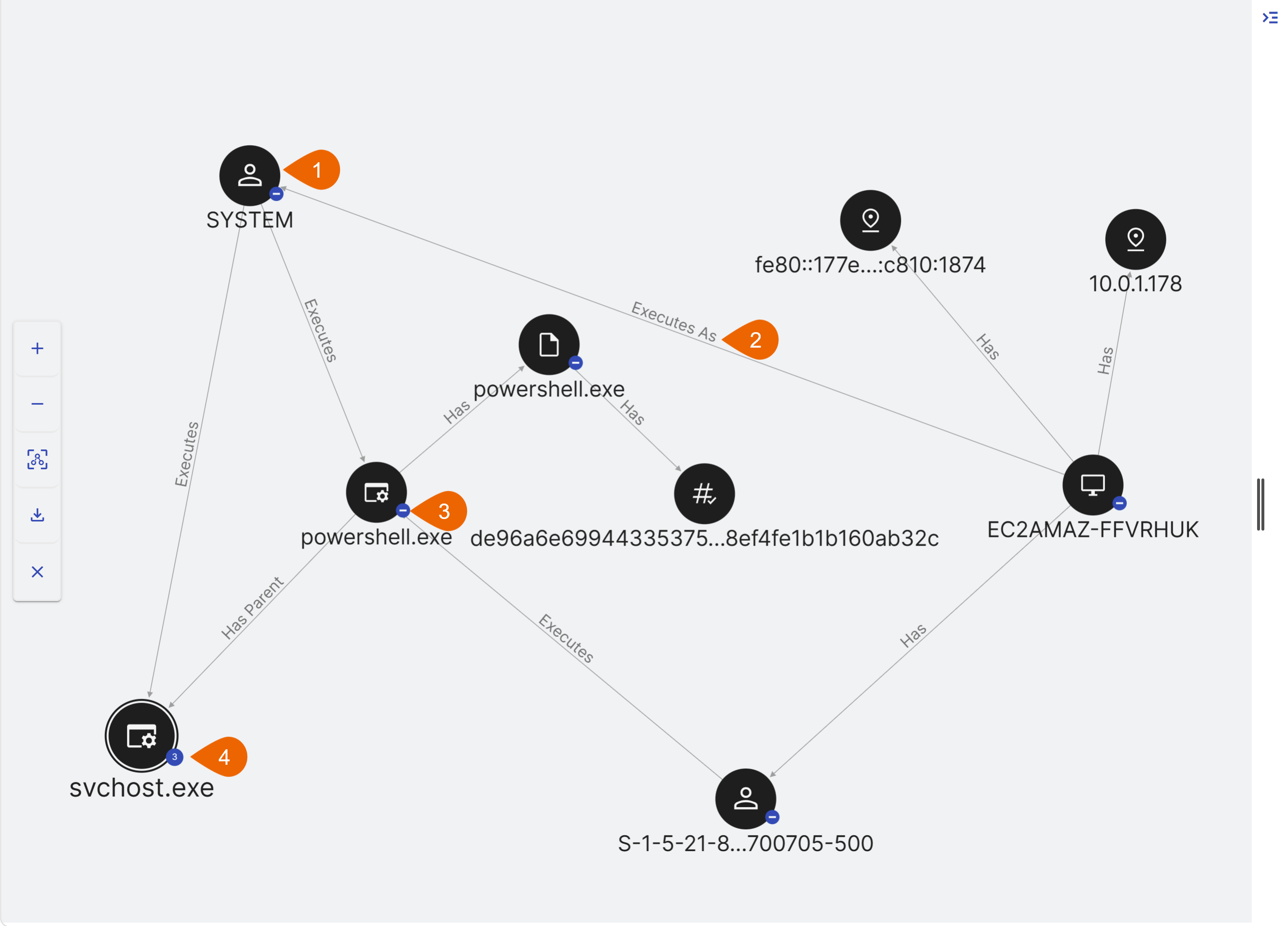
- Each node represents an entity. Click the node to view its details in the Details tab.
-
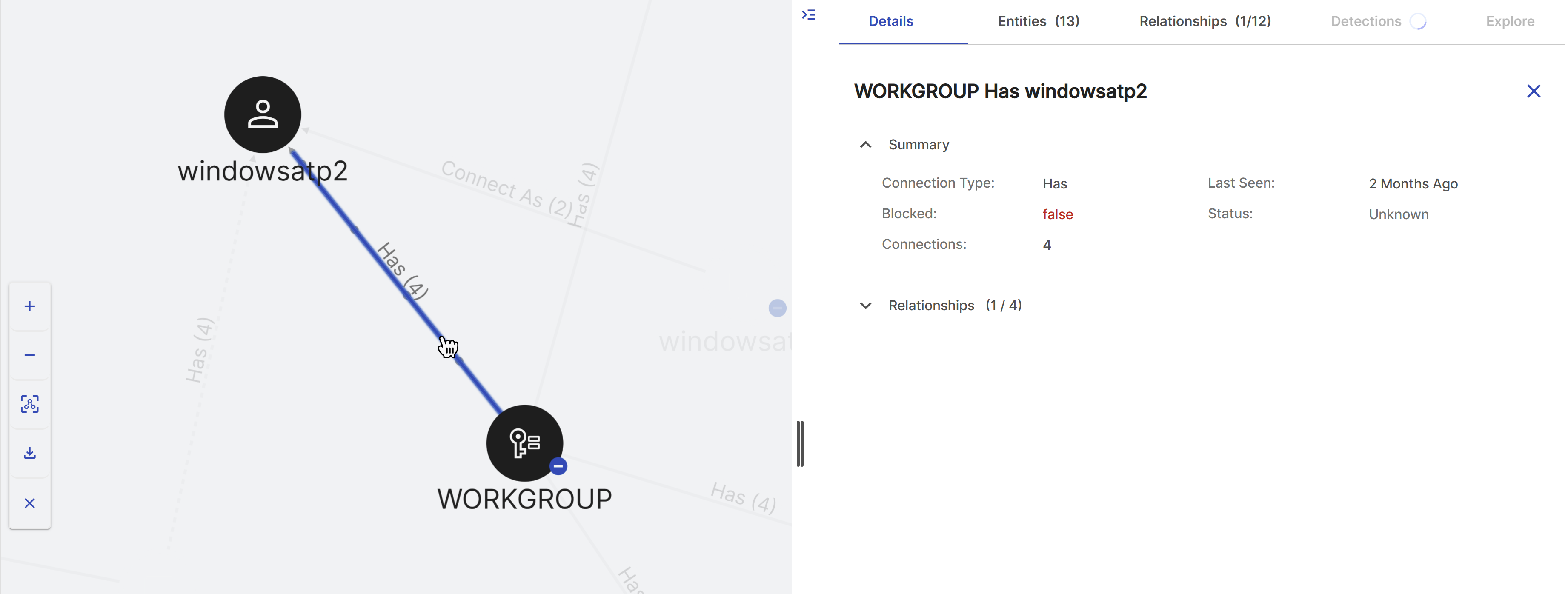
Each edge represents the relationship or activity between the connected entities, with an arrow indicating direction. Click the line to view the relationship details in the Details tab.
Tip
Edge names followed by a number indicate the activity occurred that many times.
-
A blue Minus Sign (-) indicates outgoing edges are expanded. Double-click the node to hide the outgoing edges.
- A blue number indicates the number of hidden outgoing edges. Double-click the node to show the outgoing edges.
Use the following controls to adjust the graph:
- Adjust Panels: Click and drag the divider between the graph and the tabs to resize the sections, or click the Collapse/Expand icon at the top of the divider to collapse or expand the tabs panel.
- Adjust Graph Layout: Click and drag a node to reposition it.
- Move Graph: Click and drag outside a node to move the graph.
- Zoom: Click the Plus or Minus icons at the left of the graph or scroll within the graph to zoom in or out.
- Center and Fit: Click the Center and Zoom to Fit icon at the left of the graph to reset the view to fit the window.
- Download: Click the Download icon at the left of the graph to save the graph to a PNG file.
- Clear Selected: Click the X icon at the left of the graph to clear all selected entities from the graph.
Details tab
The Details tab populates when you select an entity, relationship, or detection from a tab or the graph. See the following tab sections for more information.
Entities tab
The Entities tab shows a table of all entities associated with the case or detection. Use the checkboxes on the left to select one or more entities and highlight them and their relationships in the graph. As you select nodes in the graph, the table updates to select those entities.
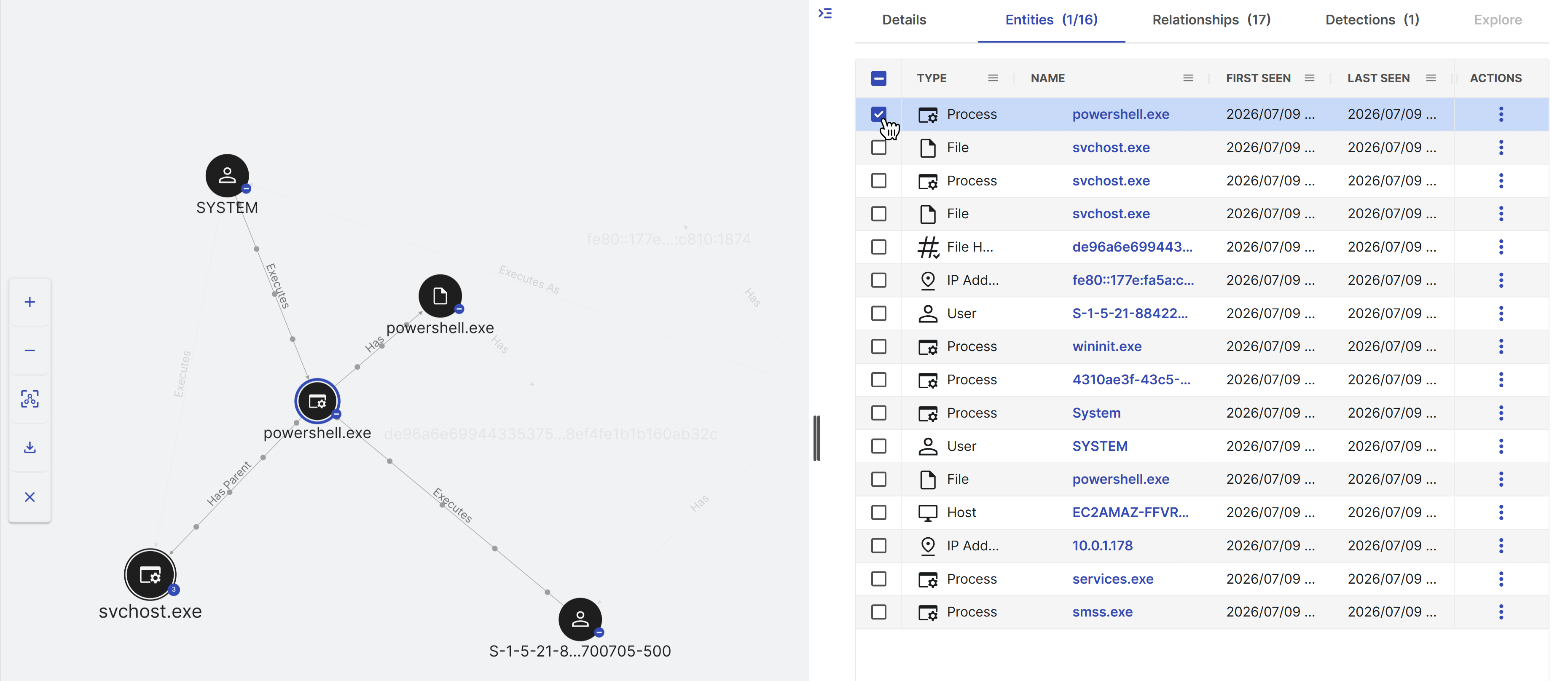
Click an entity name to open its details in the Details tab.
To customize the Entities table, click the Menu icon in a column header to perform the following actions:
- From the Menu tab of options, choose to Pin, Autosize, and Reset columns.
- From the Filter tab, when available, enter text or use the checkboxes to filter the contents of that column.
- From the Column tab, choose which columns appear in the table.
Tip
For descriptions of supported entities, see Entity types.
Relationships tab
The Relationships tab shows a table of all entity relationships. Use the checkboxes on the left to select one or more relationships and highlight them in the graph. As you select edges in the graph, the table updates to select those relationships.
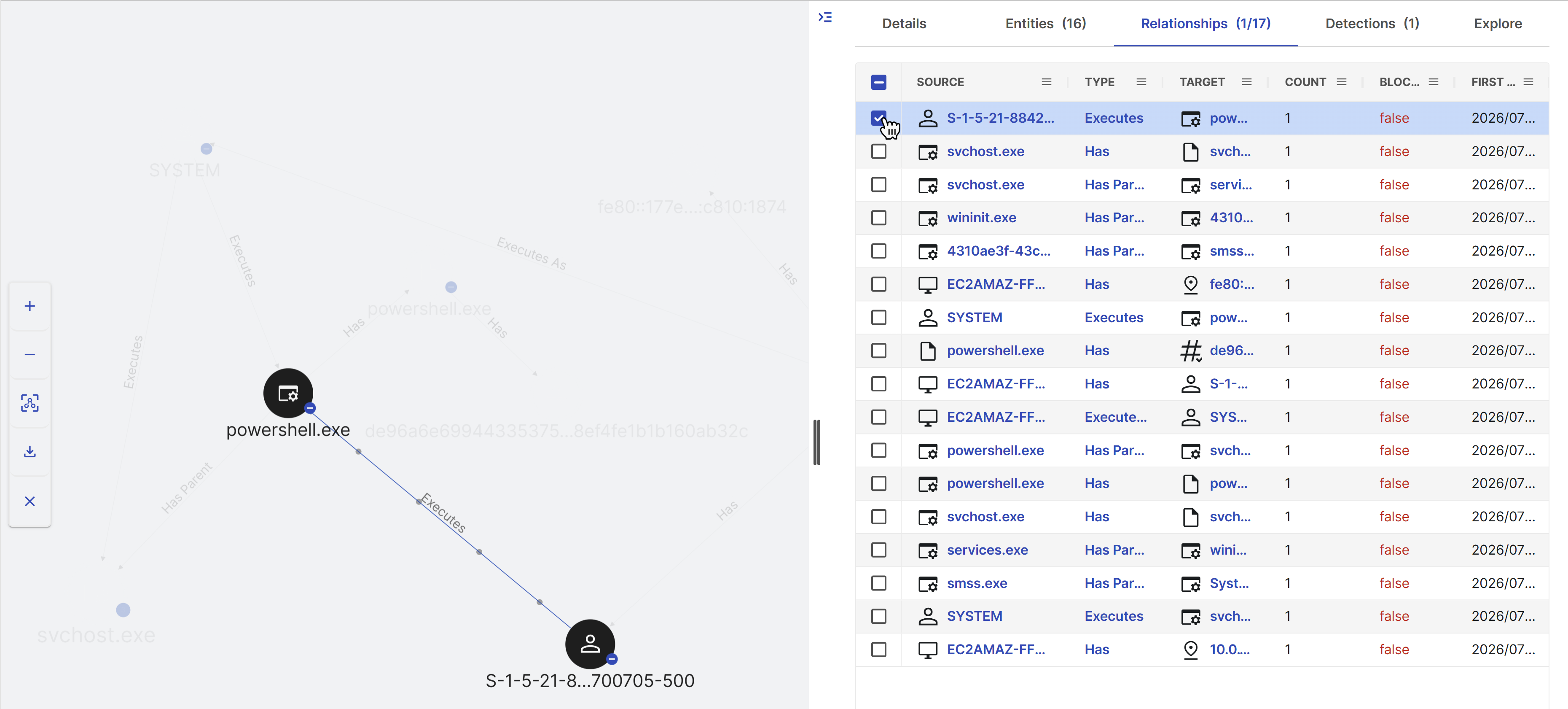
Select the relationship type to open its details in the Details tab, or a source or target entity to open the entity details.
To customize the Relationships table, click the Menu icon in a column header to perform the following actions:
- From the Menu tab of options, choose to Pin, Autosize, and Reset columns.
- From the Filter tab, when available, enter text or use the checkboxes to filter the contents of that column.
- From the Column tab, choose which columns appear in the table.
Tip
For descriptions of possible relationships, see Relationship types.
Detections tab
The Detections tab shows a table of all detections associated with the case. Use the checkboxes on the left to select one or more detections and highlight the entities and relationships associated with them.
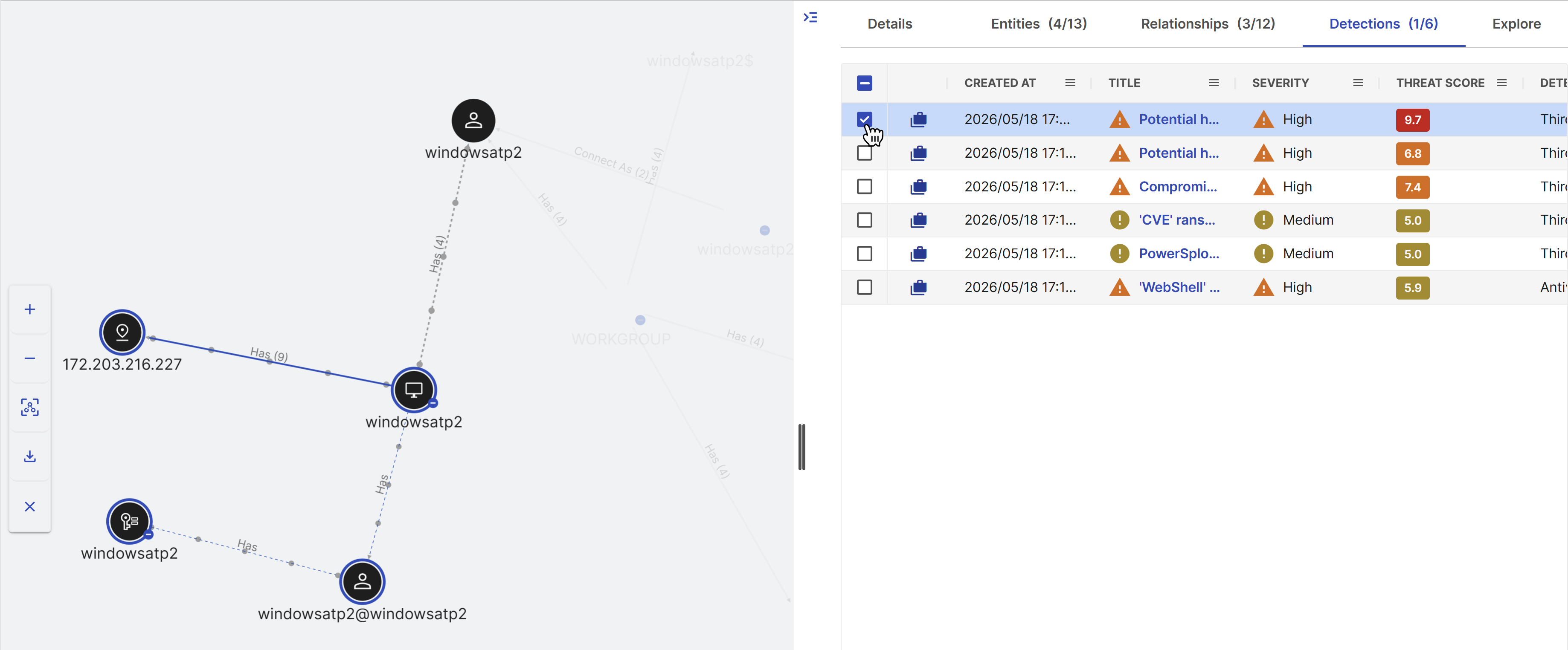
Click a detection title to open a summary of the detection in the Details tab, and click the New Tab icon in the summary to open the full details in a new tab. For more information, see Detection details.
To customize the Detections table, click the Menu icon in a column header to perform the following actions:
- From the Menu tab of options, choose to Pin, Autosize, and Reset columns.
- From the Column tab, choose which columns appear in the table.
Explore tab
When you click Explore Related Entities in entity details in the Details tab, the Explore tab populates with detections, events, and cases related to the selected entity. The search query that populates the tab defaults to entities found within 15 minutes of the first connected event. Adjust the criteria at the top of the Explore tab if desired, and then click Search.
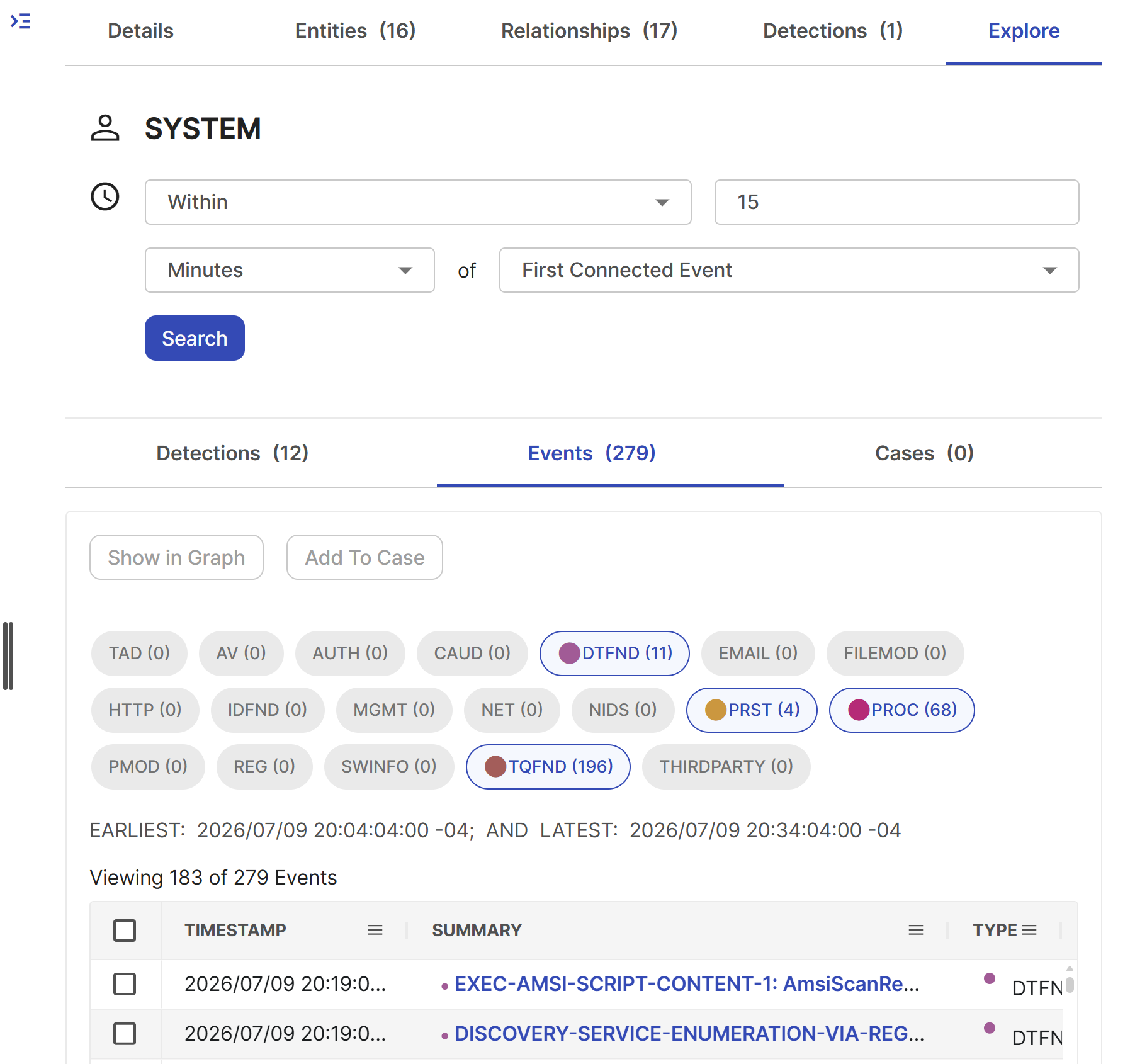
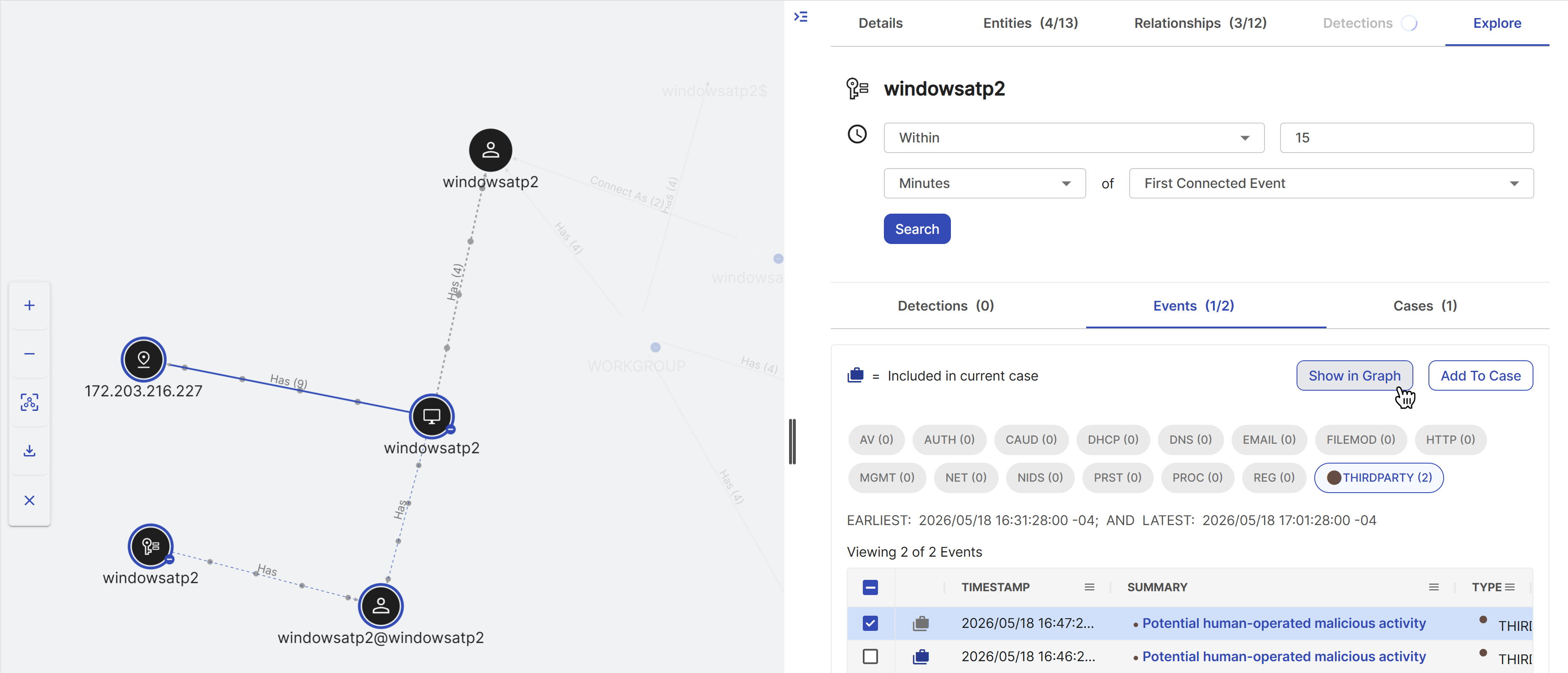
While reviewing related detections and events in the Explore tab, select one or more using the checkboxes to the left and then choose one of the following options:
- Show in Graph: Add the entities and relationships associated with the related detection or event to the graph. Related detections and events added to the graph but not to the case are denoted by a grey icon on the left of the row.
- Add to Case: Add the detection or event to the case. Related detections and events added to the case are denoted by a blue icon on the left of the row.
See entity details
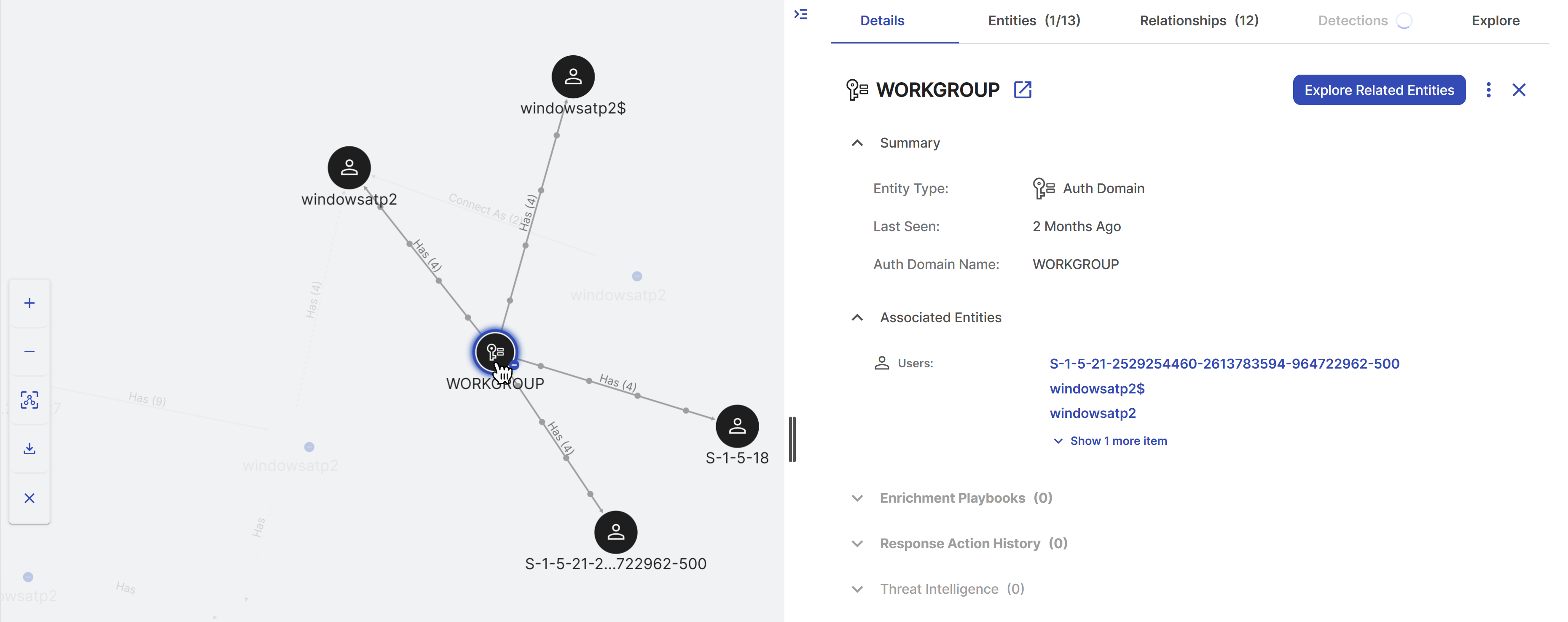
Click an entity node in the graph or an entity name in the Entities tab table to open the details in the Details tab.
The details include the entity's basic properties and, if available, threat intelligence for that entity. Click the New Tab icon in the Details tab to open the full entity details page. For more information, see Entities.
Tip
A Threat Intelligence icon appears in the graph and table for nodes with threat intelligence, indicating they are potentially malicious.
Click Explore Related Entities in the details to search for events, detections, and cases related to the selected entity in the Explore tab.
Run response actions on entities
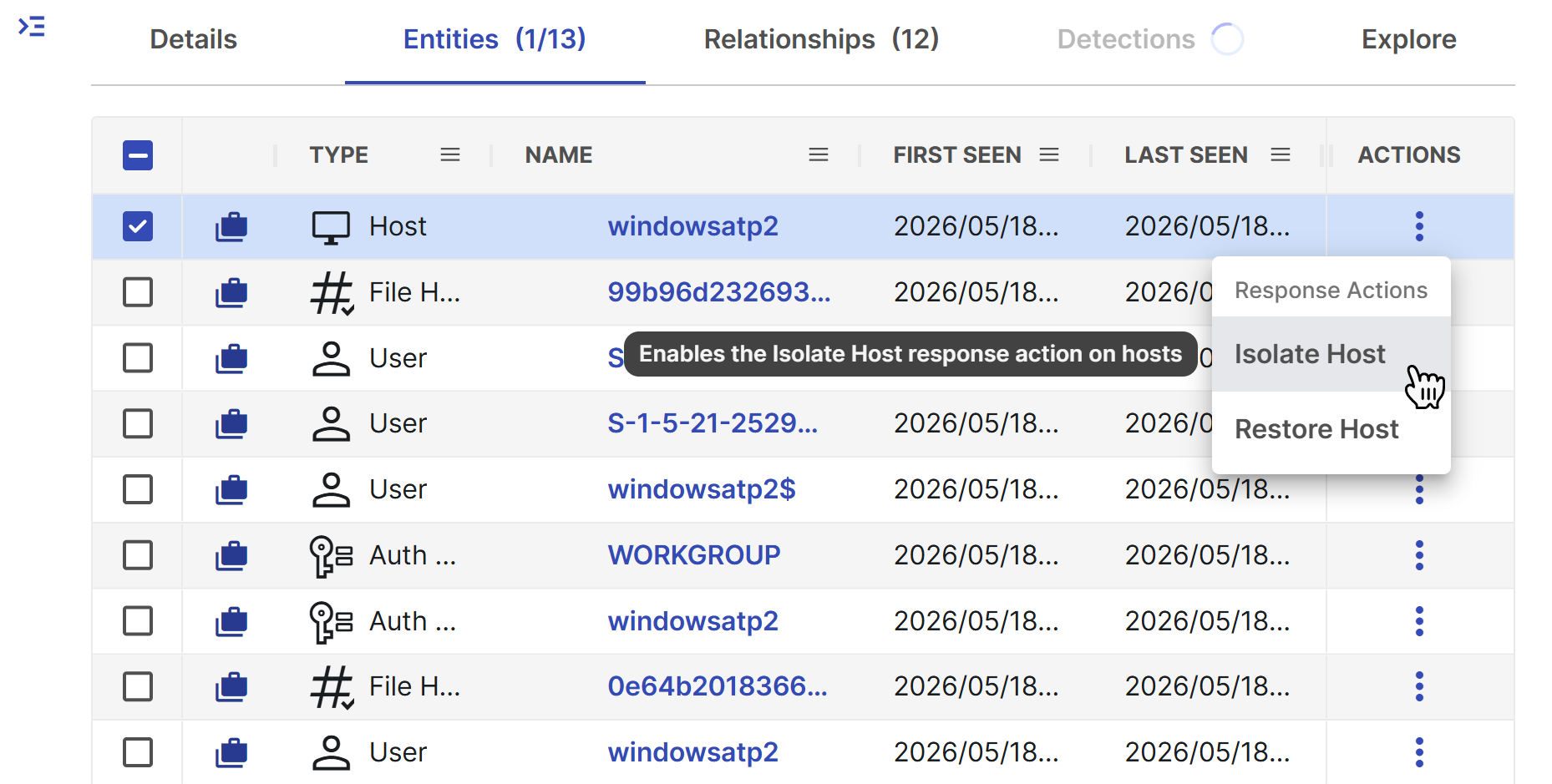
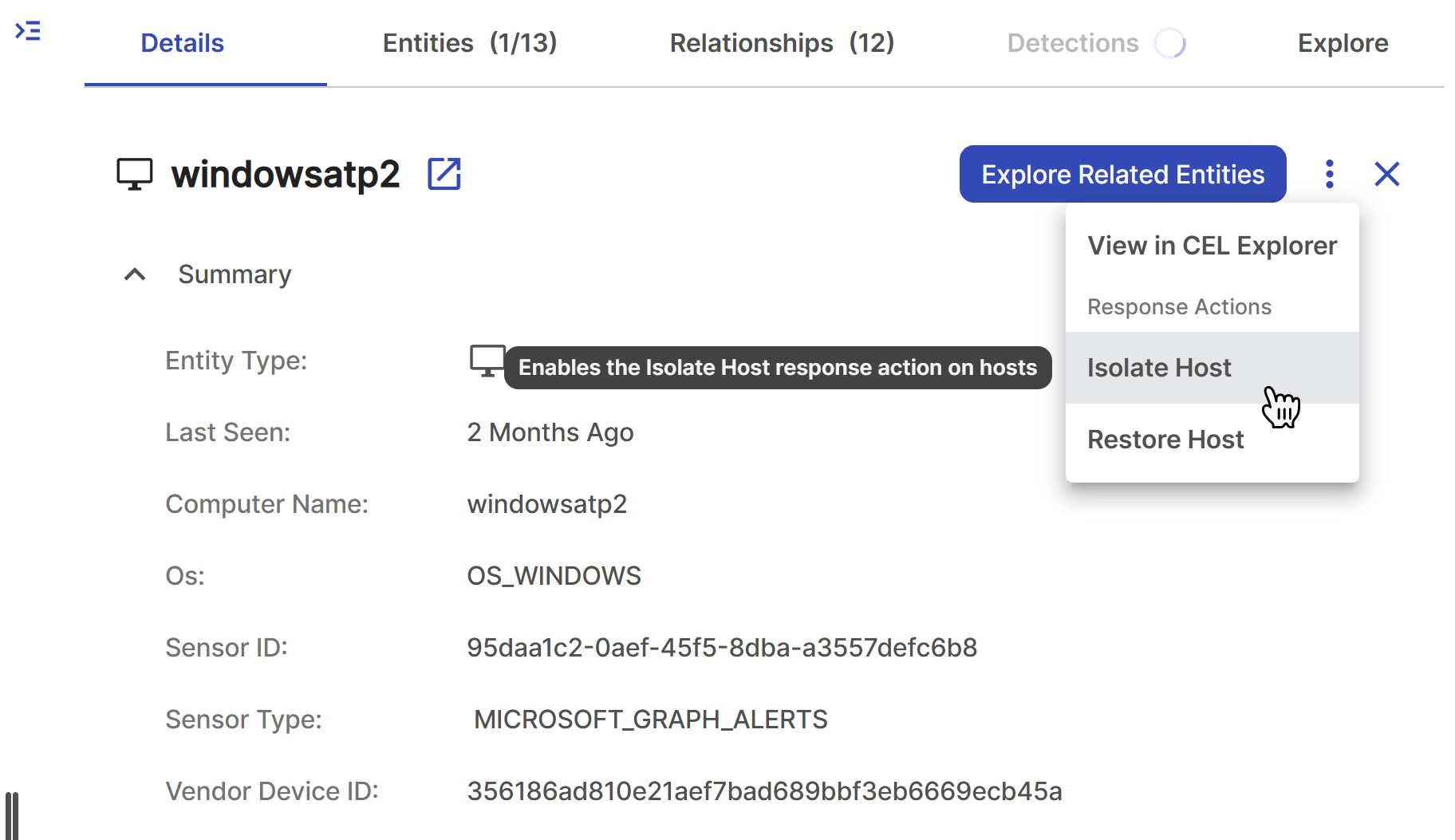
If you have configured relevant response actions in your tenant, you can perform them on an entity. Click the three dots in the Actions column of the Entities tab table or in the Details tab.
Tip
You can also run response actions on entities in the Entities sub-tab of the Evidence tab of a case. See Entities for more information.
Entity relationships
The edge, or line connecting two entities, represents the relationship or activity between them. Edges may be colored to represent the outcome of the activity when applicable:
- Red: Represents that the activity failed, such as a failed login.
- Green: Represents that the activity succeeded, such as a successful login.
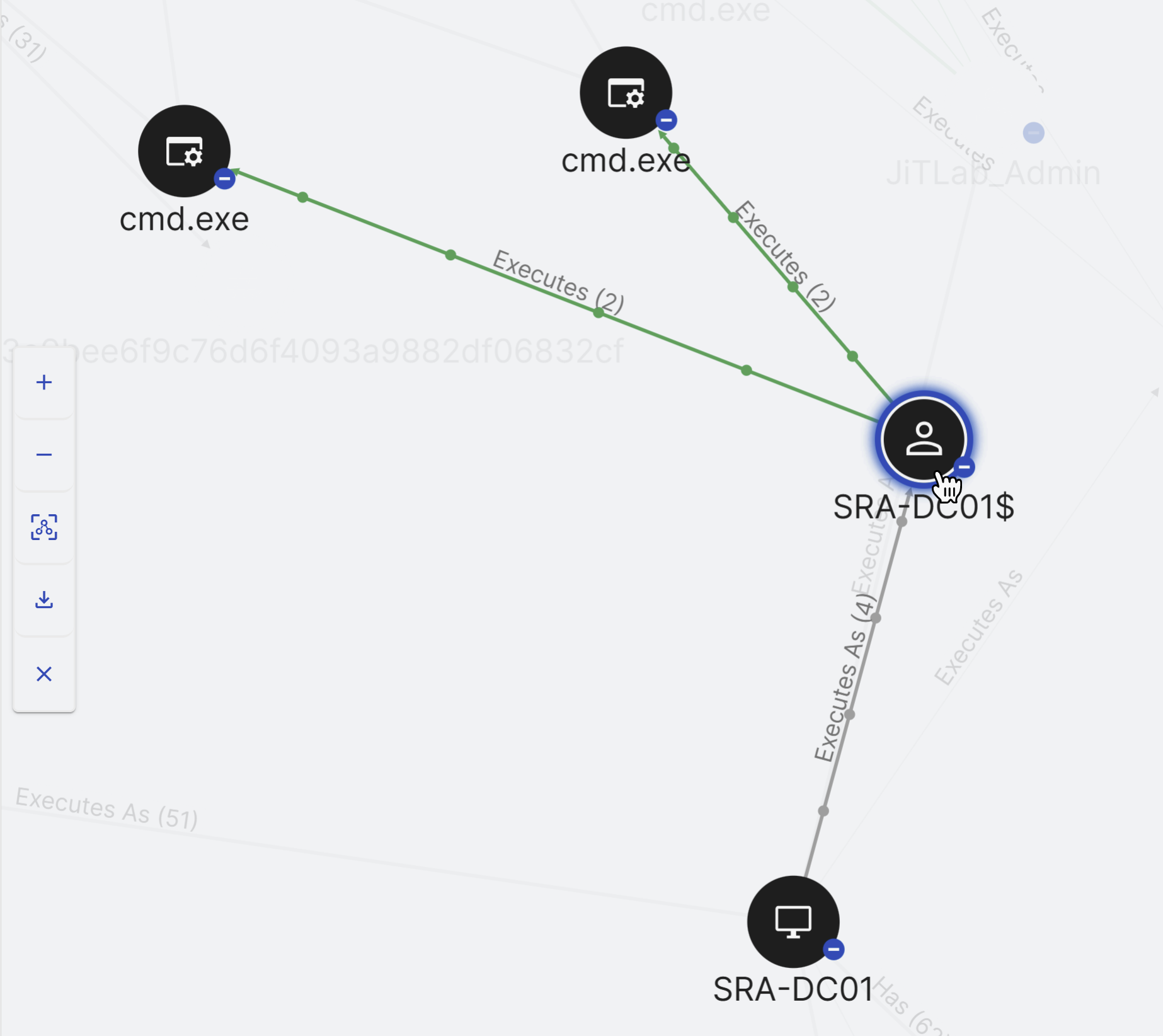
When an edge label is followed by a number, the activity was attempted that many times. For example, in the preceding image, the highlighted user successfully executed cmd.exe twice.
See relationship details
Click an edge in the graph or the relationship type in the Relationships tab table to open the details in the Details tab.
The relationship details include a summary of the relationship, which may include source and target entities and related detections.
Entity types
The following table shows the types of entities available in Entity Graph. For a complete reference of all entity types and their properties, see Entity v2 Protocol Buffer reference.
| Entity | Description |
|---|---|
| Auth domain | An authentication domain, often referred to as an auth domain, is a logical grouping of users and systems for the purpose of authentication and authorization. It helps manage access control. |
| Certificate | A certificate is a digital document used to verify the identity of entities in a network, typically in the context of secure communication. It can include information about the certificate holder and the certificate issuer. |
| Cloud object | A cloud object typically represents a specific item or file stored in a cloud environment. This could be a document, image, or any other digital object hosted in a cloud storage system. |
| Cloud resource | A cloud resource refers to any digital asset or component hosted in a cloud environment. This can include virtual machines, storage buckets, databases, and other cloud-based services. |
| DNS server | A DNS (Domain Name System) server is a network server that translates domain names into IP addresses, enabling users to access websites and resources using human-readable names. |
| Domain name | A domain name is a human-readable label used to access resources on the internet. It often represents websites or online services and is linked to one or more IP addresses. |
| An email represents an electronic message sent between users over a network. It includes sender and recipient information, message content, and metadata. | |
| Email address | An email address is a unique identifier used to send and receive emails. It typically consists of a username followed by the @ symbol and a domain name. |
| File | A file refers to a digital document or data stored on a computer or server. It can be of various types, including text, images, audio, or executable files. |
| File hash | A file hash is a cryptographic value generated from the content of a file. It is used to verify the integrity of files and detect changes or tampering. |
| Function | In the context of cybersecurity, a function typically refers to a software function or routine that performs a specific task or operation within a program or system. |
| Host | A host is a computer or device on a network that can send or receive data. In the context of cybersecurity, it refers to a system that is being monitored for security events and may include servers, workstations, routers, and other networked devices. |
| IP address | An IP address is a numerical label assigned to each device connected to a computer network. It serves as an identifier for communication within the network. |
| Process | A process is a running instance of a program on a computer. It represents the execution of a set of instructions and can be monitored for behavior and security-related events. |
| Registry key | A registry key is a hierarchical structure used in Windows operating systems to store configuration settings and other system-related information. |
| Scheduled task | A scheduled task is an automated job or process that is set to run at specific times or intervals on a computer or server. |
| Script | A script is a set of instructions written in a scripting or programming language. It can automate tasks, perform actions, or execute specific functions on a computer or within a software environment. |
| Service | A service refers to a software component or application that runs in the background and provides specific functionality or features to a computer or network. It can include services like web servers, database servers, and more |
| Task action | A task action represents a specific action or operation associated with a scheduled task, such as running a script or program. |
| User | A user is an individual or entity with authorized access to a computer system, network, or application. Users interact with these systems, and their activities are monitored for security and operational purposes. |
Relationship types
| Relationship | Description | Examples |
|---|---|---|
| Auths | The Auths relationship stands for authentication. It suggests that one entity, often a user or process, authenticates another entity, such as a user or host. | Users can have an Auths relationship with Host entities, signifying that they can be authenticated to hosts. Users can have an Auths relationship with IpAddress entities, suggesting that they can authenticate from IP addresses. Processes can have an Auths relationship with User entities, indicating that they can create authenticate requests for users. |
| Connects | The Connects relationship indicates that one entity establishes a connection with another entity. This connection typically involves communication or data exchange between the entities. | Host entities can have a Connects relationship with an IP or other entities, indicating that they establish connections or communications with them. Processes can have a Connects relationship with an IP or other entities, indicating their capacity to initiate connections or communication. |
| ConnectsWith | The ConnectsWith relationship represents a Connection relationship in conjunction with a specific entity. | Processes can have a ConnectsWith relationship with IP addresses, indicating that they establish connections or communication with specific IP addresses. Hosts can have a ConnectsWith relationship with IP addresses, signifying their ability to establish connections or communications with particular IP addresses. |
| Executes | The Executes relationship indicates that one entity initiates and runs processes. It highlights the ability of an entity, such as a user or host, to execute and manage processes. | Hosts can have an Executes relationship with Process entities. This relationship indicates that the host is capable of executing or running processes. Users can have an Executes relationship with Process entities. This relationship signifies that users can execute or run processes. |
| ExecutesAs | The ExecutesAs relationship signifies that one entity, typically a host, executes processes while assuming the identity or permissions of another entity, often a user. This relationship reflects the execution context of processes on a system. | Hosts can have an ExecutesAs relationship with User entities. This relationship indicates that the host executes processes or actions on behalf of a specific user. |
| ExecutesCloudEvent | The ExecutesCloudEvent relationship indicates that a cloud user entity initiates and performs cloud-related events or actions on cloud objects or resources. | Cloud users, such as individuals or service accounts, can execute cloud events. These events could involve actions like creating or modifying cloud resources, triggering automated workflows, or accessing data stored in the cloud. Cloud objects, which are typically resources or components hosted in a cloud environment–such as virtual machines, databases, and storage buckets–can be the target of cloud events executed by cloud users. These events may include actions like starting or stopping a virtual machine, creating a database table, or uploading data to a storage bucket. |
| ExecutesCloudEventAs | The ExecutesCloudEventAs relationship suggests that an IP address entity executes cloud-related events while assuming the identity or context of a cloud user. It reflects actions in cloud environments. | IP addresses often execute cloud-related events or actions within a cloud environment on behalf of cloud users or other entities. Cloud users may delegate specific tasks or actions to IP addresses, which then execute those tasks as representatives of the users. |
| Has | The Has relationship denotes ownership or possession. When used in context with files or resources, it implies that one entity possesses or is associated with another entity. | File: Files can have a Has relationship with FileHash entities. This relationship indicates that files have associated file hashes. Host: Hosts can have a Has relationship with various entities, including File (indicating that hosts have files), User (indicating that hosts have users), and IpAddress (indicating that hosts have IP addresses). Process: Processes can have a Has relationship with File entities. This relationship implies that processes may have associated files. |
| HasParent | The HasParent relationship represents a hierarchical or parent-child relationship between processes. It indicates that one process is a child or sub-process of another, typically showing process dependencies. | A process can have a parent process, indicating that it was spawned or initiated by another process. This relationship helps establish the lineage of processes. |
| HTTPRequests | The HTTPRequests relationship represents HTTP interactions between entities, typically users, hosts, or processes, where one entity initiates and sends HTTP requests to another entity over a network. | Users may send HTTP requests to access websites, web applications, or online services. They can have HTTPRequests relationships with IP addresses, domain names, or other entities related to web communication. Hosts, such as servers or computers, can have HTTPRequests relationships when they serve web content or interact with web services. These relationships can be established with IP addresses, domain names, or other hosts. |
| HTTPRequestsWith | The HTTPRequestsWith relationship represents the connections and interactions between entities, often users or hosts, and a particular entity that involves sending HTTP requests in conjunction with specific IP addresses. | Users may have HTTPRequestsWith relationships with specific IP addresses or domain names, indicating that they have communicated with these entities over HTTP. Hosts, such as servers or computers, can have HTTPRequestsWith relationships with particular IP addresses or domain names, denoting that they have exchanged HTTP requests with these entities. |
| InjectsThread | The InjectsThread relationship represents an action where one entity, typically a process, injects or creates a new thread within another entity, often for the purpose of hijacking execution. | A Process entity InjectsThread into another process, indicating that the first process initiates the creation of one or more threads within the second process. |
| Links | The Links relationship signifies a connection between two entities, where one entity points to or references another entity, often providing additional context or information about it. | A File entity Links to another File, indicating that the first file contains a reference or hyperlink to the second file. |
| Manages | The Manages relationship signifies that one entity has control, oversight, or responsibility for another entity within a given context or domain. | A User entity manages one or more other User entities, indicating that the managing user has administrative or supervisory control over the managed users. |
| Modifies | The Modifies relationship represents an action where one entity makes changes or modifications to another entity. | A Process entity modifying a RegistryKey entity may signify that the process is making changes to a registry key. |
| ModifiesFile | The ModifiesFile relationship suggests that a process changes or modifies a file. It signifies the action of altering the content or attributes of a file. | Process entities can modify files, indicating that they are making changes to files. |
| Persists | The Persists relationship indicates that one entity continues to exist associated with another entity over time, typically in a storage or persistence context. | A File entity persists within a Host, indicating that the file remains stored on the host‘s file system. A RegistryKey entity persists within a Host, indicating that the registry key is stored in the host‘s registry. |
| ProvidesDNS | The ProvidesDNS relationship signifies that a DNS server entity offers DNS resolution services for domain names. It reflects the role of a DNS server in providing DNS-related information. | DNSServer entities can have a ProvidesDNS relationship, indicating that they serve as DNS servers, providing DNS resolution services to resolve domain names to IP addresses. |
| Publishes | The Publishes relationship implies that an entity, such as an IP address or email address, shares or disseminates specific content or information. It reflects the action of making content available to others. | EmailAddress entities can publish emails, indicating that they are associated with sending or transmitting emails. IP Address entities can publish emails, suggesting that they are associated with sending or transmitting emails. |
| QueriesDNSWith | The QueriesDNSWith relationship indicates that a process or host queries a Domain Name System (DNS) server using a specific IP address. It represents the action of seeking DNS information using a particular address. | Process entities can have a QueriesDNSWith relationship with IpAddress entities, indicating that these processes query DNS with specific IP addresses. Hosts can have a QueriesDNSWith relationship with IpAddress entities, signifying that these hosts query DNS with specific IP addresses. |
| QueriesDNS | The QueriesDNS relationship signifies that an entity, usually a process or host, queries a DNS server or domain name for DNS-related information. It reflects the action of looking up DNS records. | IP Address entities can have a QueriesDNS relationship, indicating that they are involved in querying DNS for domain names. Process entities can have a QueriesDNS relationship, signifying that they are querying DNS for domain names. |
| Resolves | The Resolves relationship indicates that a domain name entity is resolved to an IP address. It highlights the translation of a human-readable domain name into a numerical IP address. | DomainName entities can have a Resolves relationship, indicating that they are involved in DNS resolution, typically resolving to IP addresses or other domain names. |