Integrate via HTTP Ingest
A Sophos Next-Gen SIEM subscription is required to integrate using custom transport methods. See Sophos Next-Gen SIEM overview.
You can integrate custom integrations with Sophos XDR using an HTTP Ingest custom transport so that it sends data to Sophos for analysis.
Choose this option if your data source supports posting events to a webhook or HTTP endpoint with bearer-token authentication.
Key steps
The key steps in an HTTP Ingest integration are as follows:
- Configure the integration in Sophos XDR.
- Configure your data source to send logs to an HTTPS server using the integration key and URL provided by Sophos XDR.
Requirements
The following is required for HTTP Ingest configuration:
- A Sophos Next-Gen SIEM subscription.
- A data source that supports posting events to a webhook or HTTP endpoint with bearer-token authentication.
Add a HTTP Ingest integration
To configure log forwarding from an integration to an HTTP destination, do as follows:
- In Sophos Fusion, go to Security Operations > Integrations > Marketplace.
-
Click Custom.
The Custom page opens. You can configure custom integrations here and see a list of any you've already configured.
-
In HTTP Ingest, click Set Up.
-
Enter a name for the integration, then click Done.
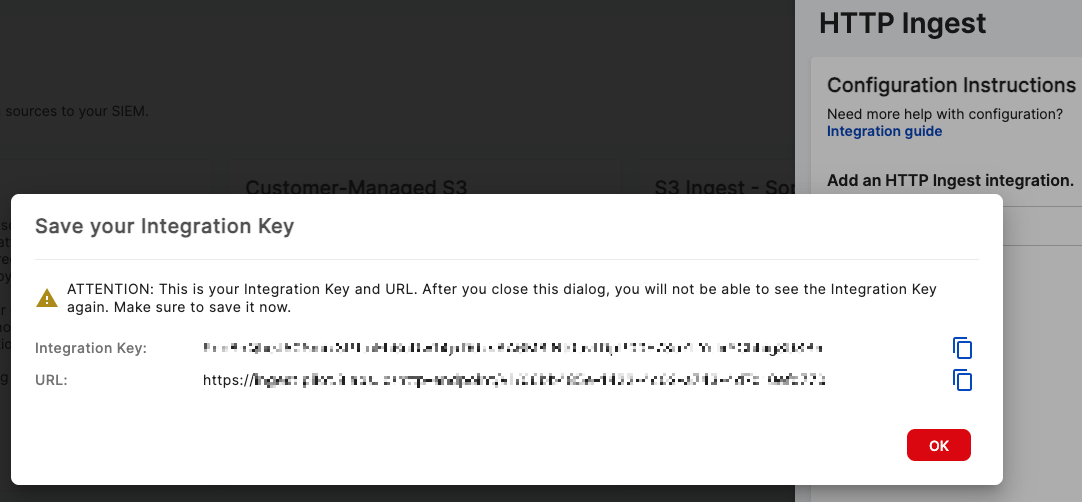
Copy the Integration Key and URL that are displayed.
Copy these values immediately, as they will not be shown again.
-
Configure your data source to send logs to an HTTPS server using the Integration Key and URL you saved.
The new integration appears in the Configured integrations table, below the custom transport options. If its status icon is a green tick, your data should appear in the Sophos Data Lake after validation.
Configuration notes
Keep the following in mind during HTTP Ingest configuration:
- HTTP Ingest is a transport, so the schemas depend on the underlying log types you send. Supported types normalize per their own integrations. Logs in an unsupported format are normalized to the
genericschema.