Custom parsers overview
A Sophos Next-Gen SIEM subscription is required to use custom parsers. See Sophos Next-Gen SIEM overview.
Custom parsers normalize log messages from data sources that Sophos XDR does not natively support, transforming them into Sophos XDR's standardized event schemas. Normalizing a source correctly is what lets detectors, custom detection rules, and advanced search operate on its data. Messages that no parser matches fall back to the generic schema.
This page explains how Sophos XDR ingests, parses, and normalizes log messages, how custom parsers map data to supported event schemas, and how normalized data can be used in detections, searches, and custom rules.
Requirements
The following is required for custom parsers:
- You must have the Sophos Next-Gen SIEM subscription to see and use custom parsers. For details, see Sophos Next-Gen SIEM overview.
- You must be a Super Admin or Admin to manage custom parsers. Other roles can only view the list of configured parsers.
How Sophos XDR ingests and normalizes log messages
This section reviews how Sophos XDR ingests and normalizes logs.
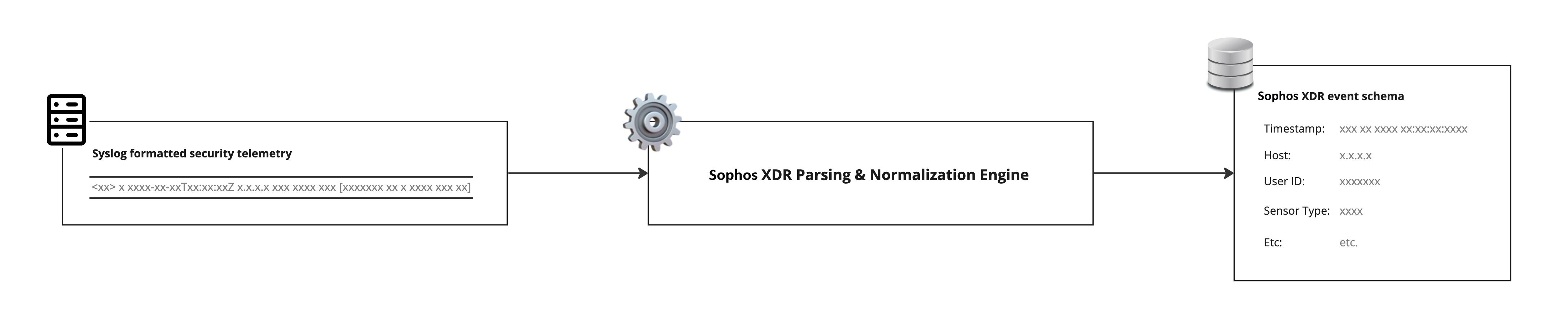
The image below shows how Sophos XDR normalizes logs to event schemas.
Event schemas
When log messages are sent to Sophos XDR over a supported transport method, it runs through a parsing engine and is normalized to one or more event schemas. An event schema is a standardized way of looking at various types of security event data. For example, user authentication logs are usually normalized to the Authentication schema, and have common fields like username, action, logon_type, and mfa_used. Detectors such as the Stolen User Credentials or Password Spray detectors are run against the data coming into the Authentication schema, so normalizing data correctly is critical to getting security value from your data source.
The Sophos XDR Main (root) parser extracts certain common fields, which are available to all parsers without additional scripting. These are event_time and sensor_id.
Generic schema
All log messages received by Sophos XDR are normalized to the generic event schema by default.
These messages:
- Are available for context and correlation in cases.
- Can be used in custom detection and suppression rules.
- Only appear in search results when you use advanced search parameters.
Sophos XDR normalizes common log fields, including:
sensorsensor_typesensor_idhost_idevent_time_usec
Sophos XDR stores the remainder of the raw log in the original_data field.
You can use the generic schema for custom rules, custom parsers, advanced searches, and log retention.
Parsing and normalization to additional schemas
Custom parsers can normalize data to a subset of Sophos XDR event schemas. For the supported schemas, see Supported schemas for custom parsers.
Log messages received by Sophos XDR must be parsed and normalized to match the destination's schema requirements. This happens in the Sophos XDR parsing and normalization engine. Log messages are normalized into event data, which then becomes available to other Sophos XDR features, including detections, searches, and custom rules.
Security telemetry sources that are not natively supported by Sophos XDR require the configuration of a custom parser to normalize the log messages to Sophos XDR's additional schemas.
Detectors and custom parsers
Log messages normalized using custom parsers can trigger Sophos XDR Domain Generation Algorithms, IP Watchlist, and Domain Watchlist detectors if the required normalized fields are populated.
Domain Generation Algorithms
| Schema | Normalized Field | Parser Field |
|---|---|---|
| scwx.dnsquery | query_name | queryName$ |
IP Watchlist
The IP Watchlist detector is compatible with messages normalized to the NIDS (scwx.nids) schema or the Netflow (scwx.netflow) schema.
| Schema | Normalized Field | Parser Field |
|---|---|---|
| scwx.nids | source_address OR destination_address | sourceAddress$ OR destinationAddress$ |
| scwx.netflow | source_address OR destination_address | sourceAddress$ OR destinationAddress$ |
Domain Watchlist
| Schema | Normalized Field | Parser Field |
|---|---|---|
| scwx.dnsquery | query_name | queryName$ |
Note
Other detectors are not guaranteed to be triggered, even if a data source's messages are normalized to a schema associated with a given detector. However, you can create custom detection rules to generate detections based on normalized data from a custom event data source. See Custom detection rules.
Supported log message formats
Sophos XDR's custom parser feature supports log messages in CEF (Common Event Format), LEEF (Log Event Extended Format), JSON (JavaScript Object Notation), XML (Extensible Markup Language) and unstructured (delimited by tabs, spaces, commas, or other common separators) formats.
Matching your messages to the correct parser script with confirm strings
After separating the syslog header from the message body (if applicable), the parsing engine attempts to match an incoming log message against a series of known patterns. These are identifiers in the message that indicate that a message comes from a known source and that we have a parser file that can manage that data. For example, log messages coming from a Palo Alto firewall contain the string panwlogs while no messages from other vendors should have that particular string of characters (this is simplified for the sake of brevity in this document; in reality, there are a number of other criteria that must be matched to confirm that a message comes from a PaloAlto device). The confirm string can be a regex pattern or an expression that evaluates to true or false, allowing for flexibility.
A confirm string must be specific enough to identify a single data source.
For example, if you create a parser for Hotbeam Networked Smart Toaster and use a confirm string such as [Nn]etwork, it might also match messages from other products, such as Palo Alto Networks devices. This could route messages to the wrong parser.
Avoid confirm strings that are too broad or too specific.
CEF message
Log:
Jul 21 14:28:03 10.10.20.20 Jul 21 14:28:04 1122334455 CEF:0|Netskope|CHS|NULL|uba|Suspicious Data Movement|High|accessMethod=Client act=Upload action=anomaly_detection appcategory=CHS White List TP browser=Chrome cci=0 ccl=unknown device=Windows Device deviceClassification=not configured deviceExternalId=001122334455-6677-8899-0011-0123456789 dst=10.20.30.40 event_type=sequence hostname=server.local managementId=null object=123456-7890.pdf os=Windows 10 policy_actions=['Upload'] policy_name=Suspicious Data Movement requestClientApplication=[Consolo-Wellsky-S3] sourceServiceName=Amazon S3 src=10.10.10.10 suser=JohnD@example.com timestamp=1658413646 uba_ap1=Microsoft Office 365 Outlook.com uba_ap2=[Consolo-Wellsky-S3] uba_inst1=demotest uba_inst2=null url=consolo-production.s3.us-west-2.amazonaws.com/
Confirm string:
!CONFIRMWITH=PATTERN
!CONFIRMSTRING=.*\|Netskope\|
JSON message
Log:
{"Act":"Rej","Cphr":"TLS_ECDHE_RSA_WITH_AES_256_GCM_SHA384","Dir":"Outbound","Error":"Malware detected by AV Scan policy: Exploit.DDE-CmdCalc.Gen","IP":"10.2.3.4","MsgId":"<BCDEF36a7a5f13f3-31829@nodered-mimecast-5ff78ffb7b-x2zlm.XYZ.net>","Rcpt":"PERSON@lab1.net","RejCode":"554","RejInfo":"[bitd.Exploit.DDE-CmdCalc.Gen, bitd.Exploit.DDE-CmdCalc.Gen]","RejType":"Virus Signature Detection","Sender":"outbound-auth@labs.com","Subject":"It's a party invitation!","TlsVer":"TLSv1.2","Virus":"Exploit.DDE-CmdCalc.Gen","aCode":"DLHmsukFP8K2X2DIH-0nQA","acc":"CUSA12A394","datetime":"2021-10-05T08:09:33-0400","headerFrom":"outbound-auth@labs.com"}
Confirm string:
!CONFIRMWITH=PATTERN
!CONFIRMSTRING=\{.*?"(aCode|MimecastIP)"\s*:\s*".*?"acc"\s*:\s*".*"datetime"\s*:\s*".*\}
Unstructured message
Log:
Nov 4 01:49:29 10.1.2.3 Nov 04 2019 01:49:29: %ASA-2-106016: Deny IP spoof from (10.1.2.3) to 10.1.2.3 on interface DMZ
Confirm string:
!CONFIRMWITH=PATTERN
!CONFIRMSTRING=(ASA|FTD|FWSM|PIX)-(\w*-)?\d-\d\d\d\d\d\d:
Prioritization and overriding default parsing
When deciding what parser to use, the parsing and normalization engine tries to match messages to parsers that have been used recently before unused parsers. This allows the parsing engine to focus on the most likely matches.
When a match is not found in recently used parsers, the parsing engine looks through the remainder of the parser library for matches. This is done in no particular order, so it is critical that confirm strings do not cause potential collisions, as there is no guarantee that the parsing engine can find the intended parser first.
Note
Avoid overlapping confirm strings. If more than one parser can match a message, parser selection can become inconsistent.
Following the previous Palo Alto Networks example, if you used [Nn]etwork] for your custom parser, that potentially routes all matching messages to your custom parser. Conflicting custom parsers produce inconsistent results in terms of prioritization.
It is possible to override the global parsing for a supported data source. Best practice is to configure your data source to match the requirements for Sophos XDR's default parser, but in the case where that is not possible, a new set of custom parsers can be created to handle this scenario.
For more information, see Overriding and extending global parsers.
Warning
Custom parsers are not maintained or updated by Sophos, so this incurs a risk of the custom parser getting out of sync with the global (native) parser.
Parsing
The first step in normalization splits an incoming log message into its component pieces. The way this happens varies depending on the data format of the message. For example, CEF and JSON formatted messages have key:value pairs built in and generate an indexed array, while an unstructured message is turned into an unkeyed array.
When you select the data format for the incoming messages, the custom parser UI includes the corresponding helper function in the parser script to split the incoming message for you.
The following example extracts all author values from the JSON structure and returns them as a string array.
JSON parsing function
data    = "{ \"store\": { \"book\": [ { \"category\": \"reference\", \"author\": \"Nigel Rees\", \"title\": \"Sayings of the Century\", \"price\": 8.95 }, { \"category\": \"fiction\", \"author\": \"Evelyn Waugh\", \"title\": \"Sword of Honour\", \"price\": 12.99 }, { \"category\": \"fiction\", \"author\": \"Herman Melville\", \"title\" : \"Moby Dick\", \"isbn\": \"0-553-21311-3\", \"price\": 8.99 }, { \"category\": \"fiction\", \"author\": \"J. R. R. Tolkien\", \"title\": \"The Lord of the Rings\", \"isbn\": \"0-395-19395-8\", \"price\": 22.99 } ], \"bicycle\": { \"color\": \"red\", \"price\": 19.95 } } }"
json    = JSON(data)
OUTPUT$ = json["$.store.book[*].author"]

# OUTPUT$: "Nigel Rees","Evelyn Waugh","Herman Melville","J. R. R. Tolkien"    (String)
Normalization
After the incoming message is split, its constituent fields are combined or transformed as necessary to match the requirements of the fields in the destination event schema. A variety of helper functions are available to manage common transformations. See Custom parser syntax.
Example
A syslog message sends date-time data Sep 21 2018 17:35:54. After parsing the incoming message, the parser must normalize the date-time value to ISO 8601 format. Note that the second argument passed to the DATETIME() function uses Golang's date format syntax.
data     = "Sep 21 2018 17:35:54"
OUTPUT1$ = DATETIME(data, "Jan 02 2006 15:04:05")
OUTPUT2$ = data

# OUTPUT1$: 2018-09-21 17:35:54 +0000 UTC    (time)

# OUTPUT2$: Sep 21 2018 17:35:54    (String)
Transformed message fields are assigned to destination schema fields.
Parent and child parsers
Most data sources can send a variety of message types. The logs for an authentication event look different from the logs for a netflow event, and provide different opportunities for security detections. In order to make best use of the incoming data, we normalize different message types to the most appropriate event schema.
To help minimize the complexity of code for different event types, we break the normalization process into parent and child steps. Most commonly, the parent parser is responsible for identifying messages coming from a particular device or other source, while each child parser normalizes one or more message types into a single schema.
The Sophos XDR root parser is the top level parent to all other parsers. If applicable, it separates and normalizes the syslog header from the message data.
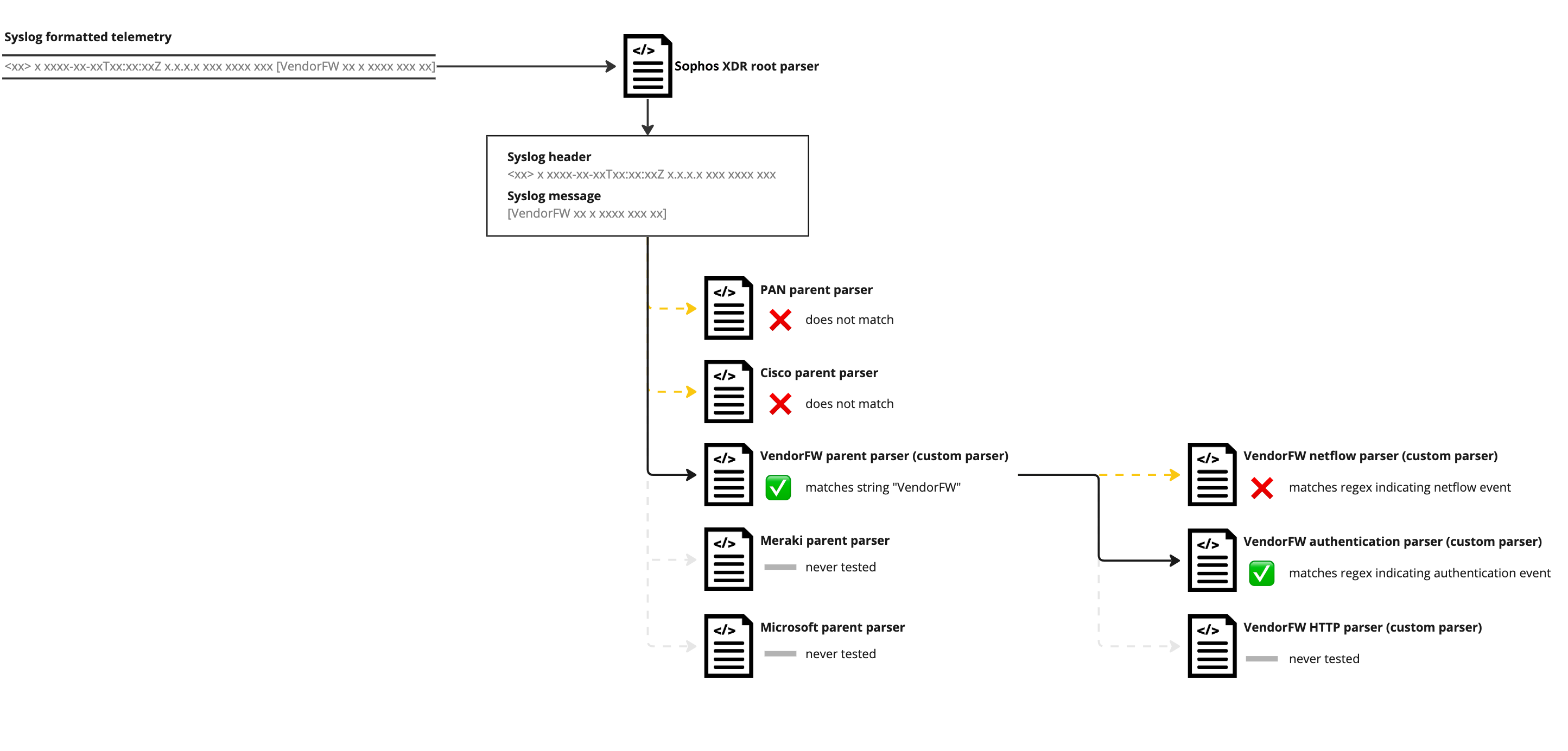
For example, a firewall device has logs that map to Sophos XDR netflow, authentication, and HTTP events. The parent parser identifies all messages coming from the firewall, while the child parsers each recognize one of the three different message types.
-
VendorFW_parent(parent parser)VendorFW_netflow(child parser)- VendorFW_auth (child parser)
- VendorFW_http (child parser)
A message that is sent to Sophos XDR is first parsed by the Sophos XDR root parser, which separates and parses the syslog header (if applicable). The parsing engine then compares the message against the root parser's children, which are all of the top level parsers in the system. When it finds a match with a parser's confirm string, it then uses that parser to further parse the message. If that parser has child parsers, the process repeats.
Note
Parsers can only have one generation of parent to child relationships. A child parser cannot have further children.
The following image illustrates the relationship of parent and child parsers.