Overriding and extending global parsers
A Sophos Next-Gen SIEM subscription is required to use custom parsers. See Sophos Next-Gen SIEM overview.
Global parsers are built into the Sophos XDR platform. They are available to all Sophos XDR customers and cannot be modified.
You can extend and override global parsers when you create a custom parser.
- Override a global parser when you need to change how an existing global parser processes supported data.
- Extend a global parser when you need to normalize unsupported event types that originate from a supported data source.
The image below shows the available options:
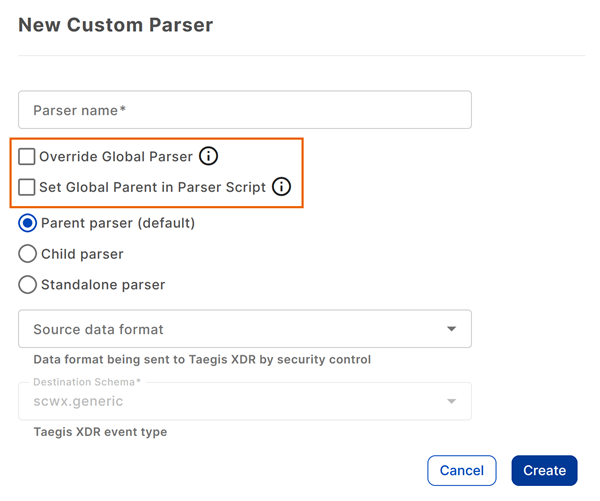
Override a global parser
Use this option when a global parser recognizes your data but does not normalize it as required for your environment.
If you enable this option:
- Add
!PARENT=<name>to the parser script. - Use the name of the global parent parser.
- Keep the override parser name the same as the global parser name.
- The Set Global Parent in Parser Script option is selected automatically.
Example
In this example, the global parser assumes timestamps are in UTC, but the source data uses a different time zone.
-
Create the new parser with the Override Global Parser setting selected. See Create a custom parser.
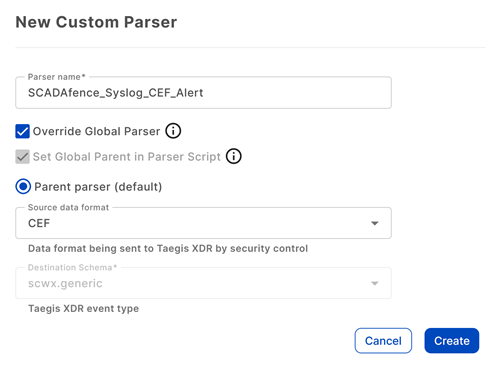
-
In the parser script, do the following:
- Set the
!PARENT=value to the global parser. - Calculate the timestamp (epoch time) based on UTC time zone offset and normalize the calculated timestamp.
- Set the
-
Click Run Test and verify the following:
- The extractor path is correct. The extractor path reflects the route a log message takes through the Sophos XDR parsers.
- The timestamp has been converted as expected.
Extend a global parser
This option lets you create child parsers for event types that a global parser doesn't currently support.
If you turn on this option:
- Add
!PARENT=<name>to the parser script. - Use the name of the global parent parser.
- Select Set Global Parent in Parser Script.
Example
In this example, a custom child parser normalizes an event type that the global parser does not currently support.
-
Create the new parser with the Set Global Parent in Parser Script setting selected. See Create a custom parser.
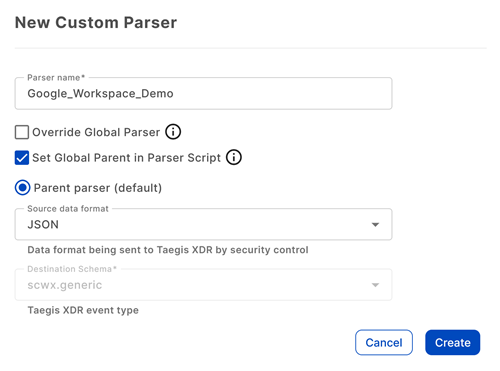
-
In the parser script, set the
!PARENT=value to the global parser and normalize the desired fields. -
Click Run Test and verify the following:
- That the extractor path is correct. The extractor path reflects the route a log message takes through the Sophos XDR parsers.
- That the desired fields are normalized as expected.