Data collectors
The Sophos XDR data collector is an on-premise or cloud-based (virtual) device that Sophos XDR uses to gather logs. It's used with syslog integrations. Available data collectors include the following:
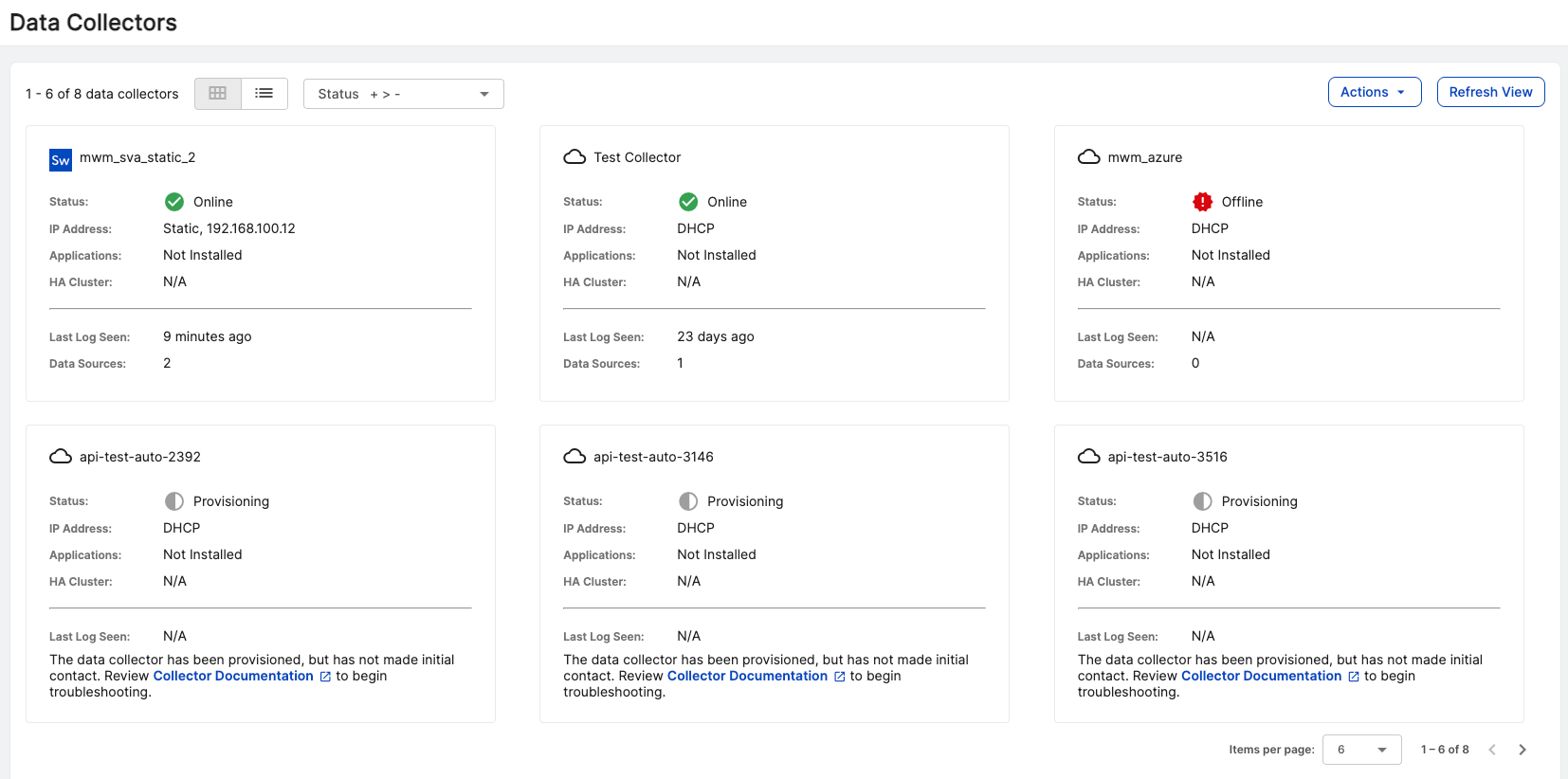
To see your organization's current data collectors and monitor their health in Sophos Fusion, go to Security Operations > Integrations > Data Collectors.
This page displays the data collectors that your organization has configured. It's available in both table and card layouts. Select the icons to switch between layouts.
Data collector limitations
Note the following limitations for data collectors:
- The Sophos XDR data collector can support up to 200K EPS (events per second) for properly configured cloud and on-premises collectors.
- Third-party tools or applications can't be installed on any Sophos XDR data collector.
- Some Sophos XDR configuration specifics depend on the region you're deployed in (US1, US2, US3, EU1, EU2).
Data collection
By default, the collector acts as a syslog forwarder and collects security log data. All syslog data is forwarded to Sophos XDR by a secure mTLS connection using TLS 1.3. For details, see The Transport Layer Security (TLS) Protocol Version 1.3.
Data collectors forward syslog data to Sophos XDR using rapid batching. The frequency is optimized based on batch size and time since the last forward.
Note
When configuring security appliances to forward events via syslog to a data collector, ensure that the log format requirements are followed exactly for the supported integration type. If an intermediate log forwarder is used to forward logs on behalf of the security appliances, the logs received by the data collector must meet the integration type's log format requirements. Logs received by a data collector that don't adhere to format requirements may be processed as generic events.
Data collector safelists
The following tables detail the network firewall requirements to ensure the Sophos XDR data collector can connect successfully to Sophos XDR.
For most data collectors
| Source | Destination | Port/Protocol | Notes |
|---|---|---|---|
| Data Collector IP or hostname | US1 collector.ctpx.secureworks.com 18.217.45.178/32 3.16.4.173/32 18.224.219.97/32 13.59.146.90/32 3.16.16.254/32 18.223.74.238/32 US2 collector.delta.taegis.secureworks.com 52.14.113.127/32 3.141.73.137/32 3.136.78.106/32 US3 collector.foxtrot.taegis.secureworks.com 44.229.101.49 35.166.77.47 34.214.135.78 EU1 collector.echo.taegis.secureworks.com 18.158.143.139/32 35.159.14.37/32 52.59.37.234/32 EU2 collector.golf.taegis.secureworks.com 54.217.251.111/32 54.194.78.20/32 52.50.215.147/32 | 443/TCP | Safelisting device access to XDR |
| Data Collector IP or hostname | NTP severs IP/Hostnames provided during provisioning | 123/UDP | Safelisting device access to NTP servers This rule is only necessary when custom NTP servers are provided during provisioning. |
| Data Collector IP or hostname | 0.pool.ntp.org 1.pool.ntp.org 2.pool.ntp.org 3.pool.ntp.org | 123/UDP | Safelisting device access to default NTP server. This rule is only necessary when custom NTP servers are not provided during provisioning. |
| Data Collector IP or hostname | DNS server IPs provided during provisioning | 53/UDP 53/TCP | Safelisting device access to DNS servers |
| Customer-owned devices sending syslog data | Data Collector IP or hostname | 514/UDP 601/TCP | Safelisting access from your syslog devices to the data collector |
Note
If using local NTP, the access must be safelisted both to and from the data collector on those networks.
For AWS data collectors
| Source | Destination | Port/Protocol | Notes |
|---|---|---|---|
| AWS Data Collector IP or hostname | US1 collector.ctpx.secureworks.com 18.217.45.178/32 3.16.4.173/32 18.224.219.97/32 13.59.146.90/32 3.16.16.254/32 18.223.74.238/32 US2 collector.delta.taegis.secureworks.com 52.14.113.127/32 3.141.73.137/32 3.136.78.106/32 US3 collector.foxtrot.taegis.secureworks.com 44.229.101.49 35.166.77.47 34.214.135.78 EU1 collector.echo.taegis.secureworks.com 18.158.143.139/32 35.159.14.37/32 52.59.37.234/32 EU2 collector.golf.taegis.secureworks.com 54.217.251.111/32 54.194.78.20/32 52.50.215.147/32 | 443/TCP | Safelisting device access to Taegis XDR via hostname |
| AWS Data Collector IP or hostname | NTP severs IP/Hostnames provided during provisioning | 123/UDP | Safelisting device access to NTP servers This rule is only necessary when custom NTP servers are provided during provisioning. |
| AWS Data Collector IP or hostname | 169.254.169.123 | 123/UDP | Safelisting device access to default NTP server. This rule is only necessary when custom NTP servers are not provided during provisioning. |
| AWS Data Collector IP or hostname | DNS server IPs provided during provisioning | 53/UDP 53/TCP | Safelisting device access to DNS servers |
| Customer-owned devices sending syslog data | AWS Data Collector IP or hostname | 514/UDP 601/TCP | Safelisting access from your syslog devices to the data collector |
Proxy support
Cloud-based and on-premise data collectors can be configured to use a forward web proxy for HTTPS communications to Sophos XDR. Use the optional Host Proxy parameter during data collector configuration in Sophos XDR.
Note
Cloud-based and on-premises data collectors don't support hard-coded authenticated proxies at this time. A proxy with man-in-the-middle (MITM) capabilities needs to safelist the above network connections.
Spool log cache
A 200GB spool log holds data when the forwarding connection to Sophos XDR is slowed or temporarily unavailable.
Frequently asked questions
Do I need to take action to update the security of my data collectors? What is the data collectors' patching process?
Data collectors update automatically and require no user intervention. Typically, data collectors update every 24 hours using the latest published packages. If your collector is connected and healthy, it'll automatically receive and apply these updates.
Are data collectors configured with a secure baseline configuration?
Yes, XDR data collectors are designed utilizing DISA STIG guidelines.