Quick Search
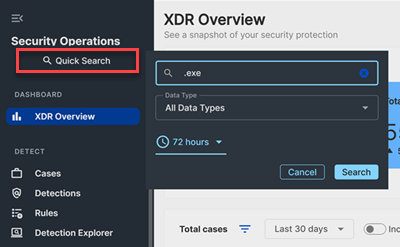
Use Quick Search at the top of the side navigation in Sophos XDR to quickly find data related to your search term across multiple data types.
By default, Quick Search searches All Data Types. This is equivalent to querying the @raw logical type in Data Lake Search. You can also search specific logical types and set a custom time range of up to 31 days. For more information, see Logical types.
Tip
Quick Search supports the following keyboard shortcuts:
Ctrl + /: Open Quick Search.Shift + Enter: Run the search.
Perform a quick search
-
Open Quick Search:
- Click Quick Search in the side menu, or
- Press
Ctrl + /.
-
Enter a search term.
-
Select a data type from the drop-down list:
Data Type Equivalent Logical Type Description All Data Types @raw Search across all event types and detections Asset Name @host Search for a hostname captured and normalized from ingested raw data into detection and event fields Command Line @command Search events and detections that contain a specified command line Domain Name @domain Search events and detections that contain a specified domain Host Name @host Search events and detections from the endpoint agent with the specified hostname. The hostname is translated to host_id, and the search runs using the matchinghost_idfrom the endpoint databaseIP Address (v4/6) @ip Search events and detections that contain the specified IP address MAC @mac Search for a MAC address in any field Path @path Search events and detections that contain a file or program path Port @port Search for a port number in any field Program Hash @hash Search events and detections that contain SHA1, SHA256, SHA512, or MD5 hashes Sensor ID Not Applicable Search events and detections for a specified sensor ID URL @url Search for a URL in any field User @user Search for a username in any field -
Adjust the time range, if needed.
-
Run the search:
- Click Search, or
- Press
Shift + Enter.
Results open in Query Editor. See Query Editor.
Note
You can search detections across any time period.
Event data is limited to time ranges of 31 days or less. You can query event data from:
- Data Lake Search by selecting any non-detection type, or
- Quick Search by selecting a non-detection data type.
When you query event data, use the custom date picker to set the time range:
- You can choose any start date for which your account has retained data.
- The end date must be within 31 days of the start date. The difference between start and end must be less than or equal to 31 days.