Active firewall rules
The Active firewall rules widget shows the number of firewall rules organized by rule type and status. It also shows the traffic, in bytes, that has matched the firewall rules in the past 24 hours. All administrators, irrespective of their rights, can see the firewall rules.
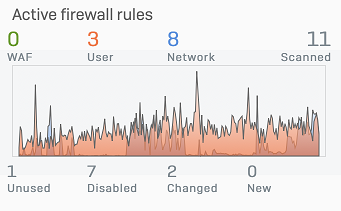
The firewall rules are shown as a color-coded chart split into the following categories:
- WAF: Firewall rules for web server protection.
- User: Firewall rules that include users or groups.
- Network: Firewall rules that don't include users or groups.
- Scanned: The total number of firewall rules included in the chart.
To see the data volume for a category, hover over the chart.
You can also see the number of firewall rules that match the following statuses:
- Unused: Firewall rules whose criteria didn't match any traffic during the past 12 hours. Consider revising or deleting unused firewall rules.
- Disabled: Firewall rules that are configured, but turned off.
- Changed: A firewall rule remains in this list for 24 hours from the time you've made changes to the rule.
- New: A firewall rule remains in this list for 24 hours from the time of its creation.
Click a number or status to go to Rules and policies > Firewall rules and see the rule table with a filter set based on your selection.
Firewall rules maintain their status for 24 hours and are checked daily. Because of this timing, a rule can have multiple statuses. Here are some examples:
Example
You create a rule at 10:00 AM. That rule is listed as New until 10:00 AM the next day.
You make changes to that rule at 11:00 AM the same day. That rule is listed as Changed until 11:00 AM the next day.
From 11:00 AM to 10:00 AM the next day, that rule shows as both New and Changed.
Example
If Sophos Firewall performs a usage check at 12:00 noon, and a rule is unused, the rule is listed under Unused until the next usage check.
You decide to turn that rule off at 1:00 PM. That rule shows as both Changed and Disabled until 1:00 PM the next day, at which time it only shows as Disabled.