Reports
The Reports widget shows up to five critical reports from the following table, depending on the modules subscribed to:
| Report name | Report content | Subscription module |
|---|---|---|
| High-risk applications | High-risk applications detected yesterday | Web Protection |
| Objectionable websites | Objectionable websites detected yesterday | Web Protection |
| Web users | Web data transferred (in bytes) by the top 10 users yesterday | Web Protection |
| Intrusion attacks | Intrusion attacks detected yesterday | Network Protection |
| Web server protection | Web server attacks detected yesterday | Web Server Protection |
| Email usage | Email data transferred (in bytes) | Email Protection |
| Email protection | Spam emails yesterday | Email Protection |
| Traffic dashboard | Categories of network traffic | Web Protection or Network Protection |
| Security dashboard | Denied network activities and traffic | Web Protection or Network Protection |
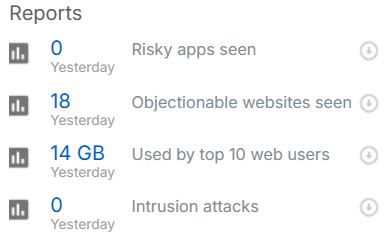
Click the name of a report to see its contents.
Click download  to download the report.
Note
When you upgrade the firmware from SFOS 20.0 and earlier to SFOS 21.0 and later, the Reports widget shows zero or a lower number until the next report update because the firewall stores the reports before and after the upgrade in separate databases. Reports are updated every 24 hours.
You can still download reports that were created before the upgrade. See Reports disk space.