Control center
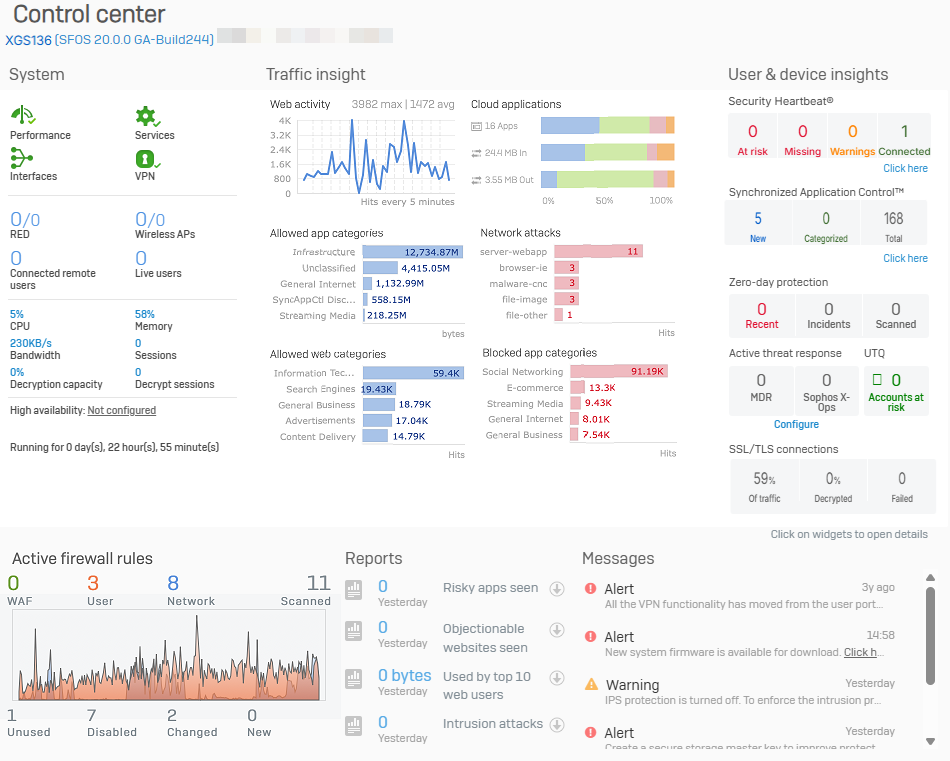
The control center appears as soon as you sign in, and shows the firewall's appliance model, firmware version, build, and serial number. It also provides a snapshot of the firewall's status and health on various widgets.
Note
The firewall doesn't show temperature information in the web admin console.
Widgets
Some widget counters are reset after a firewall restart.
-
System
See the real-time status of the Sophos Firewall services.
-
Traffic insight
See statistics related to network traffic processed by your Sophos Firewall in the last 24 hours.
-
User & device insights
See security health information for your users and devices, such as Security Heartbeat, User Threat Quotient, and SSL/TLS connections.
-
Active firewall rules
See the number of active firewall rules and the amount of traffic matching those rules.
-
Reports
Quickly access up to five critical reports depending on the firewall's subscribed modules.
-
Messages
See alerts for events that require action.