Sophos Authentication for Thin Clients
Sophos Authentication for Thin Clients (SATC) allows users of Windows-based remote application servers to authenticate with Sophos Firewall using Active Directory. Remote application servers include Microsoft Remote Desktop Services hosts and Citrix XenApp servers.
SATC consists of a component running on your session host server, which sends user information to your Sophos Firewall. The server component is incorporated in Sophos Server Protection.
SATC assigns each user an ID associated with their Active Directory (AD) username. For every outbound network connection created by user activity, such as browsing a website, SATC informs Sophos Firewall which user ID the connection belongs to.
Note
SATC can only authenticate user-based processes. Connections from processes started by system services aren't associated with a directory user. These connections must have a separate firewall rule with Match known users turned off.
To configure SATC with Sophos Server Protection on Windows-based remote application servers, download the Windows Server installer from Sophos Fusion (previously Sophos Central). The available installers depend on your licenses. See Set up SATC with Sophos Server Protection.
SATC has the limitations described in the following sections:
STAS conflicts with SATC
Sophos Transparent Authentication Suite (STAS) provides a solution for clientless SSO. SATC provides SSO on Citrix XenApp and Microsoft Windows Server Remote Desktop Services. You might need to install both STAS and SATC in your organization's network. However, STAS conflicts with SATC, so Sophos Firewall can't obtain the correct user identity on Citrix XenApp and Microsoft Windows Server Remote Desktop Services.
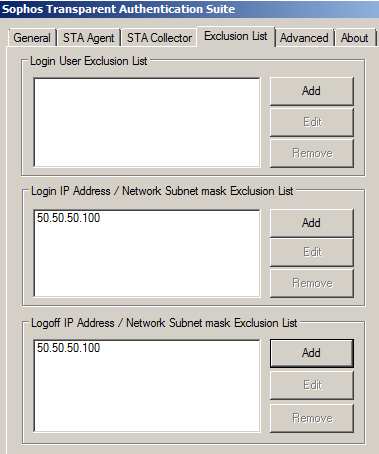
Exclude the IP addresses of your Citrix XenApp and Microsoft Windows Server Remote Desktop Services servers in STAS. You must add the IP addresses to both Login IP Address / Network Subnet mask Exclusion List and Logoff IP Address / Network Subnet mask Exclusion List on the Exclusion List tab in STAS.
In the example below, 50.50.50.100 is the IP address of the Citrix XenApp server.