Use SD-WAN routes for DNAT
You can use SD-WAN routes to route DNAT traffic to an internal server in a remote network.
-
Scenario
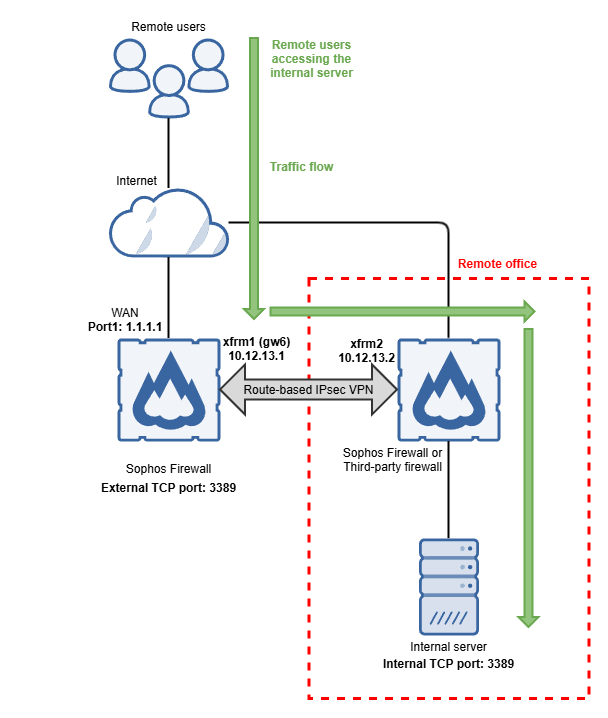
This example is based on the following deployment:
- An internal server in a remote network that can be accessed over TCP port 3389.
- Sophos Firewall and the remote firewall are connected through route-based IPsec VPN.
- The internal server behind the remote firewall can be reached through the
gw6gateway.
Network diagram
Requirements
Make sure you have the following configurations:
- Route-based IPsec VPN connections on both firewalls. See Create a route-based VPN with traffic selectors.
Configure IP host
To create an IP host object for your internal server, do as follows:
- Go to Hosts and services > IP host and click Add.
- Enter a name. This example uses
Internal_Server. - Under IP version, select IPv4.
- Under Type, select IP.
- Under IP address, enter the IP address of your internal server.
- Click Save.
Configure gateway object
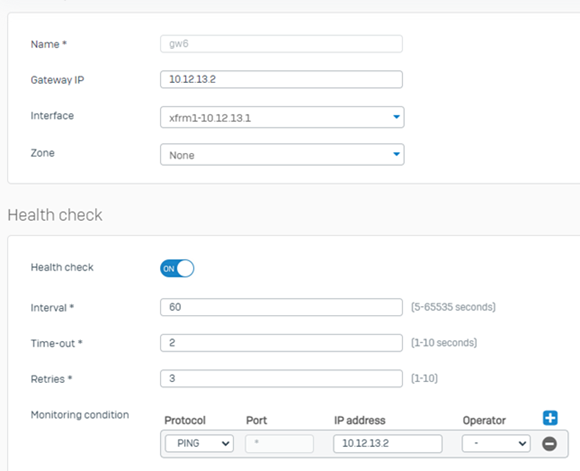
You must configure a gateway object for the gateway where the remote internal server can be reached. To configure a gateway object, do as follows:
- Go to Routing > Gateways.
- Under IPv4 gateway, click Add.
- Enter a name. This example uses
gw6. - Under Gateway IP, enter the remote gateway's IP address. This example uses
10.12.13.2. - Under Interface, select the interface of the gateway. This example uses
xfrm1-10.12.13.1. - Under Monitoring condition, enter the IP address of a host device behind the gateway. This example uses
10.12.13.2.
For more information, see Add a gateway.
Configure DNAT
To configure DNAT, do as follows:
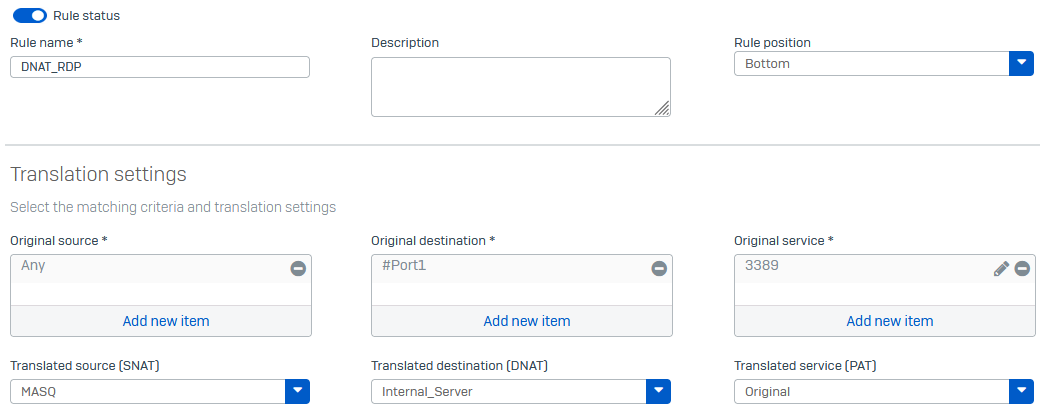
- Go to Rules and policies > NAT rules.
- Click Add NAT rule > New NAT rule.
- Enter a name. This example uses
DNAT_RDP. - Under Translated source (SNAT), select MASQ. This ensures that the reply traffic will be sent back to Sophos Firewall.
- Under Original destination, select the WAN interface on which the internal server can be reached. This example uses
#Port1. - Under Translated destination (DNAT), select your internal server. This example uses
Internal_Server. - Under Original service, select the service object for the port on which the internal server can be reached. This example uses
3389. - Click Save.
Configure SD-WAN route
To configure an SD-WAN route, do as follows:
- Go to Routing > SD-WAN routes.
- Select IPv4 and click Add.
- Enter a name. This example uses
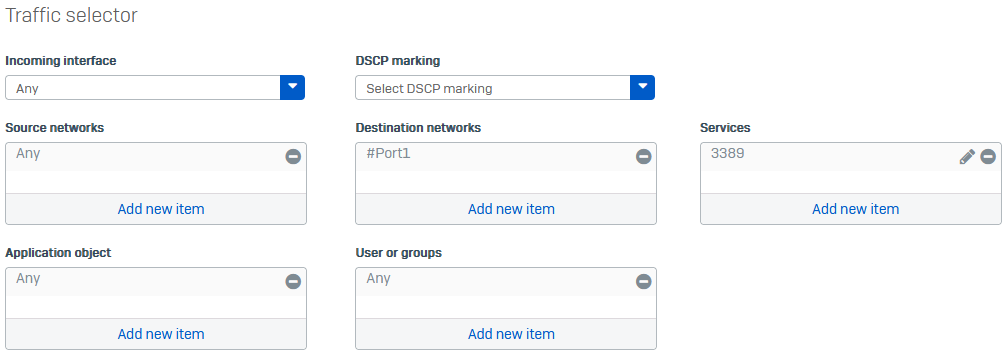
SD-WAN DNAT. - Under Destination networks, remove
Anyand select the WAN interface on which the internal server can be reached. This example uses#Port1. -
Under Services, remove
Anyand select the service object for the port on which the internal server can be reached. This example uses TCP3389.If the internal server's external TCP port is different from the internal TCP port, you must use the external TCP port in the SD-WAN route.
-
Under Link selection settings, select Primary and Backup gateways.
-
Under Primary gateway, select the gateway on which the internal server can be reached. This example uses
gw6.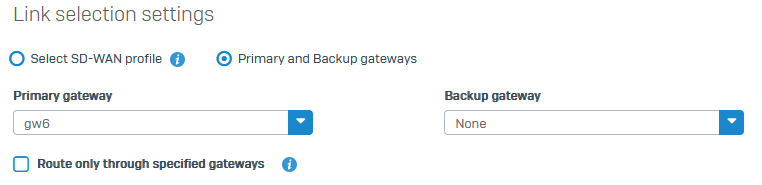
-
Click Save.
Route to multiple internal servers
To route traffic to multiple internal servers, you can do as follows:
- Use the same SD-WAN route if the servers use the same gateway but different TCP ports or WAN IP addresses. Add these ports to the SD-WAN route's services and WAN IP addresses to the destination networks.
- Use different SD-WAN routes if the servers use different gateways.