How to write URLs as regex patterns
Web exceptions can be written with URL matches using regular expressions (regex). Use the guidelines and examples to create accurate, efficient patterns and avoid common security and performance issues.
How to interpret regex patterns
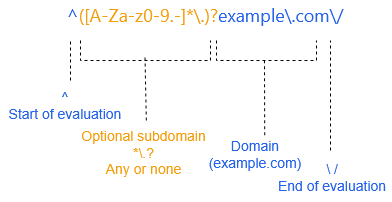
The following diagram shows how to interpret a URL regex pattern.
Requirements and examples
Learn the requirements, common examples, and patterns to avoid.
Basic requirements
URL regex patterns must follow these requirements:
- Start of URL: Start with a caret
^to anchor the match to the beginning of the URL. - Optional subdomain: Only include characters that are valid in subdomains,
[A-Za-z0-9.-]*\.. The subdomain must be followed by a period separating it from the domain. To make the subdomain optional, use([A-Za-z0-9.-]*\.)?. - Domain to match: Escape periods using the backslash
\., so they're treated as literal periods rather than regex wildcards. This ensures that hosts such aswww.example.commatch, whilebad-example.comdoes not. - Start of URL path: Include a trailing slash
/or\/to indicate the end of the domain name and the start of the path. Both formats are valid. - Internationalized Domain Names (IDNs): Use Punycode.
Common pattern examples
The following examples show common URL matching scenarios and the recommended regex patterns to use for web exceptions.
-
Match a specific domain:
^www\.example\.com\/- Matches
www.example.com. - Doesn't match
portal.example.com,morewww.example.com, ormore.www.example.com.
- Matches
-
Match a domain and all subdomains:
^([A-Za-z0-9.-]*\.)?example\.com/- Matches
example.com,portal.example.com, ordocs.example.com. - Doesn't match
badexample.com.
- Matches
Patterns to avoid
Avoid the following patterns. They can cause inaccurate matching, poor performance, or unnecessary complexity. Use the recommended alternatives instead.
-
Don't use plaintext. For example,
www.example.com. Although technically this works, it results in lower performance and security issues. -
Don't use
.to indicate a domain separator. In regex,.is a wildcard.Instead, use
\.to indicate a literal period. -
Don't use patterns that aren't anchored on the left side. For example,
www\.example\.com.Always start a regex pattern with a
^. Without it, the pattern can match any URL substring, including within paths and query strings, which reduces performance and may allow users or malware to bypass security. -
Don't use
*as a wildcard in domain names. For example,*.example.com. This isn't valid regex and doesn't pass the parser. In regex,*isn't a wildcard.Use
[A-Za-z0-9.-]*instead. This regex pattern uses a character class to match domain labels and separators while avoiding the/character, which indicates a path. -
Don't use protocols. For example,
^https?://www.example.com.Use
^www.example.cominstead.This requirement is different from Web Exceptions in Sophos UTM.
Why regex quality matters
URL regex patterns are evaluated against the entire URL. Although the browser's address bar may show only a short URL, the actual URL can include long paths and query strings, resulting in URLs that are thousands of characters long.
Patterns that are too broad, ambiguous, or poorly constructed can result in inaccurate matches and unnecessary processing overhead. Following the recommended patterns helps ensure accurate matching and consistent performance.
Security considerations
URL regex patterns are evaluated against the full URL, not just the domain name. As a result, a broad pattern may match URLs that weren't intended to be included.
For example, if you specify example\.com, it matches URLs where example.com appears anywhere in the URL. For example, malware.com/?bypass=example.com.
Anchoring patterns to the start of the URL with ^ helps prevent unintended matches.
Performance issues
Some regex patterns cause excessive processing when a match isn't found. This can increase CPU usage and reduce performance.
Avoid unanchored regex that includes a left-side wildcard, such as ([A-Za-z0-9.-]*\.)?example.com/. In a 4000-character URL, this can cause 4000+3999+3998... steps to evaluate the regex, resulting in high CPU usage and degraded performance.
Specific character classes reduce ambiguity and allow the regex engine to evaluate URLs more efficiently. For example, ^([A-Za-z0-9.-]*\.)?example\.com/.
Verify and test regex patterns
To verify the accuracy and efficiency of a complex regex, use a regex analysis tool, such as regex101.com. Check the number of steps required to evaluate the pattern when using a long URL that doesn't match. A high step count can indicate an inefficient pattern that requires excessive processing time.
Test regex patterns before deploying them in production environments.