Import groups
You can import all groups or only those that match specific attributes through the assistant.
API permission requirement
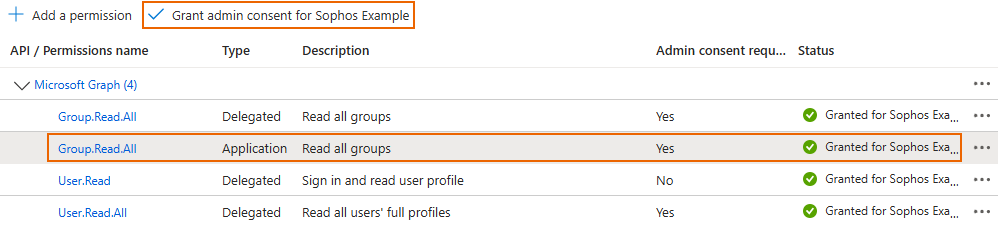
To import groups, you must add the following API permission on Microsoft Entra ID:
- Sign in to Azure Portal.
- Go to Microsoft Entra ID and select the server.
- Click App registrations and select the application configured for the firewall.
- Click API permission > Add a permission.
- Click Microsoft Graph > Application permissions and add the
Group.Read.Allpermission. -
Click Grant admin consent for your organization and click Yes.
Import group assistant
To import groups, go to Authentication > Servers and click Assistant for importing groups  for the Microsoft Entra ID server.
You can import all groups or import groups that match the attributes you specify, such as Display name and Description.
You can apply the following policies to all groups or to individual groups:
- Surfing quota
- Access time
- Network traffic
- Traffic shaping
Important
You must synchronize the time between the firewall and Microsoft Entra ID. Otherwise, the connection may fail.
Note
If you use remote access IPsec or SSL VPN, make sure to add the new groups to your VPN policies.