Microsoft Entra ID Single Sign-On
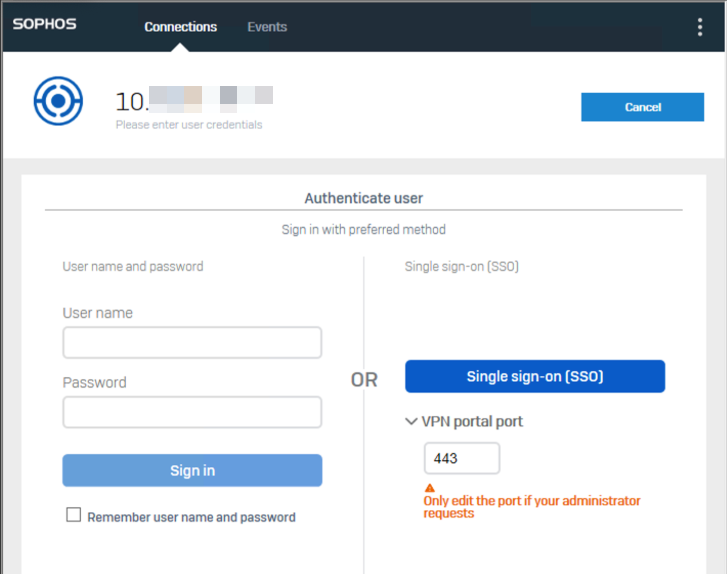
You can use Microsoft Entra ID Single Sign-On (SSO) to securely sign in to remote access IPsec and SSL VPN tunnels through the Sophos Connect client.
Microsoft Entra ID SSO is supported on the following endpoint devices:
- Windows devices running Sophos Connect client 2.4 or later
- macOS devices running Sophos Connect client 2.1 or later
VPN portal port
The VPN portal port is used both to access the VPN portal and to establish SSO.
Note
Don't change this setting unless your administrator asks you to change it.
Force SSO re-login
If you signed in using SSO and connected to the network using a shared endpoint, we recommend that you force an SSO re-login. The next user must then sign in to the client using their Microsoft Entra ID credentials and can't use your VPN session.
If you've signed in using SSO and connected to the network using a shared endpoint, we recommend that you force SSO re-login. The next user must then sign in again and can't use your sign-in to connect to the tunnels. When the new user signs in with SSO for the first time, they must enter their Microsoft Entra ID credentials.
For Windows, Force SSO re-login clears cookies used by Sophos Connect's embedded browser.
For MacOS, Force SSO re-login clears cookies used by Sophos Connect's embedded browser. It doesn't clear cookies used by the system browser. If a new sign-in is required, manually clear cookies for the relevant Microsoft Entra ID or VPN gateway domains in the system browser.
To force an SSO re-login, do as follows:
- In the Sophos Connect client, click menu
 in the upper-right corner.
 - Click Force SSO re-login.
- Click OK.