Configure SNMP community and traps
Create an SNMPv1 and SNMPv2c community by adding an SNMP manager and allow the traffic.
Introduction
In this example, we show how to do the following:
- Configure Sophos Firewall as an SNMP agent if you haven't already done it.
- Configure SNMPv1 and SNMPv2c managers.
- Allow SNMP traffic for the zone to which SNMP managers belong.
- Allow Sophos Firewall to send SNMP alerts.
Configure Sophos Firewall as an SNMP agent
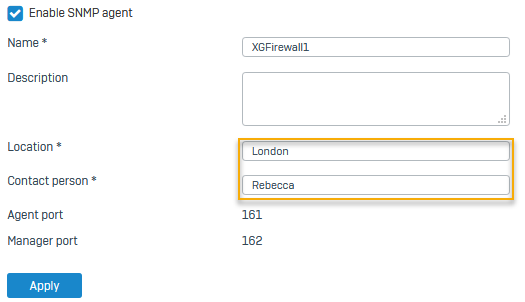
Allow Sophos Firewall to act as an SNMP agent. It uses the standard ports used by SNMP agents and users or managers.
- Go to Administration > SNMP.
- Select Enable SNMP agent.
- Enter the Location and Contact person.
-
Click Apply.
Here's an example:
Configure an SNMPv1 and v2c community
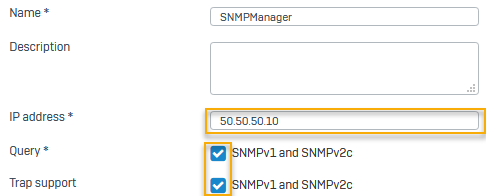
Specify the IP address of the SNMP manager. Sophos Firewall sends SNMPv1 and SNMPv2c traps to managers.
- Go to Administration > SNMP. Scroll down to SNMPv1/v2c and select Add.
- Enter a Name.
- Enter a Community string.
- Select IPv4 or IPv6.
- Specify the IP address, for example,
50.50.50.10. - Select Accept queries and Send traps.
-
Click Apply.
Here's an example:
Allow SNMP traffic and alerts
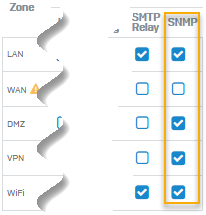
Allow SNMP traffic for the zone to which SNMP users and managers belong. Additionally, allow Sophos Firewall to send SNMP alerts.
-
Go to Administration > Device access and select the zones from which SNMP users and managers can send and receive SNMP traffic.
Here's an example:
-
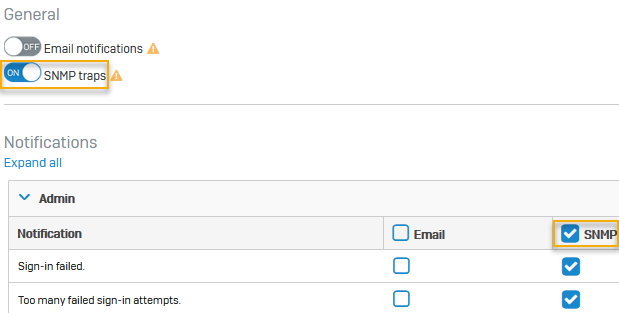
Go to System services > Notification list.
- Turn on SNMP traps.
-
Turn on SNMP for the alerts you want to send.
Here's an example:
More resources