About NDR Essentials
NDR Essentials is a cloud-hosted NDR solution that integrates directly with your firewall. It uses advanced machine learning to detect threats in real-time without impacting your firewall's performance. This provides an additional layer of security in addition to your existing firewall protection.
How NDR Essentials works
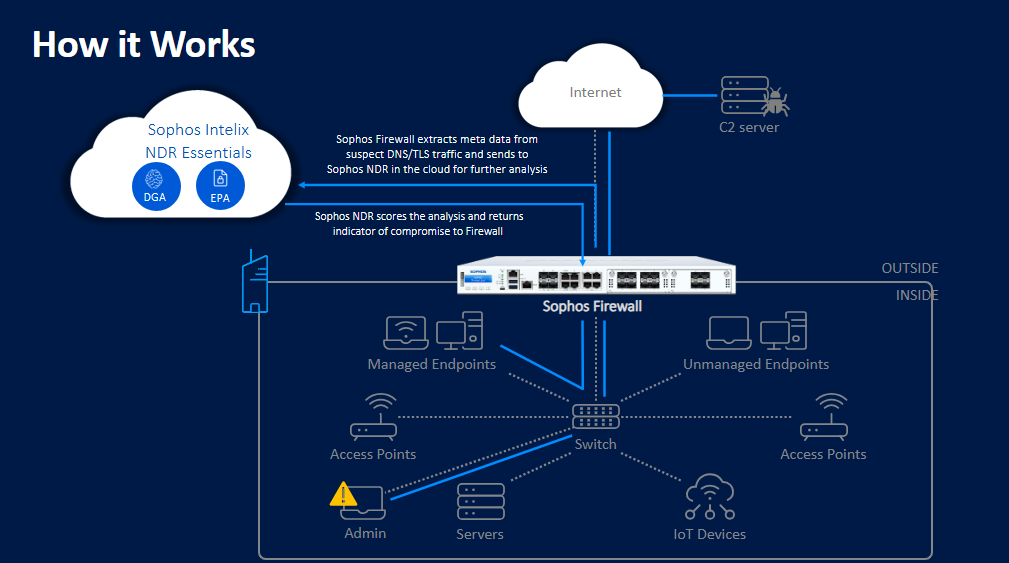
Sophos Firewall captures metadata from your TLS-encrypted traffic and DNS queries, and sends that information to the NDR Essentials service in the Sophos Cloud. There, the data is analyzed using multiple AI engines to detect threats.
This allows NDR Essentials to identify malicious encrypted payloads without needing to perform full TLS decryption. It can also detect new and unusual domain names generated by algorithms, which is often an indicator of compromised systems on your network.
The metadata extraction is performed by a lightweight engine integrated into the FastPath architecture of your Sophos XGS Series firewall. This ensures the NDR Essentials analysis can be done without impacting the performance of your firewall.
Sophos NDR Essentials provides risk scores for detections, ranging from six, which is the lowest risk, to ten, which is the highest risk. You can customize the risk score threshold for triggering alerts based on your specific environment. The default, recommended setting is High risk (Score 9 and 10) - Recommended.
The firewall keeps a record of Indicators of Compromise (IoC) for scores of 6 and above. IoCs that are clean or are false positives typically fall below a score of six, so NDR Essentials doesn't keep records of those IoCs.
The firewall sends the first request to NDR Essentials in the cloud for analysis. After NDR Essentials identifies the destination as an IoC, the firewall adds it to its threat feed. It logs subsequent requests related to these IoCs and does as follows:
- Generates logs
- Sends email notifications
- Creates local and Sophos Fusion (previously Sophos Central) reports
View threat logs
To view the Advanced threat response logs, click Log viewer and select Active threat response.
The example below shows a threat detected and logged by NDR Essentials.

To view additional details, click the Detailed view. 

Each NDR log entry includes a threat score, which indicates the severity of the detected threat. Reviewing these scores can help you decide whether to adjust the minimum threat score threshold for detection and logging. For example, you might choose to focus only on high-risk events.
Time to Live
Every IoC has a Time To Live (TTL) associated with it. The firewall runs a daily job to clean up IoC entries with expired TTLs.
You can see the number of IoCs in the NDR summary widget. See Summary. The number is updated daily based on the expired TTLs. Expired IoCs are removed.
Note
If the firewall receives a threat score for an IoC and subsequently receives a lower score, the threat score remains unchanged, but the TTL is updated. If the firewall receives a threat score for an IoC and subsequently receives a higher score, the threat score is updated to the higher score.