Security posture report - Sophos MDR
A strong security posture is important to minimize the probability and impact of a security incident.
Security Posture Report - Sophos MDR provides an overview of your security posture, as assessed by the VET (Visibility, Exposures, and Threats) model.
About the report
The security posture report is automatically generated each quarter, following the calendar year. You can download it from Sophos Central: Go to My Products > MDR > Report History.
The report combines metrics and checks that are already available in Sophos Central. It complements but doesn't replace them:
- Device Health status. See Computers and servers.
- Integration status. See Integration health alerts.
- Account Health Check. See Account Health Check.
- MDR Cases. See Cases.
The report is currently available only in English.
For enterprises with sub-estates, a security posture report is generated for each sub-estate only. Currently there's no security posture report generated at Enterprise level.
VET model
MDR uses the VET (Visibility, Exposures, and Threats) model to define and assess security posture.
Visibility assesses how well MDR can see into your digital environment. Specifically, it assesses the health of your Sophos Endpoint agents, and the coverage and health of the Sophos and third-party integrations on the XDR platform.
Exposure covers potential weaknesses in your environment that could result in a compromise. Specifically, it encompasses the Sophos product configurations checked as part of Account Health Check.
Threats relates to malicious activity that we've seen targeting your organization or your industry. Specifically, it summarizes the MDR cases activity during the quarterly reporting period.
The report has a section for each of the VET categories, showing multiple checks in that category and recommendations for improvements.
Report details
The security posture report starts with an Executive Summary, which provides an overview of the checks conducted across all VET categories, as well as a summary of our security posture recommendations.
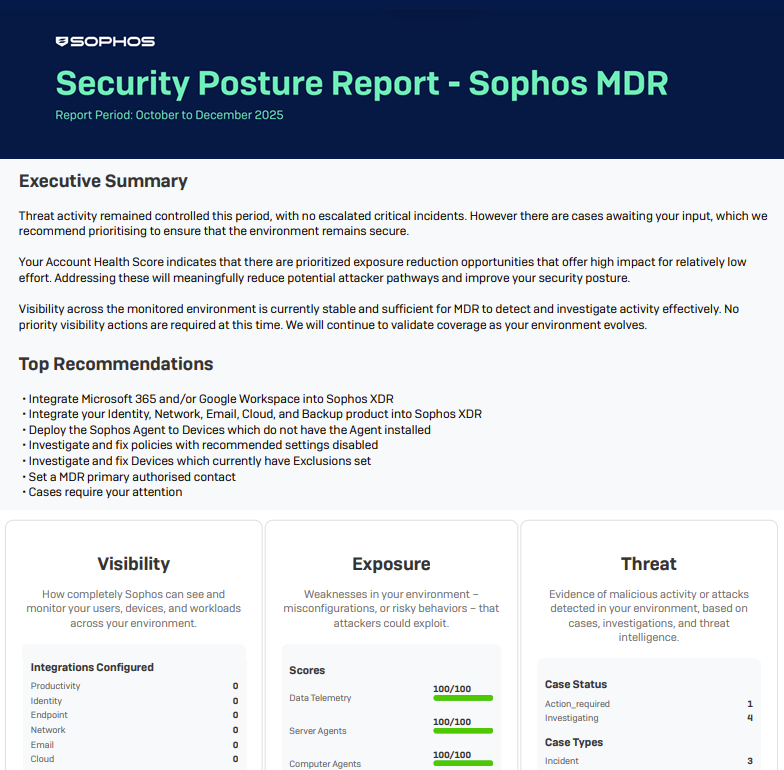
For more details of what's shown in each VET category, see the sections below.
Visibility
- Check for any unhealthy devices. Timeframe: The past 30 days.
- Check for potentially missing XDR integrations by integration category. Timeframe: Now.
- Check for potentially unhealthy XDR integrations. Timeframe: Now.
Exposure
- Check all relevant checks in Account Health Check. Timeframe: Now.
- Check that the MDR threat response mode is Collaborate or Authorize, and not Notify Only. Timeframe: Now.
Threats
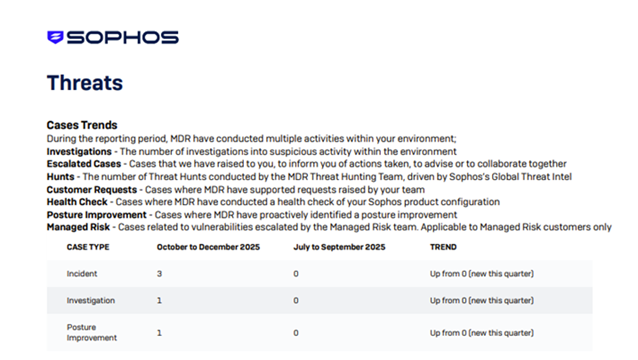
Cases Trends shows what the MDR Operations team has done for you this quarter.
- Investigations into suspicious activity
- Threat hunts
- Support for customer requests
- Cases escalated to you
Cases are escalated to inform you of actions we've taken, to advise you, or to collaborate with you.
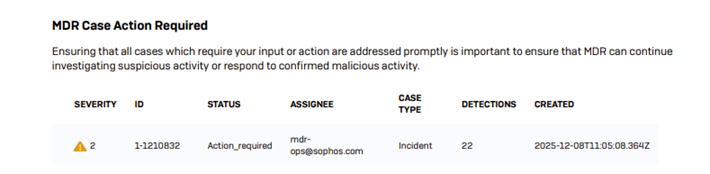
MDR Case Action Required lists cases where the MDR Operations team is waiting for your organization to respond.
You receive notifications if you're required to take action. See MDR notifications.