
Backend
Read-only user for Active Directory synchronization
 FDE
FDE
Note To increase security of the connection, we recommend that you use SSL encryption for the
Active Directory synchronization.
The account used for the import and synchronization of the Active Directory should be a read-only user. The user needs read access to the domain and all child objects.
To assign the rights:
- Open the Active Directory Users and Computers management window and go to Advanced Features.
- Right-click the domain and then click Properties.
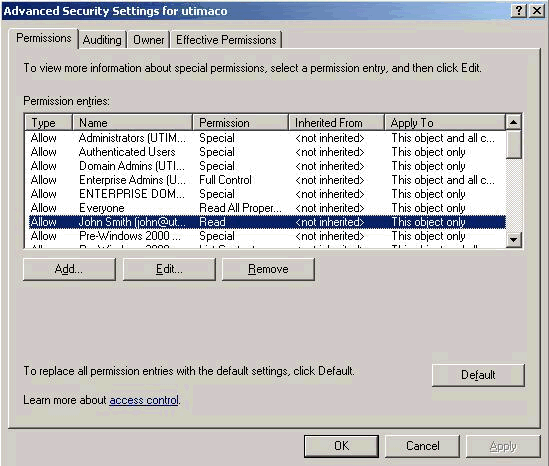
- Add a user (or a group) and select the Allow checkbox to assign Read permission.
- Click Advanced, select the user (or group) and click Edit.
- In the Permission Entry for <domain> dialog,
select This object and all child objects from the Apply
onto: drop-down list.The result should look like this:
Users displayed with "#" in the Management Center
 WinClient
  macClient
Users that registered in SafeGuard Enterprise when no domain controller was available are marked with "#" in the Management Center.